
What Can AI Automate in a Small Business? 25 Tasks Ranked by Hours Saved
Twenty-five jobs a small business can hand to AI right now, ranked by how many hours a week each one gives back, with the math shown so you can check it against your own week. Plus the tasks you should never automate and a 30-day plan to start.
Most small business owners do not need an AI strategy. They need their Tuesday back.
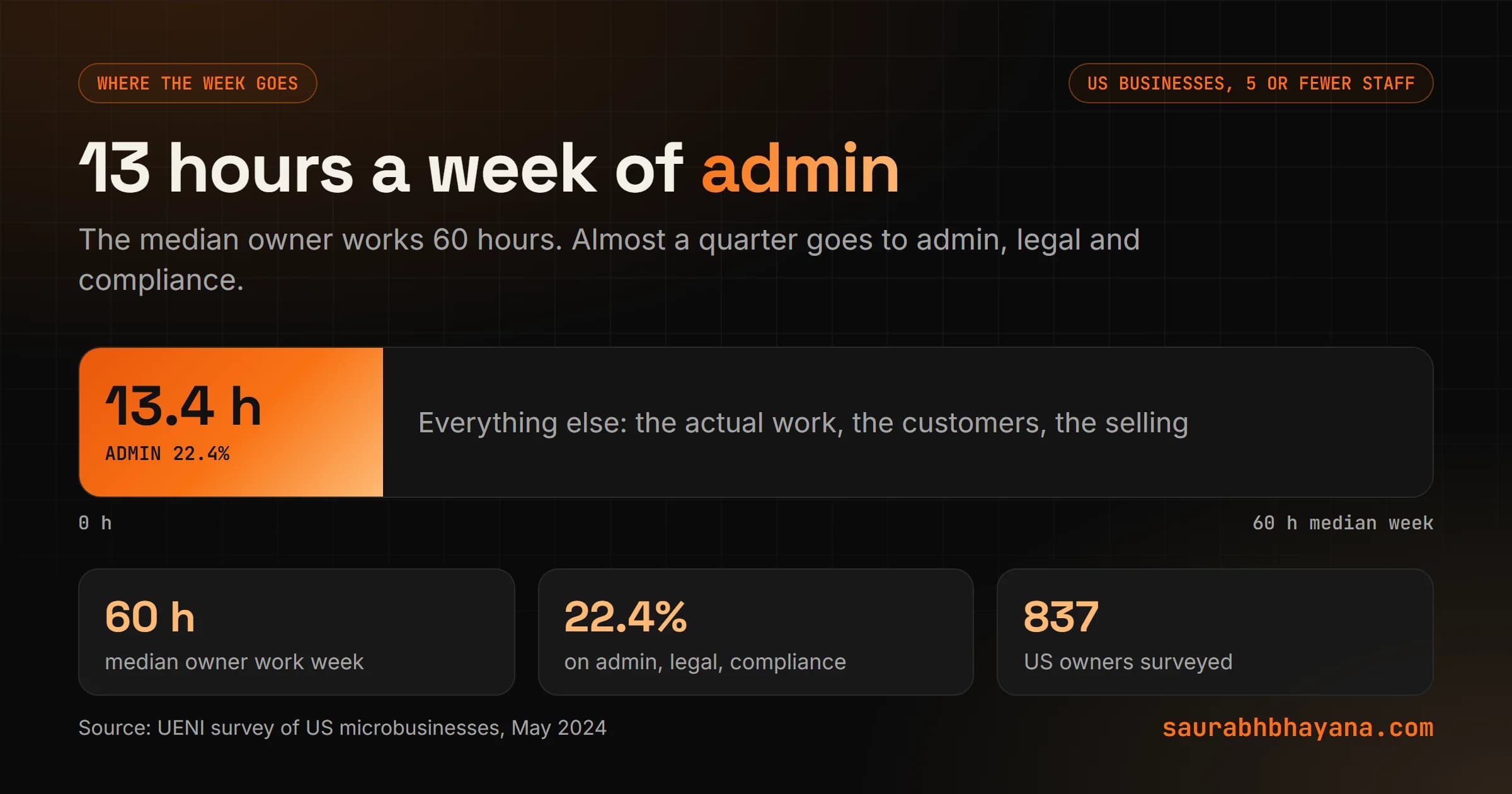
The numbers are not subtle. In a May 2024 survey of 837 US businesses with five or fewer employees, UENI found the median owner works 60 hours a week, and 22.4 percent of that goes to admin, legal and compliance. That is about 13 hours a week of work nobody started a business to do. Add the repeat customer questions, the follow-up emails and the invoices you chase twice, and the real number is higher.
This guide lists 25 of those jobs that AI can take over or cut down today, ranked by how many hours each one gives back. One honest caveat before the list: the hours are estimates. I show the math for every task so you can swap in your own numbers, and your week will not look exactly like mine or anyone else's. Some of these tasks also should not run on full autopilot, and I will say which ones and why.
I run Logical Dottech, a small team that builds these automations for clients, and wptaskify, a product that lets AI do WordPress work on its own. So the advice below comes from things we have built and broken, not from a vendor brochure.
First, the honest numbers on AI in small business
Ask two surveys how many small businesses use AI and you get two very different answers.
| Source | When | Who was asked | Share using AI |
|---|---|---|---|
| US Census Bureau, Business Trends and Outlook Survey | Dec 2025 to May 2026 | A large sample of US businesses of all sizes | 19.8% as of May 3, 2026 |
| Thryv small business AI survey | April 2026 | 561 US small and mid-sized business decision makers | 66%, up from 55% a year earlier |
Both can be true. The Census question asks whether a business uses AI in any business function. The vendor survey asks owners, many of whom count opening ChatGPT to write one email as using AI. One measures AI built into how the business runs. The other measures owners who have tried it.
The Census detail that matters most for you: from December 2025 to May 2026, AI use rose at firms with at least 20 employees, but did not change in any meaningful way at firms with fewer than 20. Larger firms are pulling ahead. Firms with 250 or more employees were at 37 percent.
Most of your small competitors have tried AI. Very few have built it into the week. That gap is the opportunity.
The same Thryv survey found 70 percent of owners say they need more training to use AI well. So the problem is rarely the tools. It is knowing which job to hand over first, and how to set it up so it does not embarrass you in front of a customer. That is what the rest of this guide is for.
How to measure the hours a task gives back
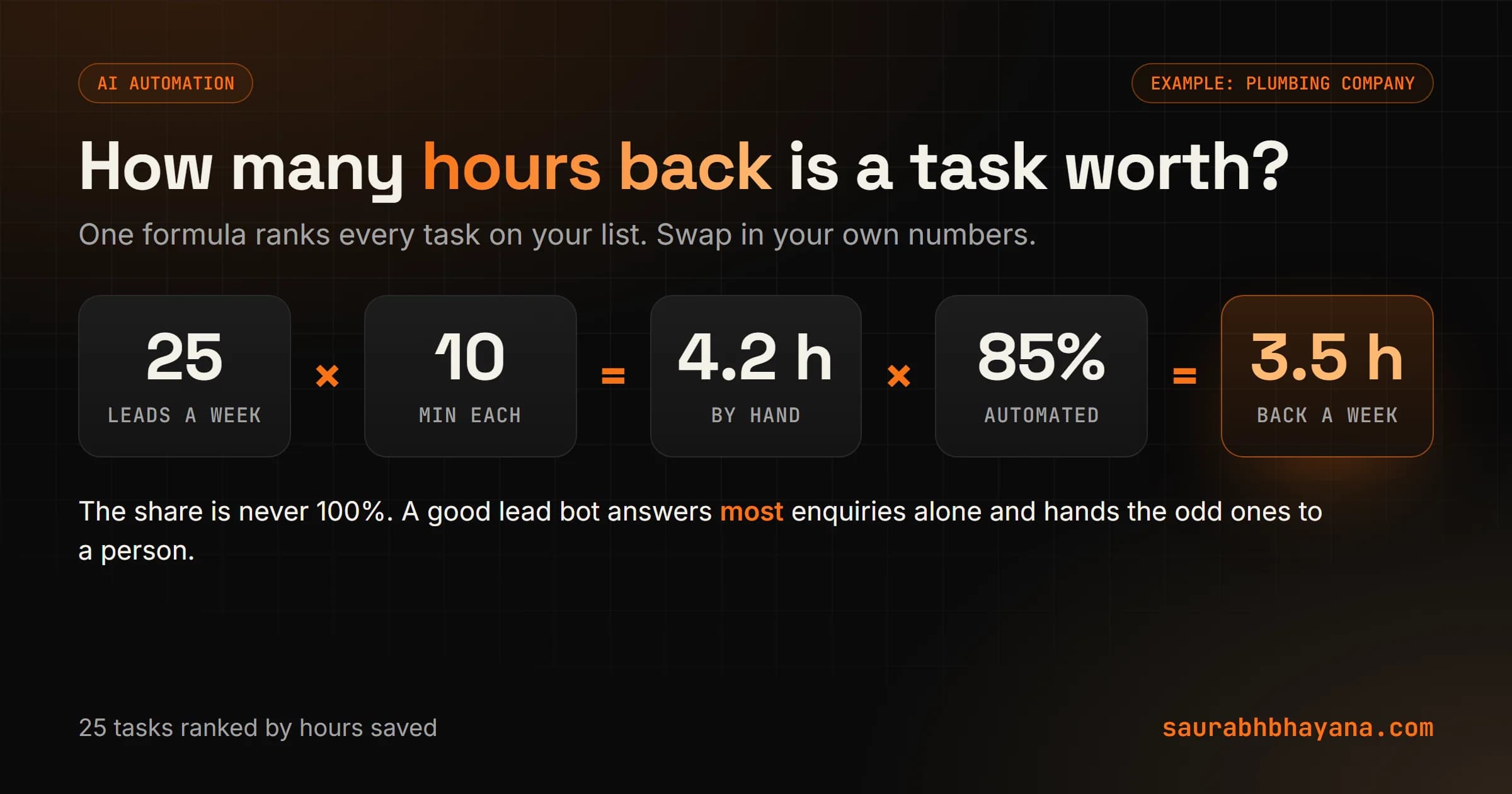
Before the list, here is the one formula behind every number in it. Use it on your own business and you will know which task to automate first without guessing.
Hours by hand a week = times it happens a week x minutes each time / 60
Hours back a week    = hours by hand x share the automation handles
The share matters. An automation rarely handles 100 percent of a task. A lead reply bot might answer 85 percent of new enquiries on its own and pass the odd ones to you. A proposal drafter might do half the work, because you still check the price and the scope.
To keep the numbers comparable, I use three example businesses through this whole guide. Pick the one closest to yours.
- •A plumbing company with six people: two in the office, four in vans. Lives on phone calls, quotes and booked jobs.
- •A bookkeeping firm with four people. Lives on documents, client email and deadlines.
- •An online store with three people. Lives on product listings, order questions and stock.
Time one task for a week before you automate it. Write down every time it happens and how long it took. People guess low on small tasks and high on big ones, and the real number almost always surprises them.
The 25 tasks, ranked by hours back
Here is the full list. The volume and minutes are realistic for a business of three to six people, and the last column says whether AI should do the task on its own or draft it for a person to approve. No single business needs all 25. Most will find five to eight that fit.
| # | Task | Example week | By hand | Hours back | Mode |
|---|---|---|---|---|---|
| 1 | First reply and follow-up to new leads | 25 leads x 10 min | 4.2 h | 3.5 h | Automate |
| 2 | Answering repeat customer questions | 50 questions x 5 min | 4.2 h | 3.0 h | Automate |
| 3 | Invoices and payment reminders | 30 invoices x 5 min + 10 chases x 10 min | 4.2 h | 3.0 h | Automate |
| 4 | Data entry from forms and emails | 60 entries x 3 min | 3.0 h | 2.7 h | Automate |
| 5 | Booking and rescheduling | 20 bookings x 8 min | 2.7 h | 2.5 h | Automate |
| 6 | Inbox triage and reply drafts | 1 h a day | 5.0 h | 2.5 h | Draft |
| 7 | Product descriptions and listings | 20 listings x 10 min | 3.3 h | 2.5 h | Draft |
| 8 | Sorting transactions for the books | 150 lines x 1 min | 2.5 h | 2.0 h | Draft |
| 9 | First drafts of quotes and proposals | 5 quotes x 45 min | 3.8 h | 2.0 h | Draft |
| 10 | Blog and SEO content drafts | 1 post x 4 h | 4.0 h | 2.0 h | Draft |
| 11 | Order status questions | 30 questions x 4 min | 2.0 h | 1.8 h | Automate |
| 12 | Screening job applications | 40 applications x 4 min | 2.7 h | 1.8 h | Draft |
| 13 | Weekly numbers report | Pulling 6 sources | 2.0 h | 1.7 h | Automate |
| 14 | Call and meeting notes with follow-ups | 6 calls x 20 min | 2.0 h | 1.6 h | Draft |
| 15 | Pulling details out of documents | 20 PDFs x 6 min | 2.0 h | 1.6 h | Draft |
| 16 | Social media posts | 5 posts x 30 min | 2.5 h | 1.5 h | Draft |
| 17 | New client onboarding | 3 clients x 40 min | 2.0 h | 1.5 h | Automate |
| 18 | Staff questions about how things work | 20 questions x 6 min | 2.0 h | 1.5 h | Automate |
| 19 | Low stock alerts and reorder drafts | Daily stock check | 1.5 h | 1.2 h | Draft |
| 20 | Missed call text back | 15 missed calls x 5 min | 1.3 h | 1.1 h | Automate |
| 21 | Scheduling field staff | Daily job board | 2.0 h | 1.0 h | Draft |
| 22 | Small website updates | 6 edits x 15 min | 1.5 h | 1.0 h | Draft |
| 23 | Capturing expense receipts | 30 receipts x 2 min | 1.0 h | 0.9 h | Automate |
| 24 | Replying to Google reviews | 10 reviews x 6 min | 1.0 h | 0.8 h | Draft |
| 25 | Translating customer messages | 15 messages x 3 min | 0.8 h | 0.7 h | Automate |
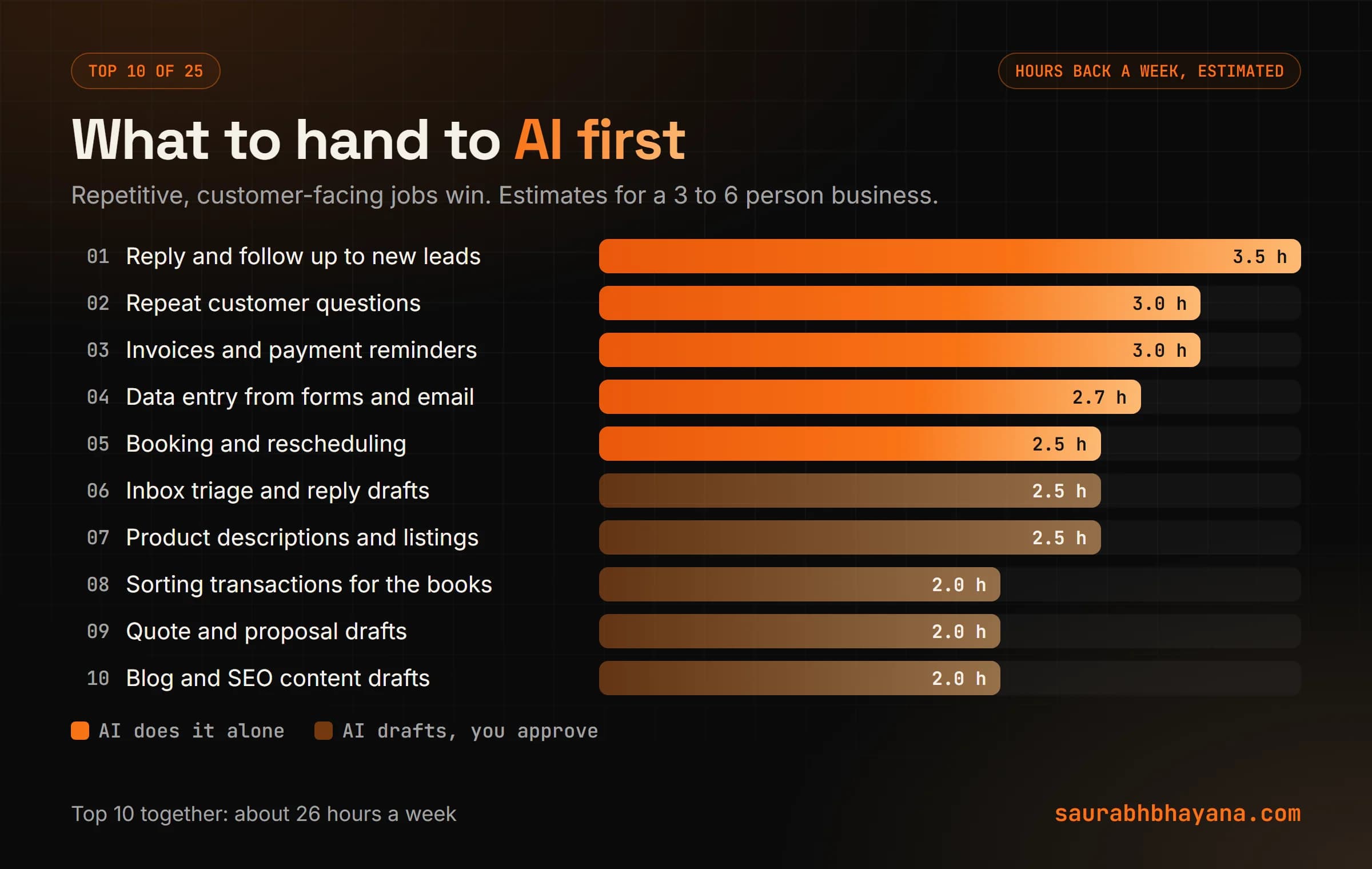
Notice the pattern at the top. The biggest wins are not clever. They are the jobs that happen dozens of times a week, follow the same shape every time, and sit between your business and your customer. That is where AI is strongest and where a slow human reply costs you money.
Customer-facing tasks: where speed earns money
These tasks rank high for two reasons. They repeat constantly, and every minute of delay costs you. A lead that waits a day for a reply often books someone else.
1. First reply and follow-up to new leads
When a form, email or chat comes in, the automation replies within a minute, asks the two or three questions you always ask, and books a call or sends a quote request to the right person. If the lead goes quiet, it follows up on day two and day five, then stops. For the plumbing company this is the single largest win, because a burst pipe call goes to whoever answers first.
The fix that makes it work: give it your real service area, real price ranges and real availability, and tell it to hand off to a person the moment someone asks for something outside them.
2. Answering repeat customer questions
Do you service my area? What are your hours? How long does shipping take? Most businesses answer the same 20 questions every week. An AI assistant connected to your own FAQ, policies and price list answers them by email, chat or DM, any hour. The trick is that it answers only from your documents, which is a method called RAG. If the answer is not in your material, it says so and passes the question on.
5. Booking and rescheduling
The back and forth of finding a time is pure waste. Connect the assistant to your calendar or booking software and it offers real open slots, confirms, sends reminders and handles the reschedule. For the bookkeeping firm, this one also cuts no-shows, because the reminders actually go out.
11. Order status questions
For the online store, where is my order is the most common message there is. The assistant looks up the order in your store and gives the tracking link and expected date. It needs read access to orders and nothing more. It should never issue refunds on its own.
20. Missed call text back
When a call goes unanswered, the system texts the caller within a minute: sorry we missed you, what do you need, here is a link to book. It is simple, cheap and saves leads that would have called the next company on the list. Field businesses like the plumber miss calls all day while staff are on jobs.
24. Replying to Google reviews
AI drafts a reply to every review that mentions what the customer actually said, and you approve it with one click. Replying to reviews is part of how your profile shows Google you are active, which I cover in my Google Business Profile ranking guide. Keep a person on the negative ones. An auto reply to an angry customer reads exactly like what it is.
25. Translating customer messages
If some customers write in Spanish or another language, the automation translates the message for you and your reply back for them. Modern models handle everyday business language well. For anything legal or medical, use a professional translator.
Back-office tasks: where the 13 hours hide
This is the admin share from the UENI survey. None of it is hard. All of it is slow, and most of it is copying information from one place to another.
3. Invoices and payment reminders
When a job is marked done, the invoice goes out with the right line items. If it is unpaid after seven days, a polite reminder goes. After 14 days, a firmer one, and after 21 days, it flags the account for you to call. You stop chasing money by memory. For the plumber and the bookkeeper alike, this one pays for the setup the first month.
4. Data entry from forms and emails
A new customer fills a form, sends an email or a photo of a document, and the details land in your CRM or spreadsheet in the right columns. AI is good at reading messy input, such as an email that says call me after 5, my address is the blue house on Oak, and turning it into clean fields.
8. Sorting transactions for the books
AI suggests a category for each bank line based on the payee and your past choices, and a person confirms the batch. The bookkeeping firm uses this across many clients, so small minutes become large hours. Do not let it file anything with a tax authority on its own.
13. The weekly numbers report
Every Monday the automation pulls sales, leads, jobs booked, unpaid invoices and ad spend from their sources and writes a short plain-English summary: what went up, what went down, what needs a look. It replaces two hours of opening tabs.
15. Pulling details out of documents
Contracts, purchase orders, statements, permits. The AI reads the PDF and pulls out the dates, amounts, names and terms into a table, then a person spot checks it. It is fast, and it is also exactly where AI can misread a number, so the check stays.
23. Capturing expense receipts
Staff snap a photo of a receipt, and the vendor, date, amount and category get filled in and matched to the card transaction. Small task, but it ends the end-of-month shoebox.
Content and marketing tasks: AI drafts, you decide
AI writes fast, and fast is the danger. Readers and search engines can tell when nobody edited the text. Use AI for the first 70 percent and keep a person on the last 30. My guide on signs of AI writing shows exactly what to strip out before anything goes live.
7. Product descriptions and listings
For the online store, AI turns a spec sheet and two photos into a title, description, alt text and SEO fields in your brand voice. A person checks sizes, materials and claims, since a wrong material on a listing becomes a return.
10. Blog and SEO content drafts
AI builds the outline from real search questions and writes a draft. You add what only you know: the job that went wrong, the real price, the local detail. That human layer is what gets content ranked and cited by AI search tools, which I explain in my AEO and GEO guide.
16. Social media posts
Turn one finished job, one review or one blog post into a week of posts, drafted and scheduled at the times your audience is online. You approve the batch once a week instead of thinking of something to post every day.
22. Small website updates
New opening hours, a fresh photo, a price change, a fixed meta description. This is the work I built wptaskify for: you tell an AI assistant what to change on your WordPress site in plain English and it does it, with a backup first. It works because the assistant talks to the site through a proper connection, which I explain in MCP vs APIs.
Team and operations tasks: fewer interruptions
These do not touch customers directly, but they decide how much of the day you spend being interrupted.
6. Inbox triage and reply drafts
The automation sorts incoming email into needs you, can wait and no reply needed, and drafts replies for the first group. You review the drafts in one sitting. This is a draft task for a reason. An AI that sends email as you, unchecked, will eventually say something you would not.
9. First drafts of quotes and proposals
From the call notes, AI fills your quote template with the scope, line items from your price list and the standard terms. You check the price and the scope, then send. It cuts a 45-minute job to about 20, which is why the share is only half.
12. Screening job applications
AI reads applications against the must-haves you set, such as a license, years of experience or the service area, and sorts them into a short list with a reason for each. A person makes every decision. Hiring rules are strict, and an automated rejection you cannot explain is a risk you do not need.
14. Call and meeting notes with follow-ups
Record the call with consent, and you get a summary, the decisions, the action items and a follow-up email draft within a minute of hanging up. It also means nothing promised on a call gets forgotten.
17. New client onboarding
When a client signs, the welcome email, intake form, shared folder, first invoice and kickoff booking all happen in order without anyone remembering to do them. The bookkeeping firm sees this one most, because every new client needs the same ten steps.
18. Staff questions about how things work
Where is the warranty form? What is our policy on after-hours call outs? Put your process documents behind an internal assistant and staff ask it instead of you. Same RAG method as the customer assistant, pointed inward.
19 and 21. Stock alerts and field scheduling
For the store, the automation watches stock, warns before you run out and drafts the reorder for approval. For the plumber, AI proposes tomorrow's job board based on location and skill, and the office manager adjusts it. Both are draft tasks, because the person doing them knows things the system does not, like which van has a flat.
What you should not automate
Every task above sits in one of three modes. Getting the mode right matters more than picking the right tool.
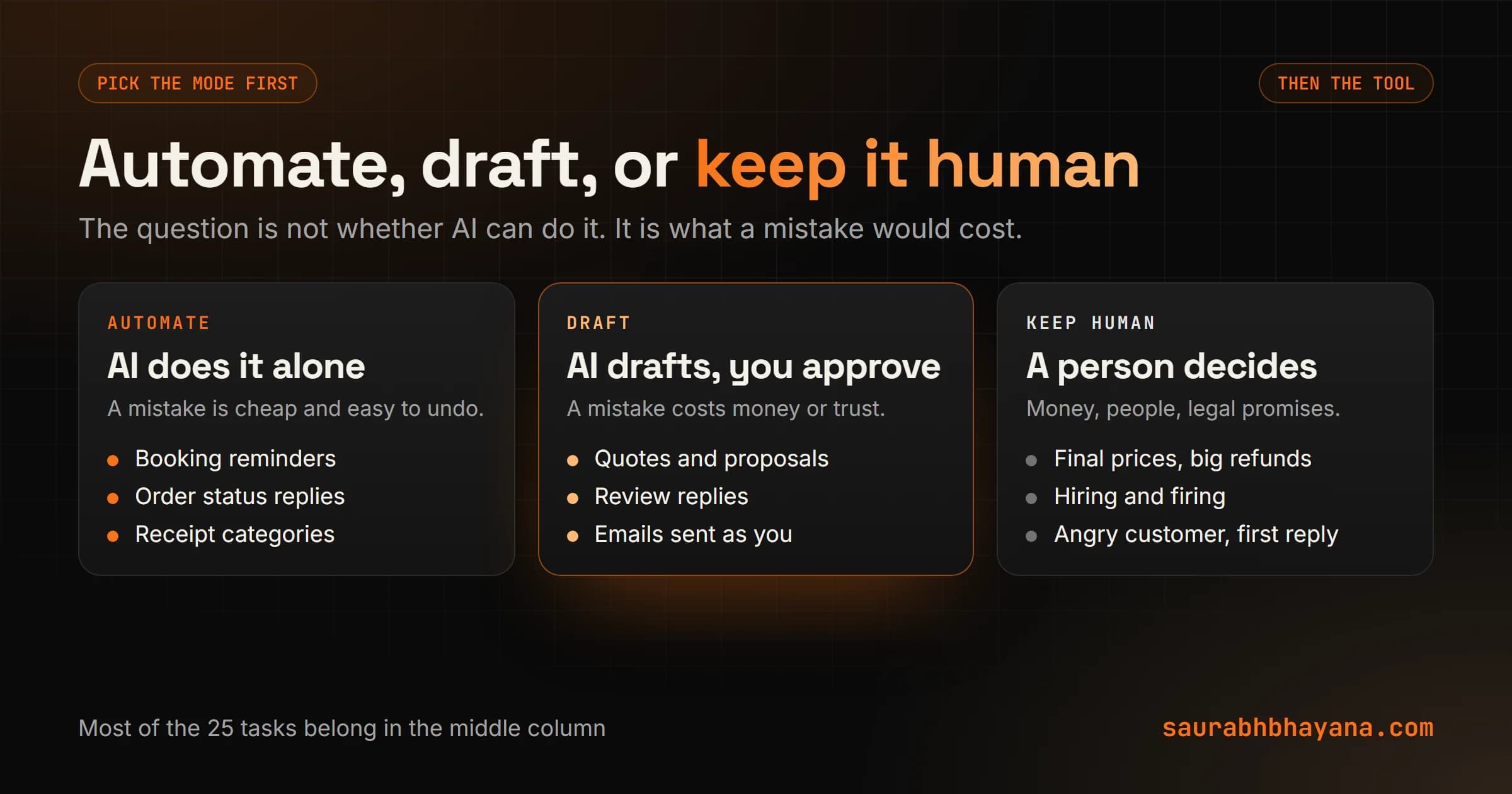
- •Automate fully when a mistake is cheap and easy to undo: a booking reminder, a receipt category, a translated message.
- •Let AI draft and a person approve when a mistake costs money or trust: quotes, review replies, emails sent as you, listings.
- •Keep it human for decisions about money, people and legal commitments: final prices, refunds above a set amount, hiring, firing, anything filed with a government agency, and the first reply to an angry customer.
The other rule I do not break: never let AI make up data. Here is a real example. We built a lead system for a French real estate firm that watches public business notices every night and finds companies that matter to their advisors. The obvious approach is to feed every record to a model and ask it to pick the good ones. That is slow, expensive, and the model will invent details that are not in the record.
So the data comes straight from the official feed and is filtered with plain code. The model only does the one thing it is good at here: turning an advisor's sentence, such as only Bordeaux, only liquidations this month, into a filter. The whole system runs for under 20 dollars a month, and nothing it shows was made up.
Facts come from your systems. AI reads, sorts and writes around them. The moment it supplies the facts, you have a problem.
What it costs to run
Less than most owners expect, as long as the AI is used only where it is needed. Most of an automation is not AI at all. Moving a form into a CRM, sending a reminder on day seven or pulling a report is ordinary software that costs next to nothing to run.
The AI part, reading a message or drafting a reply, runs on per-use pricing. On the smaller, cheaper models, a short reply draft costs a fraction of a cent. The bill only gets large when someone sends huge amounts of text to the most expensive model for jobs a small one could do. The real cost is the setup: mapping how your business does the task, connecting the tools and testing the odd cases.
Before paying for anything new, check the tools you already use. Many booking, accounting, email and store platforms now include AI or automation features you are already paying for and have never switched on.
Where to start: a 30-day plan
Do not try to automate 25 things. Automate one, prove it saves time, then do the next. Here is the order that works.
- 1.Week 1, measure. Pick three tasks from the table that you know happen a lot. Log every time they happen for five working days, with minutes. Now you have your own numbers, not mine.
- 2.Week 1, pick one. Run the formula. Choose the task with the most hours back that sits in the automate or draft mode, not keep human.
- 3.Week 2, write the rules. Write down how you do the task today, the facts it needs (price list, service area, policies) and when it should hand off to a person. This page is most of the work.
- 4.Week 2, build it small. Set it up for one channel only, such as website form leads, not every lead source at once.
- 5.Week 3, run it in draft mode. Let it work but have a person check every output for a week. Fix the rules each time it gets something wrong.
- 6.Week 4, measure again. Log the same task for five days. Compare the hours. If it saved time and the outputs were right, switch on full mode where the task allows it, and pick task two.
Three tasks done properly in 90 days will give most small businesses back five to ten hours a week. That is more than an extra working day, every week, without a new hire.
If you would rather have it built for you, this is what my team does every day. Tell me what eats your week and I will tell you honestly which tasks are worth automating and which are not. If you want to turn these skills into a business of your own instead, read my guide to AI businesses you can start with zero employees.
Frequently asked questions
What tasks can AI automate in a small business?+
The ones that repeat often and follow the same shape: replying to new leads, answering repeat questions, booking, invoices and payment reminders, data entry, order status, receipts, reports and meeting notes. AI can also draft quotes, listings, social posts, review replies and blog content for a person to approve.
How many hours can AI save a small business?+
It depends on how often your tasks happen. Use the formula: times a week, times minutes each, divided by 60, times the share the automation handles. In the examples in this guide, the top 10 tasks add up to about 26 hours a week for a business that has all of them. Automating three tasks well typically gives back five to ten hours a week.
How many small businesses actually use AI?+
It depends on the survey. The US Census Bureau found 19.8 percent of US businesses used AI in any business function as of May 3, 2026, with no meaningful growth at firms under 20 employees from December 2025 to May 2026. A Thryv survey of 561 small business owners in April 2026 put it at 66 percent, because it counts owners who use AI tools in any way.
What should a small business not automate with AI?+
Decisions about money, people and legal commitments: final prices, larger refunds, hiring and firing, anything filed with a government agency, and the first reply to an angry customer. Also never let AI supply facts. Prices, dates and customer details should come from your own systems, with AI only reading and writing around them.
Is AI automation expensive for a small business?+
Running costs are usually low, because most of an automation is ordinary software and only the reading and writing steps use AI, which costs a fraction of a cent per short message on smaller models. The main cost is the setup: mapping the task, connecting your tools and testing the unusual cases.
Do I need to know how to code to automate my business with AI?+
Not for simple automations. Many booking, email, accounting and store tools have AI and automation built in, and no-code tools connect them. Custom code starts to make sense when you need your own interface, a login for customers or staff, or rules the no-code tools cannot express.
Which task should I automate first?+
The one with the most hours back that does not need a human decision. For most service businesses that is the first reply to new leads or repeat customer questions. For online stores it is usually order status questions or product listings. Measure for a week first so you choose on real numbers.
Read next
My team and I automate the work that eats your hours with AI, and get your business found on Google, Maps and in AI answers.