
How to Get More Google Reviews Without Breaking Google's Rules
Most happy customers never leave a review because nobody asked at the right moment. Here is when and how to ask, the exact messages to send, how to automate it, and the review tactics Google and the FTC now ban outright.
Most happy customers never leave a review. Not because they do not want to. Because nobody asked them at the right moment, with a link that takes one tap.
That is good news, because it means the fix is mostly a habit, not a trick. In BrightLocal's 2026 survey of 1,002 US consumers, 28 percent said they will always write a review if a business asks, up from 16 percent a year earlier. The customers are willing. Most businesses just ask badly, ask late, or do not ask at all.
Here is the caveat, up front: there is no legal way to get 100 reviews by Friday. The shortcuts that promise it, buying reviews, offering a discount for five stars, asking only the customers you know are happy, now break Google's rules and, in the US, a federal rule with fines of up to $53,088 per violation. This guide covers what still works inside those rules, with the exact messages to send and how to put the whole thing on autopilot.
I will use three example businesses throughout: a plumbing company, a dental practice and a neighbourhood bakery. One fixes emergencies, one sees booked patients, one serves walk-ins. Between them they cover how almost every local business meets its customers.
Why reviews matter more in 2026
Google says it plainly on its own help page for local ranking: more reviews and positive ratings can help your business's local ranking. Review count and rating feed prominence, one of the three factors Google names. I cover the other two, relevance and distance, in my Google Business Profile ranking guide.
Then there is the customer side. BrightLocal's 2026 numbers show the bar going up, not down.
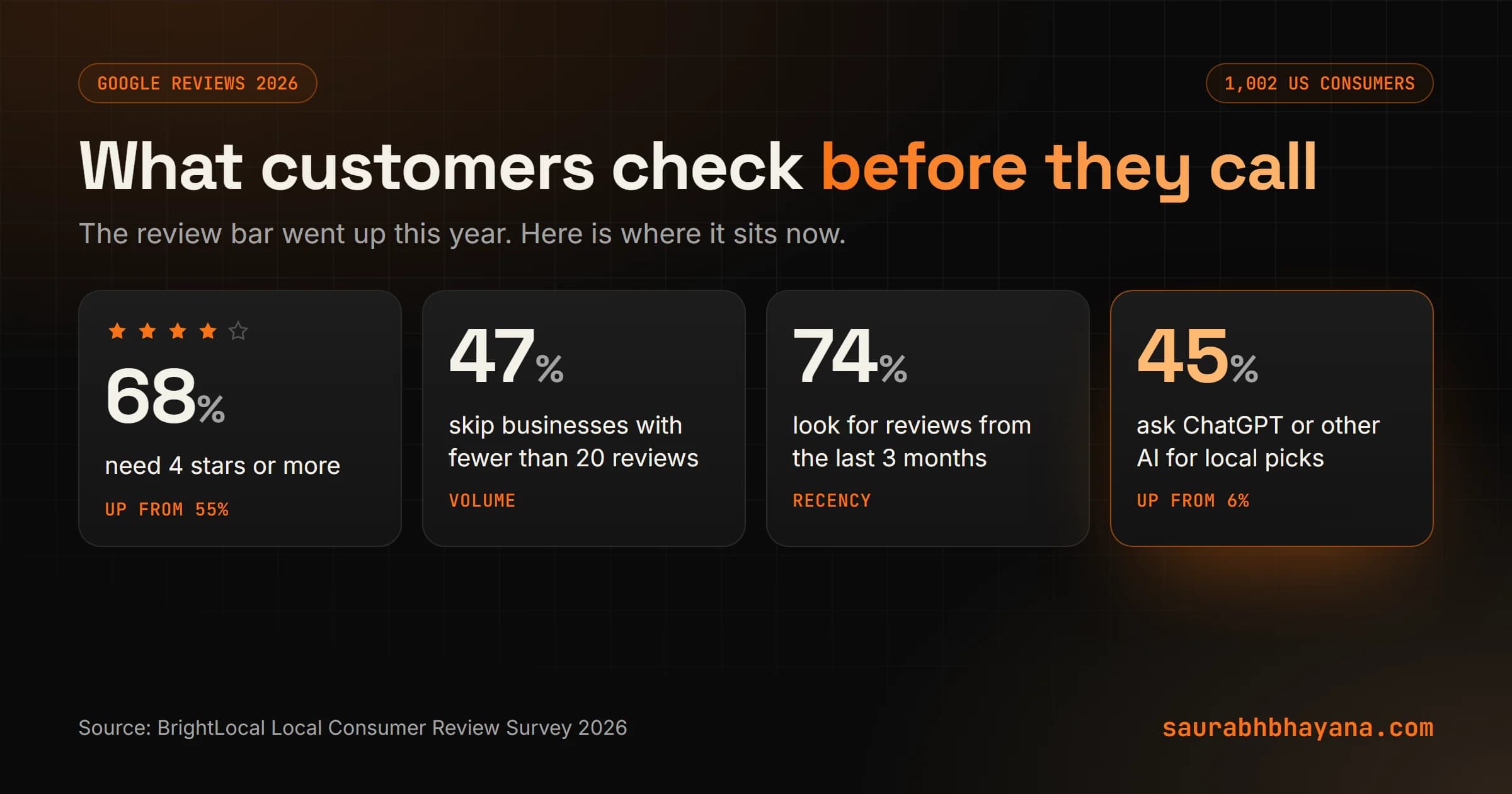
| What customers want | 2026 | 2025 |
|---|---|---|
| Four stars or more before they will use you | 68% | 55% |
| Only 4.5 stars or more | 31% | 17% |
| Reviews from the last two weeks | 32% | 20% |
| Reviews from the last three months | 74% | Not reported |
| Will not use a business with fewer than 20 reviews | 47% | Not reported |
| Use ChatGPT or other generative AI for local recommendations | 45% | 6% |
Two of those rows change how you should think about reviews. Recency means a pile of reviews from 2022 does not help much. You need a steady trickle, every month. And the AI row means your reviews now get read by machines as well as people. The same survey found 82 percent of consumers read AI-generated review summaries. When an assistant describes your business, it pulls from what customers wrote. I explain how AI tools choose which businesses to mention in my AEO and GEO guide.
A steady flow of recent, genuine reviews beats a big pile of old ones. Build a habit, not a campaign.
The rules: what Google and the FTC now ban
Read this part before you send a single request, because the most common review advice on the internet now gets reviews deleted.
Google's rules
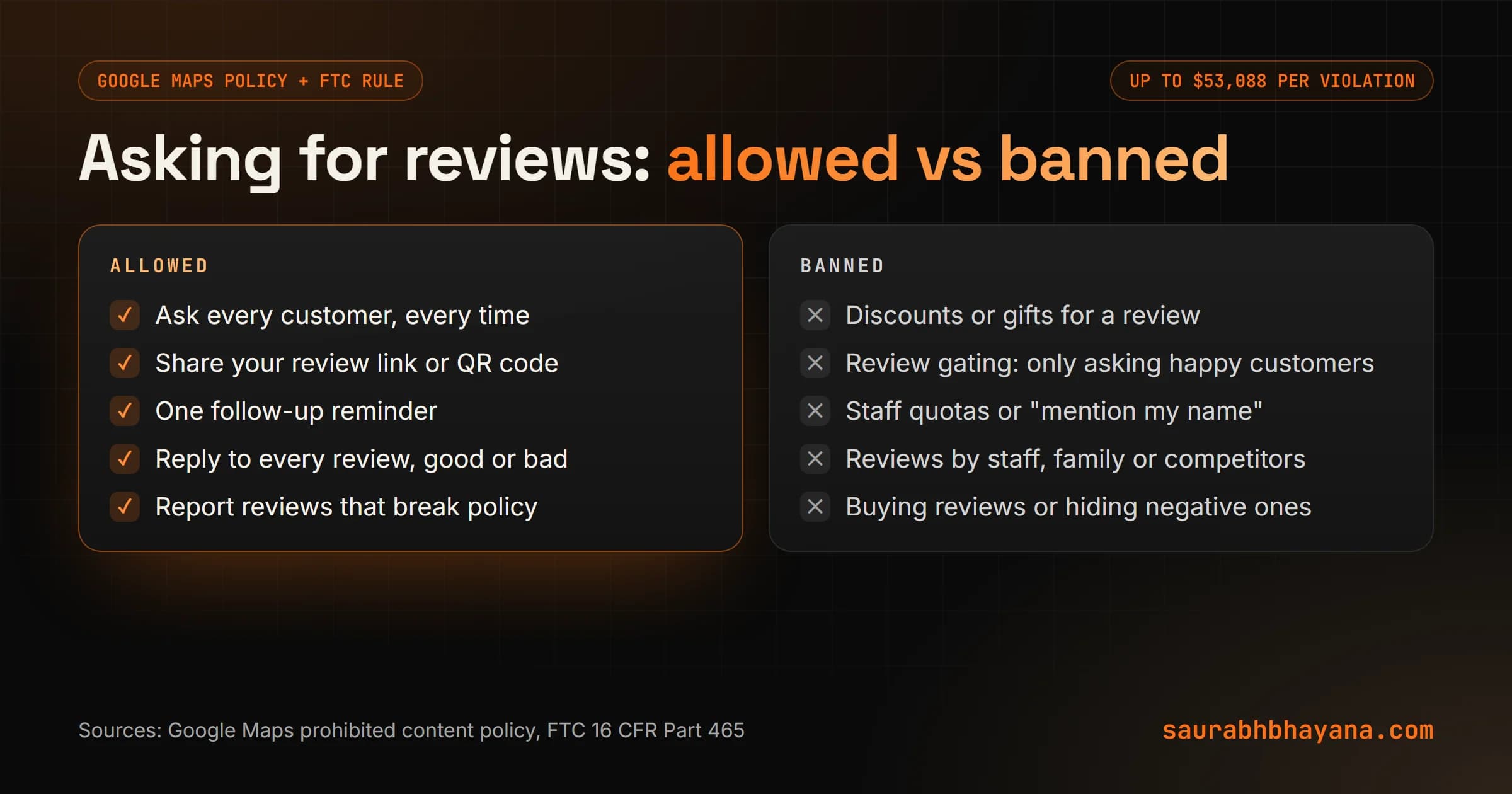
Google's Maps contribution policy puts these under rating manipulation, and says such reviews are not allowed and will be removed. Merchants may not:
- •Offer incentives, such as payment, discounts, free goods or services, for a review.
- •Offer an incentive to change or remove a negative review.
- •Discourage or prohibit negative reviews, or selectively solicit positive reviews from customers.
- •Require or pressure customers to leave ratings or write reviews.
- •Ask staff to collect a set number of reviews, or to get reviews that include specific content, such as a staff member's name.
- •Post reviews where there is a conflict of interest, which includes current or former employees, contractors, family and competitors.
And the one thing Google explicitly allows: asking customers to post reviews that reflect a genuine experience, without incentives and without trying to influence the rating or what they write.
The FTC rule
In the US, the FTC's Consumer Review and Testimonials Rule (16 CFR Part 465) bans fake reviews, buying positive or negative reviews, undisclosed reviews by insiders, and suppressing negative reviews through threats or by hiding them on your own site. Civil penalties go up to $53,088 per violation, the inflation-adjusted figure the FTC cited in warning letters sent to ten companies in December 2025. A business is liable when it knew or should have known a review was fake, so you cannot hand it to an agency and look away.
Review gating, the trap most tools still sell
Review gating is the funnel that asks how was your visit, sends happy customers to Google and sends unhappy ones to a private feedback form. Plenty of review software still offers it. It is exactly what Google means by selectively soliciting positive reviews.
The fix: send every customer the same link to Google. You can still offer a way to contact you directly, as long as it is offered to everyone and the Google link is offered to everyone too. Google's own help page makes the point that a mix of positive and negative reviews often looks more trustworthy than a wall of five stars.
Check any review tool you already pay for. If its request flow asks for a star rating before showing the Google link, switch that feature off.
Step 1: Get your review link and QR code
Google gives every Business Profile its own short link and QR code that open the review box directly. Google's help page puts it simply: ask customers to visit a Google link or scan a QR code. Find the option to ask for reviews in your Business Profile, copy the link, and download the QR code.
Then put the link everywhere a customer already looks at you after the sale: the invoice, the receipt, the booking confirmation, your email signature, and a printed card or sign at the counter. One detail to plan for: customers must be signed in to a Google account to leave a review. Most are, on their phones, which is another reason to ask on the phone and not on a shared tablet at the front desk.
Step 2: Ask at the right moment
Timing matters more than wording. Ask when the customer feels the result, not a week later when they have forgotten you.
| Business | The moment | How to ask |
|---|---|---|
| Plumbing company | The leak is fixed and the customer is relieved | The tech mentions it in person, the text arrives within 2 hours |
| Dental practice | Checkout after the visit | Front desk mentions it, a text with the link follows the same afternoon |
| Bakery | At the counter, coffee in hand | QR card by the register and on the receipt, a line in the loyalty email |
The rule for all three: ask every customer, including the ones who did not smile. You do not get to pick. That is the whole point of the policy, and it also protects you, because a profile that only has glowing reviews reads as fake to customers who have learned to look for it.
Step 3: Send a message that takes one tap
Keep the request short, personal and specific to the job. Do not tell them what to write, and do not mention stars. Here are three that work, one per channel.
TEXT (plumbing, sent within 2 hours of the job)
Hi Maria, it's Dan from Northside Plumbing. Thanks for having us out today.
If you have a minute, would you leave us a Google review? It helps
neighbours find a plumber they can trust: [review link]

EMAIL (dental, sent the same afternoon)
Subject: Thanks for coming in today
Hi James, thank you for visiting us today. We read every review, and
yours helps other families choose a dentist. Would you share how your
visit went? [review link]
Dr. Patel and the team

IN PERSON (bakery, at the counter)
"If you ever have a second, we'd love a Google review. The code's right
there on the card."
Notice what is missing. No a five-star review would mean the world. No mention our fast service. No discount. Each of those steers the rating or the content, which Google's policy forbids, and customers can smell it anyway.
Send from a real name. A message from Dan at Northside gets read. A message from noreply gets deleted.
Step 4: Put the ask on autopilot
The biggest reason businesses do not get reviews is that asking depends on someone remembering. On a busy day, nobody remembers. So take the memory out of it.
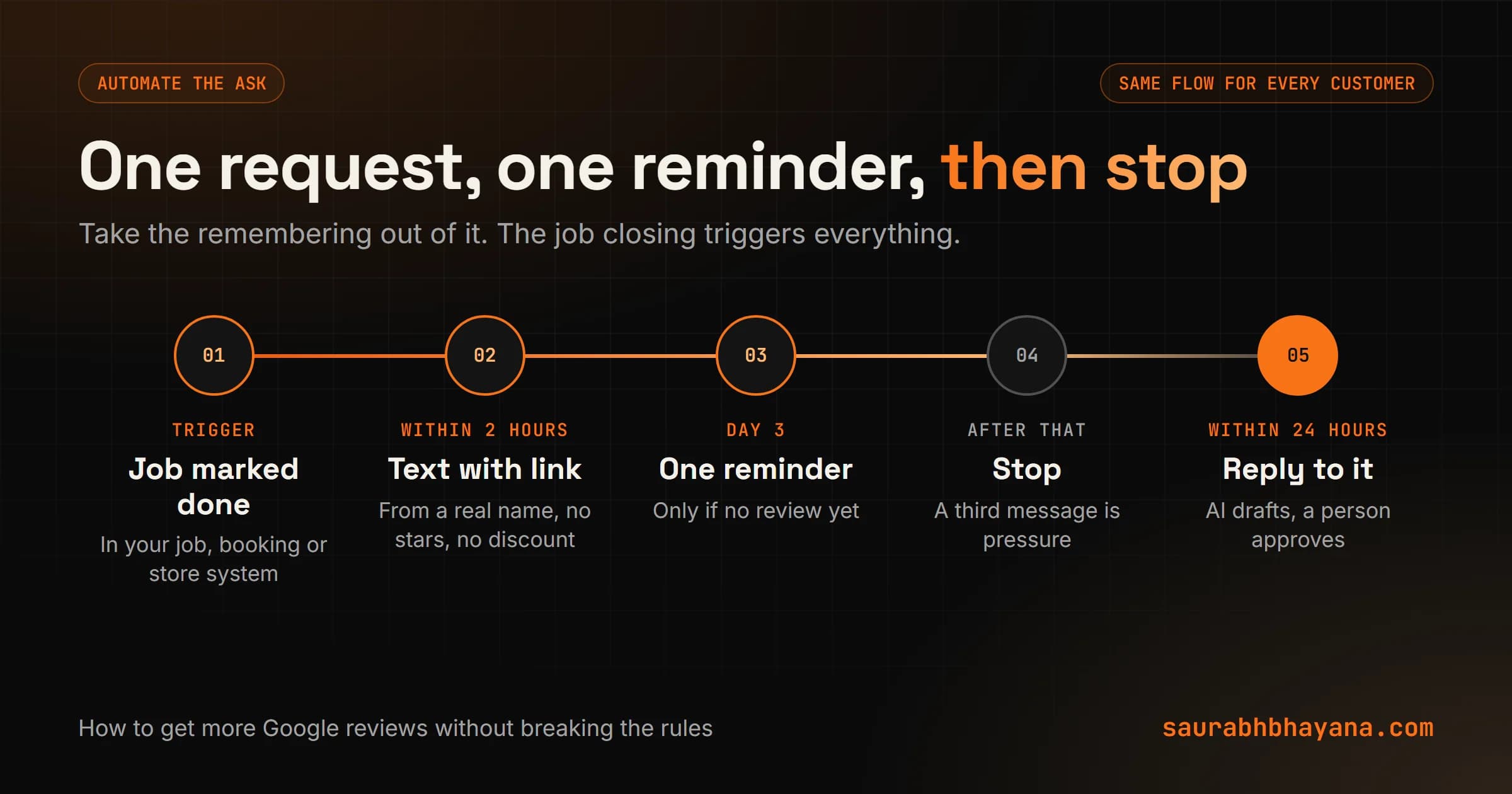
- 1.Trigger on the job, not on a mood. When a job is marked done in your job software, booking system or store, the request goes out. Every customer, every time.
- 2.Send within two hours. Fast enough that the experience is fresh, late enough that they have left your premises.
- 3.Remind once after three days. If they have not left a review, one gentle reminder. Then stop. A third message is pressure.
- 4.Skip anyone who already reviewed or opted out of messages. Respect for the customer is also respect for the law on text messages.
- 5.Alert a person on every new review, so replies happen fast.
This is one of the 25 tasks in my guide to what AI can automate in a small business, and it is one of the easiest to set up. Most job, booking and point-of-sale systems can already send a message when a job closes. You just need the right message and the right rules.
Staff: build a habit, not a quota
Google specifically bans asking staff to collect a set number of reviews, or reviews that mention them by name. So no leaderboards and no please mention Sarah. Instead, make the ask part of how a job ends, the same way the plumber's tech always shows the customer the fixed pipe. The system sends the link. The person just mentions it.
Step 5: Reply to every review
Replies are where most businesses lose the advantage they just earned. BrightLocal's 2026 survey found 89 percent of consumers expect owners to respond to reviews, 80 percent are likely to use a business that responds to all of them, and 50 percent are put off by templated or generic replies. Expectations on speed jumped too: 32 percent now expect a reply by the next day, up from 18 percent.
Google's own help page says replying shows you value feedback, and that positive reviews and helpful replies can help your business stand out.
Replying to a positive review
Thank them by name, mention the specific thing they mentioned, and keep it to two or three sentences. Do not paste the same line under every review. Readers scroll, and a column of identical replies looks automated because it is.
Replying to a negative review
- 1.Wait an hour before you write. Never reply angry.
- 2.Thank them and acknowledge the specific problem, without arguing about details in public.
- 3.Say what you will do or have done about it, in one sentence.
- 4.Take it offline with a real name and a direct number or email.
- 5.If you fix it, do not ask them to change the review in exchange for anything. Offering an incentive to revise a negative review is banned. If they choose to update it on their own, that is their call.
AI is useful here as a drafter. It can write a first reply that refers to what the customer actually said, and you approve or edit it in seconds. Keep a person on every negative reply. And read the draft against my signs of AI writing list, because a reply that sounds generated undoes the point of replying.
What to do about fake or unfair reviews
You will eventually get a review from someone who was never a customer, or one that breaks Google's rules. Report it from your Business Profile. Google removes reviews that break its policies, such as fake content, conflicts of interest, off-topic rants or offensive language. It does not remove a genuine review just because it is negative.
Do not fight it in the replies, and never threaten the reviewer. Suppressing negative reviews through intimidation is one of the things the FTC rule bans. A calm, factual reply does more for the next reader than winning the argument.
A 30-day plan to get your first steady flow of reviews
- 1.Day 1: Copy your review link and download your QR code from your Business Profile.
- 2.Day 2: Audit what you do today. Remove any incentive, any star-rating filter and any staff quota.
- 3.Day 3: Add the link to invoices, receipts, booking confirmations and your email signature. Print the QR card.
- 4.Days 4 to 7: Write your request text and email using the templates above, in your own voice.
- 5.Week 2: Set up the automatic request after every completed job, plus one reminder after three days.
- 6.Week 2: Tell the team the ask is part of finishing a job. No quotas.
- 7.Weeks 3 and 4: Reply to every new review within a day. Track how many requests went out and how many reviews came in.
- 8.Day 30: Compare requests sent against reviews received. That ratio tells you whether the timing and the message work, and which one to change first.
If you want this set up for you, from the review link to the automatic request and AI-drafted replies, that is part of the Local SEO and Google Business Profile work my team does. Tell me about your business and I will tell you what is missing.
Frequently asked questions
How do I get more Google reviews?+
Ask every customer right after the job is done, with your Google review link or QR code, and follow up once by text or email. Put the link on invoices, receipts and confirmations, automate the request so nobody has to remember, and reply to every review. Consistency matters more than any single tactic.
Is it against Google's rules to ask for reviews?+
No. Google explicitly allows businesses to ask customers to post reviews that reflect a genuine experience. What is banned is offering incentives, discouraging negative reviews, asking only happy customers, pressuring people, and setting staff review quotas.
Can I offer a discount for a Google review?+
No. Google's policy bans incentives such as payment, discounts and free goods or services in exchange for reviews, and removes reviews posted because of one. In the US, the FTC rule also bans buying reviews, with civil penalties of up to $53,088 per violation.
What is review gating and is it allowed?+
Review gating means asking customers how they felt first and sending only happy ones to Google. It is not allowed. Google's policy bans selectively soliciting positive reviews, so every customer must get the same Google review link.
How many Google reviews do I need?+
There is no magic number, but BrightLocal's 2026 survey found 47 percent of US consumers will not use a business with fewer than 20 reviews, and 74 percent look for reviews from the last three months. Aim for a steady flow every month, not a one-time push.
Do Google reviews help local SEO?+
Yes. Google's own help page says more reviews and positive ratings can help a business's local ranking, and that review count is part of prominence. Replying to reviews also shows customers and Google that the business is active.
Should I reply to every Google review?+
Yes. BrightLocal's 2026 survey found 89 percent of consumers expect owners to respond and 80 percent are likely to use a business that responds to all reviews. Reply in your own words, since 50 percent are put off by templated replies.
Can I ask Google to remove a bad review?+
You can report a review from your Business Profile, and Google removes it if it breaks its policies, for example if it is fake, off-topic, offensive or written with a conflict of interest. Google does not remove genuine reviews just because they are negative.
Read next
My team and I automate the work that eats your hours with AI, and get your business found on Google, Maps and in AI answers.