How to Rank Your Google Business Profile in 2026 (The Complete Strategy)
The full Google Business Profile strategy, explained the way it actually works: what moves your Google Maps ranking, what wastes your time, and what gets your listing suspended. Built from real local SEO practice.
A customer opens Google Maps and types plumber near me. Three businesses show up in the box at the top, the local pack, and one of them gets the call. That spot is worth more than any ad, and it is not random. Google decided those three based on a set of signals you can actually influence.
This is the complete strategy for ranking a Google Business Profile in 2026, in the order that matters. One honest caveat first: there is no secret trick. Everyone in local SEO works from the same checklist. The businesses that win are the ones that do the boring parts consistently, while everyone else sets up the profile once and forgets it. So this guide is less about hidden tactics and more about what actually moves the needle, what quietly wastes your time, and what gets your listing removed.
How Google actually ranks a Business Profile
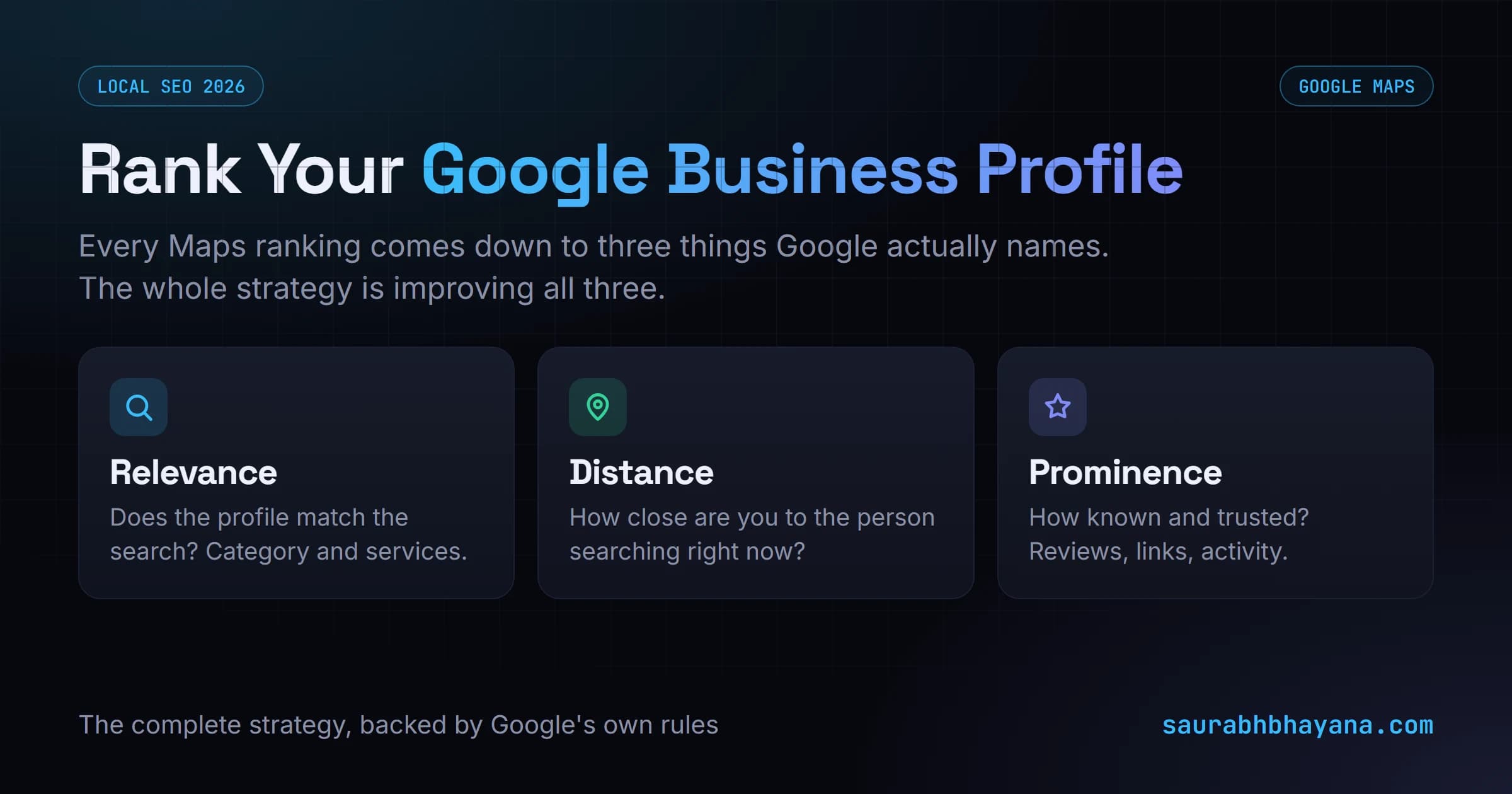
You do not have to guess at this. Google states it plainly in its own documentation: "Local results are mainly based on relevance, distance, and popularity." (Popularity is the word Google uses for what the industry calls prominence.) Those are the only three factors, and every tactic below is really just a way to improve one of them. Here is what each one means in Google's own terms:
- •Relevance: Google defines this as "how well a Business Profile matches what someone is searching for." Your primary category, your services and your description control it. If someone searches for an electrician and your category says electrician, you are relevant.
- •Distance: Google defines this as "how far each business is from the customer who's searching." You cannot move your shop, so this factor is largely fixed, but you can widen how far your reach extends by getting stronger on the other two.
- •Prominence: Google defines this as "how well-known a business is," and adds that "prominent places are more likely to show up in search results." Reviews, links, citations, mentions and consistent activity build prominence over time. This is the factor you have the most control over.
One more thing Google is explicit about, and it settles a lot of arguments: "There's no way to request or pay for a better local ranking on Google." No agency, tool or hack can buy you a spot. Ranking is earned by improving the three factors above, which is exactly why doing the basics consistently works and shortcuts do not.
The fix: stop chasing a hundred random tips and, for every change you make, ask which of relevance, distance or prominence am I improving? If a tactic does not clearly move one of the three, it is not worth your time. That single question keeps the whole strategy focused and matches how Google itself describes the system.
Step 1: Claim, verify and complete the profile
Nothing ranks until this is done, so it is not optional, it is the entry ticket. Claim the profile, verify it (by video, postcard or phone depending on your category), and fill in every single field. A half-complete profile tells Google the business is not serious.
- •Business name: your real name, exactly as it appears on your signage. Nothing extra.
- •Address and service area: accurate. A storefront shows an address; a service business (like a plumber) sets a service area instead.
- •Hours: correct, including holiday hours. Wrong hours cost you real customers and hurt visibility.
- •Phone and website: a local number and a link to the specific, relevant page (not just the homepage).
Use a URL that includes the city and main service where it makes sense, and link to the page that actually matches this location, not a generic homepage. For a single location, the homepage is fine; for many locations, each profile should point to its own local page.
The fix: treat completeness as a ranking factor in itself. Every empty field is a missed relevance signal, so fill all of them before you do anything clever.
Step 2: Get the categories right (the biggest lever)
If there is one thing on this page that moves ranking the most, it is your primary category. It directly feeds the relevance factor by telling Google which searches you should even be considered for. Get it wrong and nothing else you do will save you, because you will not appear for the searches that matter.
Google's own advice is specific here, and it is worth following to the letter. Google says to "choose categories that are as specific as possible": its example is that a nail salon should pick "Nail salon", not the broad "Salon". It also says to "choose the fewest number of categories it takes to describe your overall core business", and warns: "Do not use categories solely as keywords or to describe attributes of your business." Categories are not a keyword box. They describe what your business is.
- •Primary category: the single most specific match for your core service. Not 'Contractor' if you are an 'Electrician', not 'Salon' if you are a 'Nail salon'. Specific beats broad, and Google says so directly.
- •Additional categories: Google's own example is a grocery store with a bakery and deli, which sets 'Grocery store' as primary and adds 'Bakery' and 'Deli' as additional categories. Add one for each genuine department or service you offer, and no more.
- •Do not pad the list: Google tells you not to select a category for every product or service, and not to use categories that belong to nearby or related businesses. Fewer, accurate categories beat a long padded list.
- •Check competitors: look at who ranks above you and which categories they use. The free GMB Everywhere browser extension reveals a competitor's primary and secondary categories, which is the fastest way to spot a category you are missing.
Your primary category decides which searches you can win. Everything else decides whether you win them.
The fix: pick the single most specific primary category that describes your core business, add only the genuine additional services as extra categories, and never use the category fields as keyword slots. Revisit this whenever Google adds new categories in your industry, because a more specific option often appears over time.
Step 3: Make reviews your engine
Reviews are the strongest prominence signal a small business has, and they work on four levels at once. Most owners only think about the star rating, but Google reads far more than that. Google's own guidance is blunt: "More reviews and positive ratings can help your business's local ranking," and it explicitly recommends that you respond to reviews to show you value your customers. So reviews are not a vanity metric, they are a documented ranking input.
| What Google reads | Why it matters |
|---|---|
| Volume | More reviews signal a real, active business. |
| Recency | A steady stream of fresh reviews beats a burst two years ago. |
| Keywords in the text | A review that says 'best emergency plumber in Corona' helps you rank for exactly that. |
| Your replies | Replying to every review, good or bad, is an activity and trust signal. |
The fix: build a simple habit of asking every happy customer for a review, and reply to all of them. Ask them to mention the service and the area in their own words. A slow, steady trickle of genuine reviews is worth more than any one-time push, and it is the one thing competitors find hardest to copy.
Step 4: Keep the profile alive with posts, photos and updates
A Google Business Profile is not a set-and-forget listing. Google favours profiles that look active, so treat it like a small social account you update regularly.
- •Posts: publish a Google Business Profile post weekly at minimum. Offers, updates, tips, anything that keeps it fresh.
- •Photos: add real, local photos regularly. Your work, your team, your premises. Real beats stock every time.
- •Videos: three to five short videos showing the business builds trust and stands out.
- •Products and services: fill out these sections fully, with descriptions and prices where you can.
- •Q&A: seed the questions and answers section yourself with the questions customers actually ask.
Two small photo details most people skip: add descriptive alt text so Google knows what each image shows (do the same on your website), and geo-tag your photos with the location they were taken. Free tools can add the geo-tag for you, and it gives Google one more local signal tying your business to its area.
The fix: put a weekly 15-minute slot in the calendar for one post and a couple of photos. The businesses that lose their ranking are almost always the ones that stopped updating. Consistency is the whole game here.
Step 5: Line up your website behind the profile
Your profile and your website are one system, and Google cross-checks them. If they disagree, both suffer. This is where NAP consistency and schema come in.
- •NAP consistency: your Name, Address and Phone must be identical on your profile, your website, and every directory that lists you. Even small differences (Street vs St) erode trust.
- •LocalBusiness schema: add structured data to the matching page on your site with the same NAP, hours and area served, so machines can read it cleanly.
- •Link both ways: link from your website to your profile, and make sure the profile links back to the right page. Add a map of your location on that page.
- •Matching titles and headings: the page title, headings and a couple of natural keywords should echo what the profile is about.
The fix: audit your NAP across the whole web and make every listing match exactly, then add LocalBusiness schema to the page your profile points to. Consistency is a trust signal, and trust is prominence.
Step 6: Widen your reach beyond your address
The distance factor means you rank strongest right next to your address and weaker further out. You cannot move, but you can push your reach outward by building prominence and relevance for nearby areas.
- •Citations: get listed in trusted local and industry directories with consistent NAP. Each one is a vote. The more places your business name, website and NAP appear across the web (directories, awards, mentions, partner sites), the more Google ties them back to your profile and trusts it, as long as they all match exactly.
- •Local content: create pages or posts that genuinely cover the nearby towns and neighbourhoods you serve.
- •Local links: earn links from local news, suppliers, partners and community sites.
- •Areas served: fill in the areas-served fields on the profile and mention those areas naturally in your content and reviews.
The fix: accept that proximity is fixed and compete on prominence instead. The business with more reviews, more citations and more genuinely local content will out-rank a closer competitor that has none.
What is overrated (do not over-invest here)
Some tactics get a lot of attention but do far less than people think. Do them, but do not let them crowd out the high-impact work above.
- •Spamming dozens of photos while ignoring reviews and posts. Photos help, but they are not a substitute for the real levers.
- •Obsessing over the business description. It matters a little; your category and reviews matter far more.
- •Chasing every tiny setting while never asking for reviews consistently. Effort in the wrong place is still wasted effort.
The fix: spend your time in proportion to impact. Categories, reviews and consistent activity first. Everything else second.
Local ranking myths to drop
A few beliefs are so common they are worth killing outright, because chasing them wastes real effort:
- •Myth: the most reviews always win. Not true. Look at any local pack and you will often see a listing with fewer reviews out-ranking one with more, because proximity and relevance outweigh raw review count. Reviews help, but they do not override how close and how relevant you are.
- •Myth: a higher star rating always ranks higher. Also not true. A 4.8 profile frequently sits above a 4.9 one. Rating is a trust signal for customers, not a simple ranking dial.
- •Myth: running Google Ads boosts your organic Maps ranking. It does not. Ads buy you the paid slot only; the local pack is earned separately and Google keeps the two apart.
- •Myth: just completing the profile will rank you. Completeness is the entry ticket, not the finish line. You still need the right category, genuine reviews, activity and consistency to actually climb.
The fix: judge every tactic against the three real factors, relevance, distance and prominence. If a belief does not map to one of those, it is probably a myth.
What gets your profile suspended (never do this)
This is the part cheap 'ranking hacks' will not warn you about. These tactics can get your profile suspended or removed, wiping out everything you built. No ranking is worth that risk, and Google's guidelines spell most of it out.
The biggest one is your business name. Google's rule is exact: "Your name should reflect your business's real-world name, as used consistently on your storefront, website, stationery, and as known to customers." It then bans everything people try to stuff in: keywords and taglines, location or address details, hours or status like 'Open 24 hours', phone numbers or URLs, service or product descriptions, and store codes. Google warns directly that "including unnecessary information in your business name isn't permitted, and could result in the suspension of your Business Profile." So 'Joe's Plumbing' is fine; 'Joe's Plumbing Best Emergency Plumber Corona 24/7' is a suspension waiting to happen.
- •Keyword stuffing your business name. Use your real name exactly as it appears on your signage, and nothing else. This is the single most common cause of suspension.
- •Buying fake reviews or reviewing your own business. Google detects the patterns, and when it purges fake reviews it can take your genuine ones with them. There is no such thing as safe bought reviews.
- •Fake local listings: listing your business at addresses where you do not actually operate to appear in more areas. Google penalises this, and it never lifts your ranking.
- •Using a fake address, a virtual office, or a PO box as a storefront. If customers cannot visit you there, do not list it as an address; use a service area instead.
- •Buying backlinks to your website. Paid link schemes can get your site penalised, which drags your local ranking down with it.
- •Creating duplicate profiles for the same business. One business, one profile. Duplicates get merged or removed.
Here is the safe way to get your keywords in front of Google. You cannot put them in the profile name, but you CAN put them on your website. If your agency is called Visible, keep the profile name Visible, and on your website header write something like Visible, Best Digital Marketing Agency in Bhopal. You are not stuffing the profile, you are telling Google what you are relevant for through the linked landing page instead. Same signal, zero suspension risk.
The fastest way to lose your ranking is to fake the thing that earns it. Every shortcut here is a suspension waiting to happen.
The fix: keep everything honest and real. A genuine, well-maintained profile always beats a manipulated one in the long run, because it cannot be taken down overnight.
Step 7: Measure it properly
You cannot improve what you cannot see, and checking your own ranking by searching on your phone is misleading. Google personalises results by your location and history, so it lies to you about where you really rank.
- •Use a geo-grid rank tracker: it checks your ranking from many points across your service area and shows a real map of where you are strong and weak.
- •Watch the profile insights: calls, direction requests, website clicks and searches show whether visibility is turning into real actions.
- •Track over time: local SEO is a slow build. Look at the trend over weeks and months, not day to day.
The fix: set up a geo-grid view of your rankings and review it monthly. It shows exactly which nearby areas to target next, so your effort goes where it will move the map.
The strategy in one page
Rank a Google Business Profile by improving relevance, distance and prominence, in this order: claim and fully complete the profile, get the primary and secondary categories exactly right, build a steady stream of genuine reviews and reply to them, keep the profile active with weekly posts and fresh photos, line up your website with consistent NAP and LocalBusiness schema, widen your reach with citations and local content, avoid the tactics that get you suspended, and measure real progress with a geo-grid tracker. None of it is secret. The businesses that win are simply the ones that keep doing it.
If you also want the on-page and AI-search side of ranking, start with the fundamentals of how search works across Google and AI answers.
Frequently asked questions
What are the main Google Business Profile ranking factors?+
Google ranks local profiles on three factors: relevance (how well your profile matches the search, driven by your category, services and description), distance (how close your business is to the searcher), and prominence (how known and trusted you are, driven by reviews, links, citations and activity). Every optimization tactic is really a way to improve one of these three.
How do I rank higher on Google Maps?+
Complete every field on your profile, pick the most specific primary category plus relevant secondary ones, build a steady flow of genuine reviews and reply to all of them, post and add photos weekly to stay active, keep your Name, Address and Phone identical everywhere online, add LocalBusiness schema to your website, and earn local citations and links. Do these consistently rather than once.
How important are reviews for Google Business Profile ranking?+
Very important. Reviews are one of the strongest prominence signals a local business has, and Google reads four things: the volume, the recency, the keywords inside the review text, and whether you reply. A steady trickle of fresh, genuine reviews that mention your service and area, with a reply on each, beats a one-time burst of reviews you never respond to.
How often should I post on my Google Business Profile?+
At least once a week. Google favours profiles that look active, so regular posts, fresh photos and updated information act as activity signals. A profile updated weekly out-ranks one that was set up and left untouched. Put a short recurring slot in your calendar so it actually happens.
What can get my Google Business Profile suspended?+
The most common causes are keyword stuffing your business name (use your real name only), buying fake reviews or reviewing your own business, using a fake address or virtual office as a storefront, and creating duplicate profiles for one business. These can wipe out your listing entirely, so never use them. A genuine, well-maintained profile is always safer and ranks better long term.
Why do I rank in some areas but not others on Google Maps?+
Because of the distance factor. You rank strongest near your registered address and weaker further away. To widen your reach you have to build more prominence than nearby competitors: more genuine reviews, consistent citations, local links, and content that genuinely covers the areas you serve. A geo-grid rank tracker shows exactly which nearby areas to target next.
How do I track my real Google Maps ranking?+
Do not rely on searching from your own phone, because Google personalises results by your location and history. Use a geo-grid rank tracker, which checks your position from many points across your service area and maps where you are strong and weak. Also watch your profile insights (calls, direction requests, website clicks) to see whether visibility is turning into real actions, and judge progress over weeks and months.
Can I pay Google to rank higher in local results?+
No. Google states directly that "there's no way to request or pay for a better local ranking on Google," and it keeps the system that way to stay fair for everyone. You can pay for ads, which appear in a separate labelled slot, but the local pack ranking itself is earned only by improving relevance, distance and prominence. Any agency or tool that promises to buy you a ranking is either misinformed or breaking Google's rules.
What should my business name be on Google Business Profile?+
Exactly your real-world business name as it appears on your storefront, website and stationery, and nothing more. Google prohibits adding keywords, taglines, location details, hours, phone numbers, URLs, or service descriptions to the name, and says doing so "could result in the suspension of your Business Profile." So 'Joe's Plumbing' is allowed; 'Joe's Plumbing Best Emergency Plumber Corona' is not and risks suspension.
Read next
I build fast, SEO-ready sites and rank them on Google and AI search. Or join my free community and grow alongside other website owners.