
Location Pages for Local SEO: The Structure That Ranks (and the Spam Google Names)
How to build location pages that rank in Google and Maps without turning into doorway pages: the site structure, what goes on each page, how many to build and how fast, and the popular tactics Google's own spam policies describe word for word.
A business owner proudly shows a local SEO agency his website: 300 pages, built by running his own SEO with AI. Almost none of them are indexed. The site looks busy, but Google read the pages for what they mostly are: the same page with a different town name pasted in.
Location pages still work. Done right, they are how a home service business shows up across a whole metro instead of only near its own office. But the advice around them is a mess, and here is the honest caveat up front: a lot of what gets taught as "what ranks right now" is described almost word for word in Google's own spam policies. It may work for a while. It is also how sites lose everything in one update.
This guide started with a popular video from a local SEO agency owner. His structure and rollout advice is solid, and we use it below. His keyword-stuffing tricks are not, and we show you Google's exact wording for each one. We also share what we did when we built town pages for a plumbing site in Idaho this month.
What a location page is (and what a doorway page is)
A location page is a page about one service in one place: roof repair in McKinney, emergency plumber in Nampa, HVAC repair in Plano. It exists because someone in that town searches for that service, and it should be the best answer for that person.
A doorway page looks the same from a distance but exists only to catch a search. Google's spam policies define doorway abuse as "when sites or pages are created to rank for specific, similar search queries", and list examples that read like a description of most location page templates: "Having multiple domain names or pages targeted at specific regions or cities that funnel users to one page" and "Creating substantially similar pages that are closer to search results than a clearly defined, browseable hierarchy."
Swap the town name. If the page still reads true, it is a doorway, not a location page.
The fix: before you write a single location page, list what is true only for that town. Jobs you did there, customers you can quote, local rules, weather, the problems you see on that side of the metro. If the list is empty, you do not have a location page yet; you have a service area.
The website structure that works
Think of the site as an upside-down tree. The homepage sits at the top and is the strongest page you have, because most outside links point to it. Below it sit two branches: your service pages and an areas hub. Town pages hang under the hub. Neighbourhood and sub-service pages come last, and only when you have real material for them.
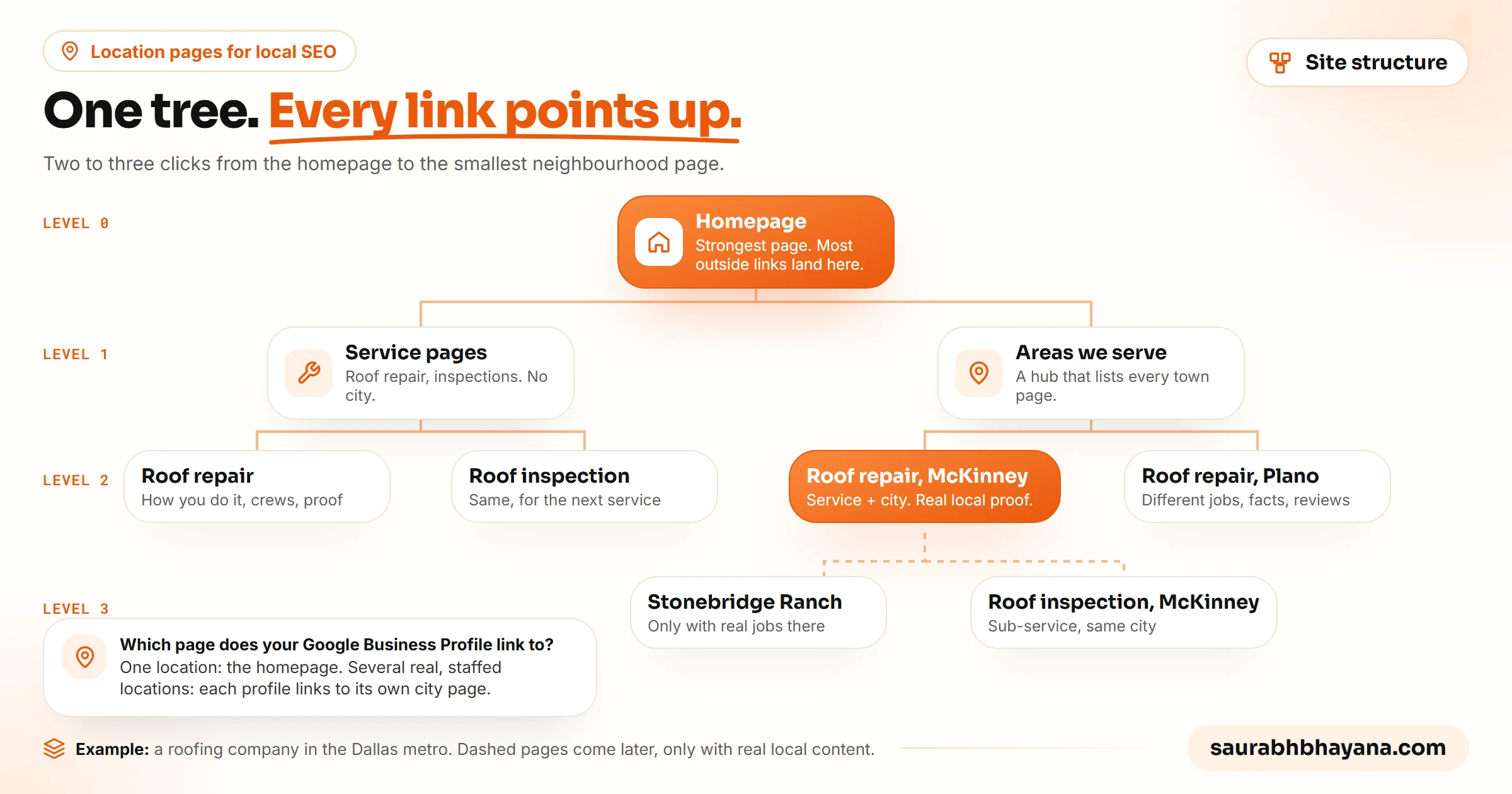
- •Homepage: your main service and main city in the title and H1, not "Home" or a slogan. This is where press, sponsorships and directory links should point.
- •Service pages: one per core service, with no city. They show Google what you do and how you do it.
- •Areas hub: one page that lists every town you cover and links to each town page.
- •Town pages: one service in one town, the page that wins map and local searches.
- •Neighbourhood or sub-service pages: added later, for parts of the metro where you rank weakly and have real jobs to show.
Keep it shallow. Nothing should sit more than about three clicks from the homepage, and the URLs should read like the hierarchy: /roof-repair for the service, /roof-repair-mckinney or /areas/mckinney for the town.
Which page should your Google Business Profile link to?
If you have one profile, link it to your homepage. If you have several real, staffed locations, link each profile to its own town page, so the profile and the page tell Google the same story about the same place. Do not point every profile at the homepage, and do not point a profile at a page for a town it is not in.
The fix: draw your tree on paper before you build anything. Every page should have exactly one parent and a reason to exist. If a page has no parent, it is an orphan; if it has no reason, it is a doorway.
Service pages vs service and city pages
Some SEOs say you only need the service plus city pages. Keep both. A service page is unlikely to rank nationally for "roof repair" against big franchises, but it proves you are a real specialist and gives every town page something to link up to.
| Service page | Service and city page | |
|---|---|---|
| Example | /roof-repair | /roof-repair-mckinney |
| Job | Show what you do and how you do it | Win searches in one town |
| Content | Your process, crews, materials, warranty, photos from any job | Jobs, photos, reviews and facts from that town only |
| Links to | Homepage and related services | Its service page and the homepage |
| Linked from | Homepage navigation | The areas hub and the profile for that location |
The fix: write the service page once, properly, and keep town names out of it except a short list of the areas you cover. Save every town-specific detail for the town page, so the two never repeat each other.
Start with competitor research, but copy the right things
The useful part of every agency playbook is the same: Google has already shown you who wins in your market, so study them before you build. Search the service the way a customer does (usually "service near me", sometimes "city service"), then run a grid scan in a rank tracker to see who holds the top three spots across the metro.
- •Look at review pace first. A competitor collecting reviews every day may be winning on reviews, not on their website. Do not copy the website of someone whose reviews are doing the work.
- •Count their location pages. If the top two have 30 to 60 town and neighbourhood pages, you will need real coverage to compete; if they have six, the edge is somewhere else, often links or reviews.
- •Open the page their profile links to. Note the title, H1, sections, photos, reviews and how they link to other pages.
- •Check what is real. A page with genuine job photos and named neighbourhoods is a model. A page with a city list in the footer is a risk they are taking, not a strategy to copy.
The fix: build a one-page sheet of the top three: review count and pace, number of location pages, what their linked page contains. Copy the structure and the depth. Leave the tricks.
What to put on a location page
The town page is the page your profile sends people to and the one most likely to turn a search into a call. It has two jobs: convince Google it belongs in this town, and convince the person to pick up the phone.
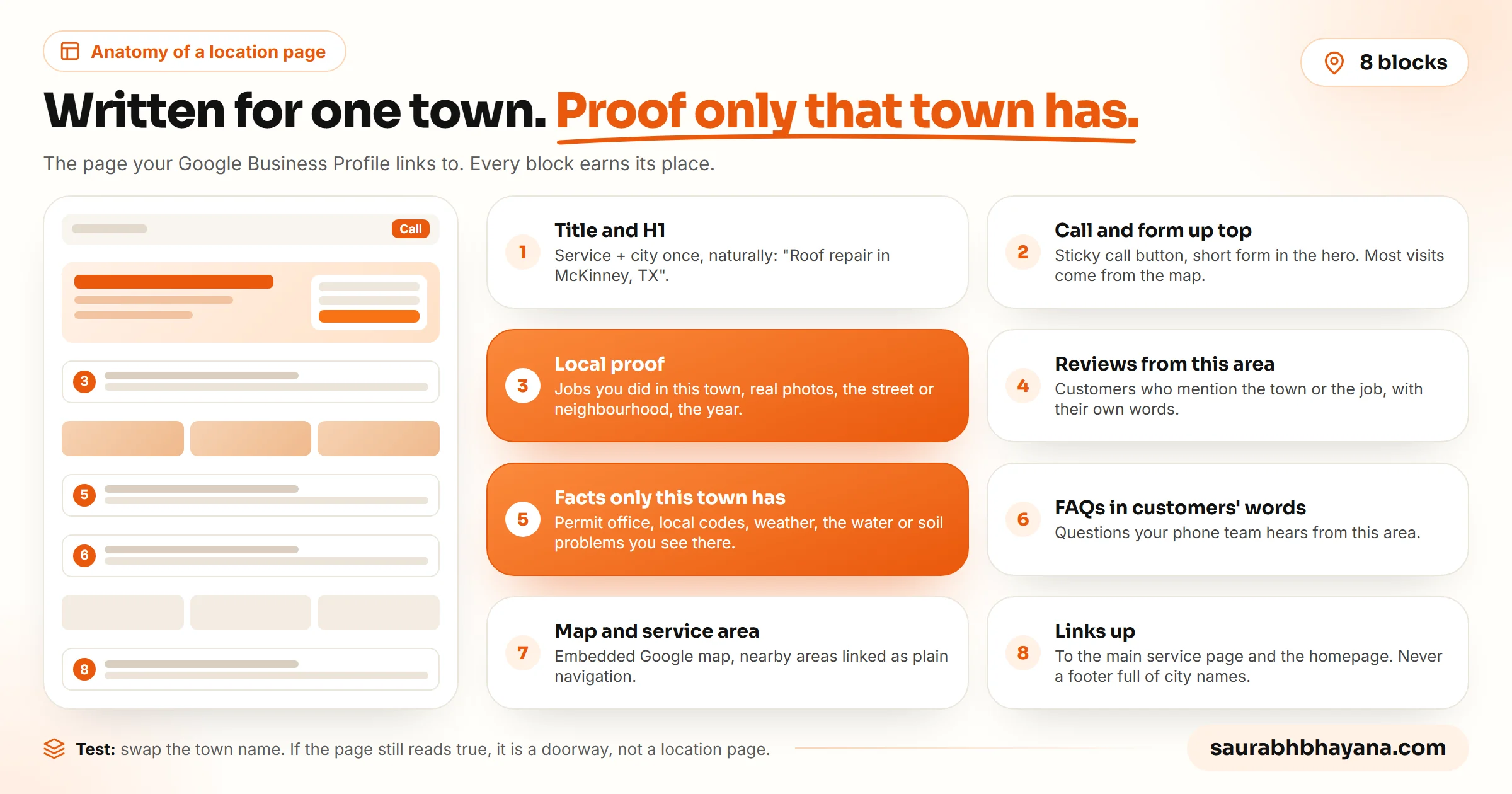
- 1.Title and H1: the service and the town, once, in plain words. "Roof Repair in McKinney, TX | Ace Roofing" is enough.
- 2.Call and form at the top: a sticky call button and a short form in the first screen. People arriving from the map want to act, not scroll.
- 3.Local proof: jobs you did in this town, with real photos, the neighbourhood or street, and the year. This is the block nobody can copy.
- 4.Reviews from this area: customers who mention the town or the job, in their own words.
- 5.Facts only this town has: the permit office, local codes, weather, the soil, water or housing problems you see there.
- 6.FAQs in customers' words: the questions your phone team actually hears from this area.
- 7.Map and service area: your embedded Google map and the nearby areas you cover, linked as plain navigation.
- 8.Links up: to the main service page and the homepage.
What we did on a plumbing site in Idaho
In November 2026 we built a local plumbing site for the Boise, Idaho area with four town pages: Meridian, Nampa, Caldwell and Kuna. Each one got facts we could verify from the town's own sources: the after-hours water and sewer numbers, how many wells supply the town, the water hardness where the city publishes it, and which office issues plumbing permits. Nampa's page, for example, explains that the city's water comes from wells in the Snake River Plain aquifer and that the curb stop at the street is for city staff only.
Then we checked every page against every other page for repeated 8-word phrases. The first drafts failed: they shared template blocks such as a "Common plumbing calls in X" list and the same permits paragraph with the town name swapped. We replaced those with a town-specific "Before you call from X" list and a link to one shared permits guide. Every page ended up at least 93% unique within the site.
You can run the same check without special tools. Paste two of your town pages side by side and highlight every sentence that would still be true if you swapped the town names. If more than a few lines light up, rewrite those blocks with real local detail or move them to one shared page and link to it.
The fix: give each town page at least three things only that town has before you publish it. If you cannot, add the town to your areas hub and service area instead of building a page.
How many location pages, and how fast
There is no magic number. The video's rule of thumb is 30 to 50 per metro for competitive trades, but the real answer comes from your competitor sheet: match the depth of the businesses that already win, and only with pages you can fill with real proof.
Speed matters more than the count. Google's spam policies call out scaled content abuse, which includes "using generative AI tools or other similar tools to generate many pages without adding value for users". Three hundred pages in a month is the pattern that policy describes.
- 1.Build the homepage and core service pages first, and make sure they are indexed.
- 2.Add town pages for your real locations and strongest service areas, five to ten at a time.
- 3.Submit the sitemap in Google Search Console and check each new URL is indexed.
- 4.Wait two to four weeks, then compare grid scans. Daily scans are too noisy to judge.
- 5.Only then add the next batch, starting with the parts of the metro where the scan is weakest.
The fix: put the rollout in a calendar, not a weekend. A steady trickle of real pages that get indexed beats a pile that never does.
The tactics to skip (Google already named them)
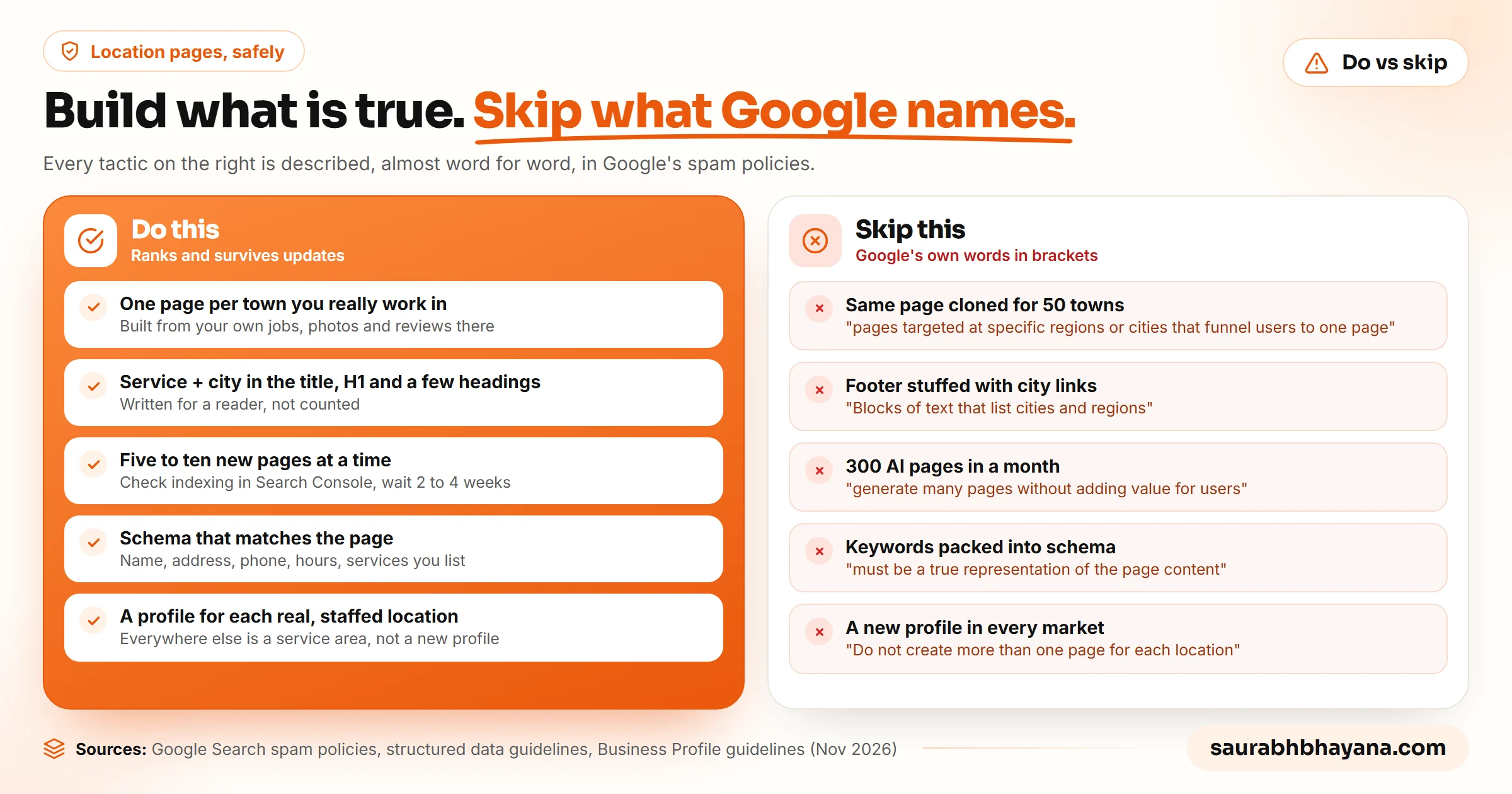
Agency videos often show black-hat tricks that "rank like crazy right now". Some of them do, in some markets, for a while. Each one below is described in Google's own documentation, which means a spam update or a manual action can take the rankings, and sometimes the whole site, with it.
| Tactic you will see taught | What Google says |
|---|---|
| Repeating the service and city 50 to 80 times per page | Keyword stuffing: repeating words or phrases so often that they sound unnatural |
| A footer packed with links to every city page | Keyword stuffing includes "Blocks of text that list cities and regions that a web page is trying to rank for" |
| The same page cloned for dozens of towns | Doorway abuse: "pages targeted at specific regions or cities that funnel users to one page" |
| Hundreds of AI-written pages in a month | Scaled content abuse: "generate many pages without adding value for users" |
| Stuffing keywords into schema and FAQ markup | Structured data "must be a true representation of the page content" and must not mark up content readers cannot see |
| A new Google Business Profile in every market | "Do not create more than one page for each location of your business"; virtual offices are not eligible |
One more myth to drop: adding FAQ schema to win rich results. Google's FAQ structured data documentation now says "FAQ rich results are no longer appearing in Google Search". FAQs on the page are still worth writing, because customers and AI answers read them. Just write them for people.
The fix: judge every tactic by one question: would this page still make sense if search engines did not exist? If the answer is no, it is a bet against Google with your whole site as the stake. Our guide to what gets a Google Business Profile suspended covers the profile side of the same risk.
Where your links should point
Inside the site, links flow up. Town pages link to their service page and the homepage; service pages link to the homepage and to each other where it helps a reader. Neighbourhood pages link to their town page. The areas hub links down to every town page, so none of them is an orphan.
Outside links, such as a local news story, a sponsorship, a supplier or a chamber of commerce listing, should usually point to your homepage. It is the page that passes strength down the tree. Pointing outside links at deep town pages only makes sense once the homepage is already strong.
The fix: check every new page has at least one link in (from the hub or its town page) and one link up. Then put your outside link building into the homepage first. If you want the profile side of local ranking too, start with our full Google Business Profile ranking strategy.
Frequently asked questions
Do location pages still work for local SEO?+
Yes, when each page is genuinely about one service in one town and carries proof only that town has, such as jobs, photos, reviews and local facts. Pages that are the same template with a different town name are what Google calls doorway abuse, and they tend to go unindexed or get demoted.
How many location pages should I have?+
As many as you can fill with real local proof, matched to the depth of the competitors already winning in your market. For a busy metro that can mean dozens, built over months. Publish them five to ten at a time and make sure each one is indexed before adding more.
What is the difference between a location page and a doorway page?+
A location page answers a searcher in one town with information specific to that town. A doorway page exists only to rank, and Google's spam policies list "pages targeted at specific regions or cities that funnel users to one page" as doorway abuse. A quick test: if the page still reads true after you swap the town name, it is a doorway.
Should my Google Business Profile link to my homepage or a location page?+
If you have one profile, link it to your homepage. If you have several real, staffed locations, link each profile to the page for its own town, so the profile and the page describe the same place.
Can I create a Google Business Profile for every city I serve?+
No. Google's guidelines say "Do not create more than one page for each location of your business", and virtual offices are not eligible. A service-area business gets one profile for its real base, with the towns it covers set as its service area.
Is it OK to list all my service cities in the footer?+
A short, honest list of the areas you serve is fine for navigation. A footer packed with links to dozens of city pages matches what Google calls keyword stuffing: "Blocks of text that list cities and regions that a web page is trying to rank for." Put the full list on one areas page instead.
Do FAQ schema and keywords in schema help location pages rank?+
Not in the way many guides claim. Google says structured data "must be a true representation of the page content", so keywords packed into schema break its guidelines. FAQ rich results no longer appear in Google Search at all. Keep schema accurate (name, address, phone, hours, services) and write FAQs for customers.
Read next
My team and I automate the work that eats your hours with AI, and get your business found on Google, Maps and in AI answers.