21 Things to Do With Claude: Real Use Cases and Which Ones Need Care
From checking a lease to chasing a refund, turning meeting notes into a proposal and building your own language tutor: 21 real things to do with Claude, where each one runs, and which ones to double-check before Claude acts for you.
Most people use Claude like a smarter search box: ask a question, read the answer, close the tab. That is the smallest part of what it can do now. Claude can read a 30-page contract, write and run code on your computer, act inside your browser, and run a job every morning while your laptop is closed.
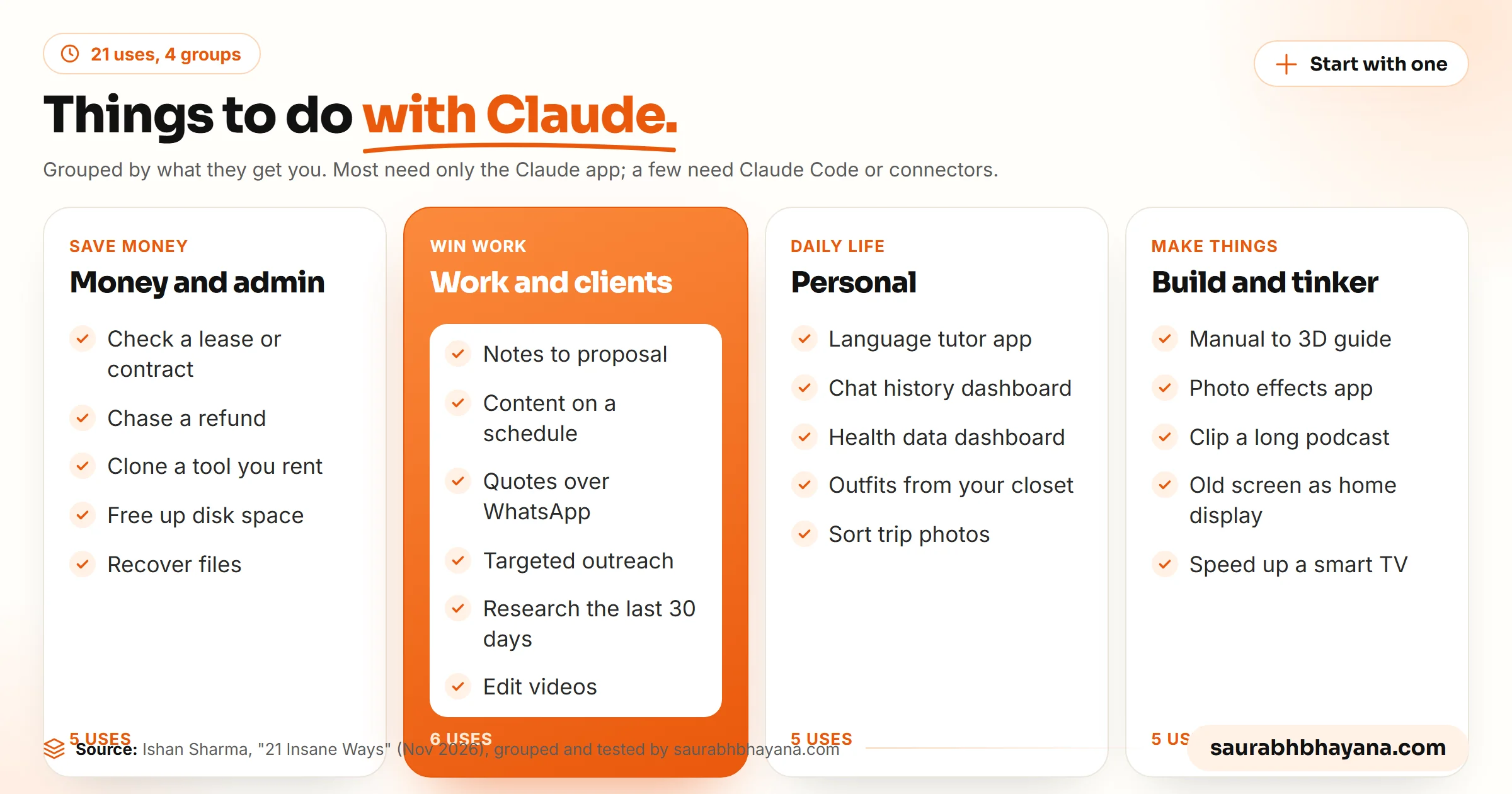
Ishan Sharma's recent video collected 21 ways people are using Claude, researched, fittingly, with a Claude skill that scans Reddit, X and YouTube. We grouped them by what they get you, added which Claude surface each one needs, and flagged the ones where you should check Claude's work before it acts. We use Claude Code every day to run this blog, so where we have done something similar ourselves, we say so.
New to Claude? Our guide on how to use Claude covers the basics first, from your first chat to projects and memory.
Save money and handle admin
1. Check a lease or contract before you argue
Ishan was moving out of a flat in Bangalore when the landlord demanded two months' notice and asked him to repaint every wall. He had not read the agreement in years. Claude read the 30-page lease attached to the email thread and found that notice was one month and that repainting was not in the contract. He says that saved him about ₹40,000, roughly $420. Connect Gmail or upload the PDF, then ask specific questions: what is the notice period, what am I responsible for when I leave, quote the clause.
Always ask Claude to quote the exact clause and page. You can check a quote in seconds, and it stops a confident summary from going beyond what the document says. For high-stakes contracts, use Claude to prepare questions for a lawyer, not to replace one.
2. Chase a refund with the company's own rules
One traveller booked business class with Qantas, had the flight cancelled and was rebooked in economy. Customer service replied that they could not help by email. He asked Claude to go through the airline's own conditions for that situation and write the claim, and the refund came through. The same works for an online shop refusing a return: give Claude the order, the shop's policy and your consumer rights, and have it draft each reply until the case is closed.
3. Build your own version of a tool you rent
The video shows a skill called REA that studies a piece of software you use and rebuilds its features one by one. Ishan rebuilt his invoicing tool, with line items, tax details and PDF export, to stop paying about ₹3,000 a year for it. Our view: this works best for simple tools you use alone. Build your own version from the features you need; do not copy another company's code, design or branding, and check the licence and terms of any tool you study. For a cheap tool, also count the time you will spend maintaining your copy.
4. Free up disk space and Google Drive storage
Ask Claude to scan your computer or Drive and list the biggest files, duplicates and things you have not opened in years. Users in the video report Drive usage falling from 91% to 64%. Have it produce the list first and delete only after you approve it.
5. Recover files from an old or failing drive
One person plugged in a drive that would not open, asked Claude Code to work out why, and got back a lost wedding film. Old USB sticks and external drives are worth a try. But if the files really matter, stop using the drive, have Claude make a full image copy first and work on the copy. Every extra read of a failing drive can make recovery harder, and a professional lab is still the right call for irreplaceable data.
Win work and serve clients
6. Turn meeting notes into a proposal and contract
After a sales call, writing the proposal can take days, so it often slips. With a meeting notetaker connected, Claude can pull the summary, action items and transcript and turn them into a proposal and contract in a couple of minutes. Give it your services, prices and packages once, in a project or a skill, so every proposal uses your real terms. Read it before sending, especially the price and scope.
7. Make content on a schedule while your laptop is shut
Ishan's content agent runs every morning at 9: it reads his idea list in Notion, looks at a recent YouTube video, turns the topic into an Instagram carousel in his brand colours and fonts, saves it to Google Drive and sends him the link. He built the steps in Claude Code, saved them as a skill and moved it to a scheduled cloud task. We run our blog and social publishing the same way: Claude Code renders the charts, prepares each post and schedules it, and we review before anything goes live. Read more about skills and Cowork scheduled tasks.
8. Collect quotes over WhatsApp
Planning a trip or a renovation means messaging many vendors for prices. With Claude in Chrome, Claude can use WhatsApp Web to send the same request to each one, collect the replies and compare them. People in the video use it to find rentals and to screen job applicants. These messages go out as you, so keep approval on and read each one before it sends.
9. Find the right people and write targeted outreach
Connect a lead database such as Apollo, pick a company and a role, say a marketing head in one country, and Claude can find the contact and draft a short email sequence for them. Used carefully, this replaces hours of manual research. Used carelessly, it is spam. Keep volumes low, personalise each message, include a way to opt out, and follow the email laws where your recipients live, such as GDPR in Europe and CAN-SPAM in the US.
10. Research what people said in the last 30 days
The Last 30 Days skill searches Reddit, X and YouTube on a topic and summarises what people are actually saying right now. The video's own list of 21 uses came from it. It is a fast way to research a market, a product launch or a competitor before you write about it.
11. Edit videos
A video skill called lemo-opuscar gives Claude 66 animation styles to apply to footage you recorded, from cartoon looks to pixel art. A one-minute edit takes 30 to 40 minutes of Claude's time, against hours for a human editor. We edit our own short videos through Claude Code with Remotion; our post on whether Claude can edit videos covers what works.
Personal life
12. Build a tutor for the exact language you want
One learner wanted Mexican Spanish, but every app taught European Spanish. He asked Claude to build an interactive app that listens to him speak, checks his pronunciation and corrects his mistakes in that dialect. If no app teaches the language or accent you need, describe it and have Claude build one.
13. Turn years of chats into a dashboard
An engineer exported 12 years of WhatsApp messages with his fiancée and had Claude build a site that showed who texted more, who said "I love you" more, and that they messaged most around 9 pm and most of all when they lived apart. It is a lovely use, with one rule: those messages belong to two people, so ask the other person before you upload them.
14. Make sense of your health data
Export data from a Whoop, Apple Watch or Fitbit, add blood test reports, and ask Claude for a dashboard of your sleep, recovery and routine, with suggestions on meal timing and training days that fit your calendar. Treat it as a way to understand your numbers and prepare questions, not as medical advice. Talk to a doctor before changing medication or starting supplements.
15. Plan outfits from clothes you already own
Ishan gave Claude his wardrobe and asked for five outfits for events that month, without repeating what he had already worn. Because Claude remembered his style and past outfits, the results felt new without buying anything.
16. Sort trip photos by place, activity and people
Photos carry hidden data: the date, the camera and often the location. Claude can read that data and group thousands of photos into folders by place, activity or person, ready to share with friends. Work on a copy of the folder, not your only originals.
Build things and tinker
17. Turn a manual into an interactive 3D guide
Give Claude the PDF manual for a wardrobe, an appliance or a Lego set and ask for an interactive 3D app that walks through each step: which screw goes where and in what order. A boring booklet becomes something you can rotate and follow.
18. Build a photo effects app
One developer showed an app made only with Claude Code that changes a photo's style each time you tap, with options to view it in 3D or AR. If you like visual effects, describe the ones you want and build your own playground, no coding background needed.
19. Clip and search a long podcast
Give Claude a three-hour podcast link and ask it to split the conversation into sections, then ask questions about specific parts. Ishan did this with a long episode on how India's UPI payments work to jump straight to the useful sections. Podcasters can use the same method to find their best clips.
20. Turn an old screen into a home display
An old phone, tablet, Kindle or monitor can become a dashboard for the living room: today's weather, this month's events, deliveries on their way and a recipe idea for dinner. Claude builds the page and the screen just shows it.
21. Speed up a slow smart TV
Android and Samsung Tizen TVs get slower over time and fill up with ads. With the open-source Free My TV project, people point Claude at a TV on the same Wi-Fi and have it strip the clutter and build a faster home screen. This is the riskiest item on the list: changing a TV's software can void the warranty or leave it unusable. Read the project first and start with the changes you can undo.
Which uses need extra care?
Claude can act for you, so the right question is not whether it can do the job but what happens if it gets it wrong. We sort every task by that worst case. If the worst case is redoing it, just try it. If it costs money or trust, read the output before it goes out. If it is hard to undo, learn the rules first.
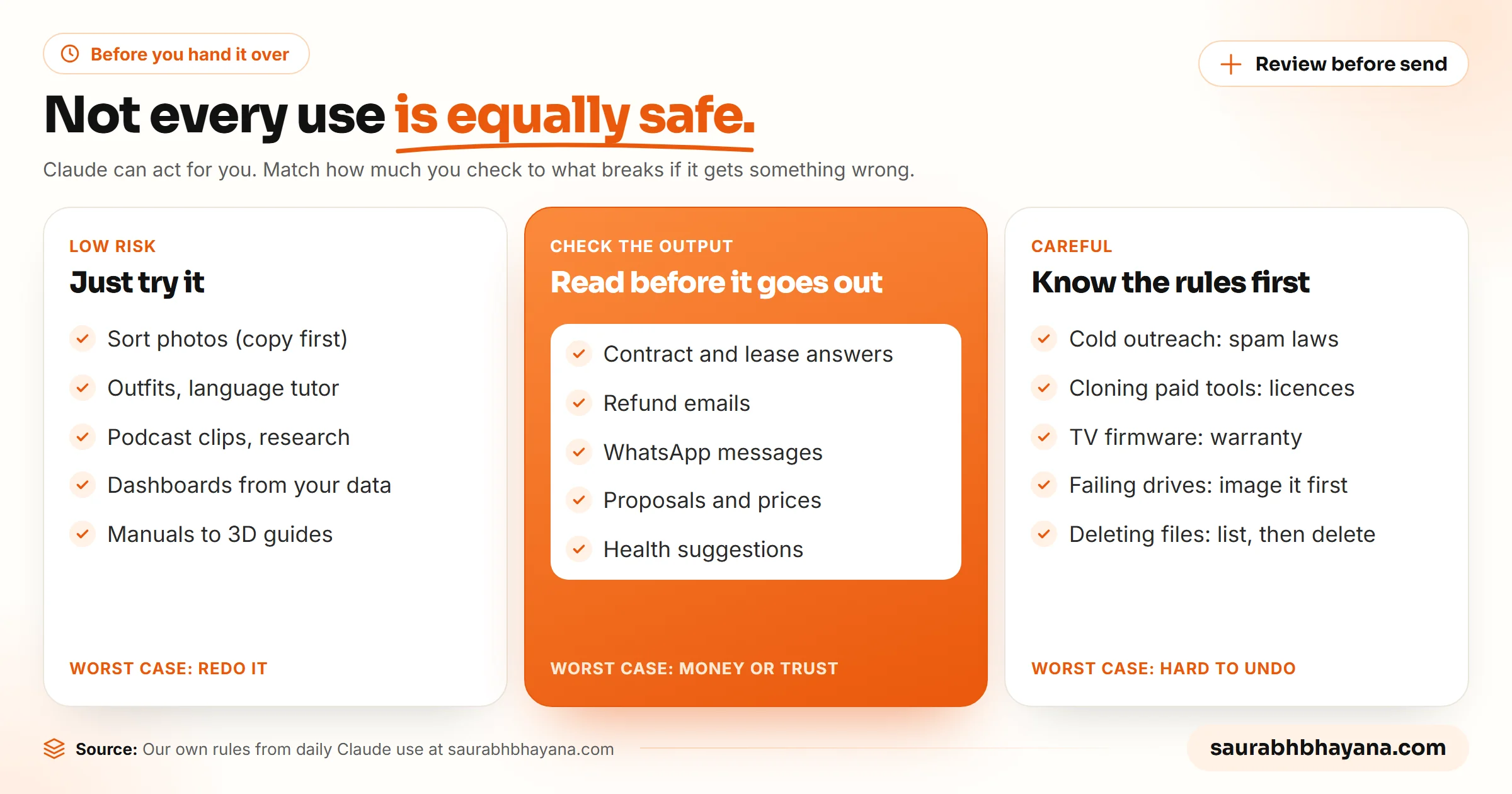
Two habits cover most of the risk. Keep Claude on manual approval for anything sent in your name or anything that deletes or moves files. And for browser tasks, use a separate Chrome profile without your banking or health accounts, because a web page can hide instructions meant for the AI.
How to start with Claude
- 1.Pick one task from this list that costs you at least an hour a week.
- 2.Do it once with Claude, step by step, and fix what it gets wrong.
- 3.Write the steps into a project or a skill so Claude does it the same way next time.
- 4.Once it works three times in a row, schedule it as a cloud task or hand it more of the work.
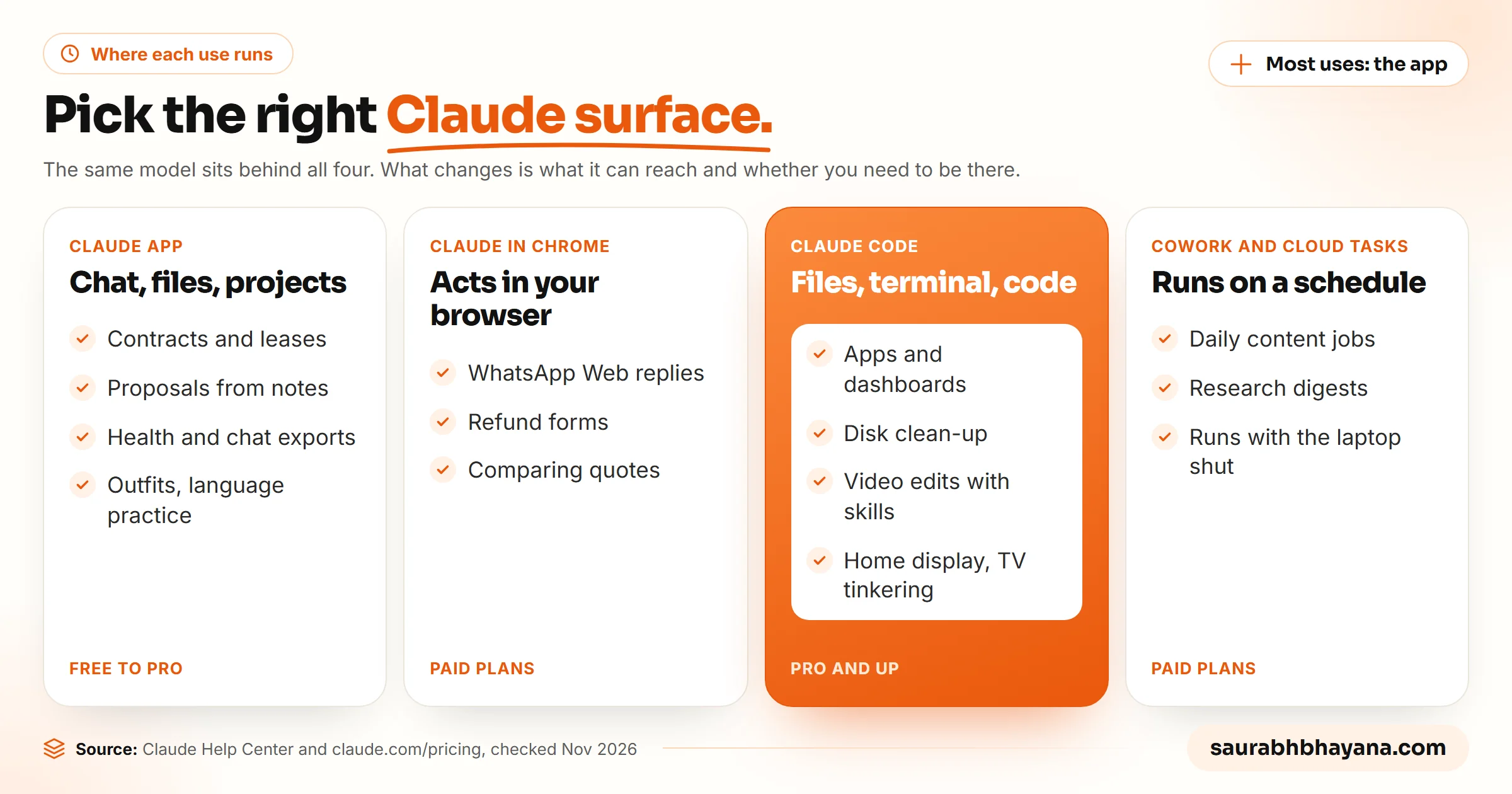
Most of these need a paid plan. Claude in Chrome, Claude Code and Cowork are not on the Free plan, while document questions and personal projects work on any plan. Our Claude Code pricing guide compares the plans if you are deciding.
Frequently asked questions
What cool stuff can I do with Claude?+
Beyond chat, Claude can build small apps from a description, turn a furniture manual into a 3D guide, make a dashboard from your chats or health data, clip a long podcast into searchable sections, edit videos with skills, and run jobs such as daily content creation on a schedule while your laptop is shut.
What should I use Claude for?+
Start with the task that costs you the most time each week. Common high-value uses are reading long documents such as leases and contracts, writing proposals from meeting notes, research, refund and complaint emails, and repetitive content work you can later schedule.
Can Claude send messages or emails for me?+
Yes, with the right tools. Claude in Chrome can act in WhatsApp Web or Gmail in your browser, and the Gmail connector lets Claude search your mail and prepare drafts. Keep manual approval on for anything sent in your name and read each message first.
Which Claude plan do I need for these use cases?+
Document questions, outfits, language practice and other chat-based uses work on any plan. Claude in Chrome, Claude Code and Cowork scheduled tasks need a paid plan; Pro starts at $20 a month.
Is it safe to give Claude my contracts or health data?+
Share only what you are comfortable sharing, check your plan's data settings, and ask other people before uploading conversations that include them. Use Claude's answers on legal and health questions to understand your documents and prepare questions, not as a replacement for a lawyer or doctor.
Can Claude recover files from a corrupted drive?+
It can help diagnose the problem and run recovery tools through Claude Code, and people have recovered lost files that way. For files that matter, stop using the drive, make a full image copy first and recover from the copy, or use a professional recovery service.
What are you not allowed to do with Claude?+
Anthropic's Usage Policy bans uses such as creating malware, fraud and scams, weapons development, harassment and any sexual content involving minors. Separately, you are responsible for following laws and other services' terms when Claude acts for you, such as email marketing laws and software licences.
Read next
My team and I automate the work that eats your hours with AI, and get your business found on Google, Maps and in AI answers.