
Can Claude Edit Videos? How to Edit Reels With Claude Code, Remotion and HyperFrames
Claude can't open Premiere, but it can edit a video by writing code: captions, cuts, colour, charts and motion graphics, rendered to MP4. Here is how it works, the five ways to do it from basic to pro, what it is good and bad at, and what we learned making reels this way.
Imagine dropping a raw phone video into a folder and typing: "Make this a trending reel. Captions, background music, a chart where I mention numbers." An hour later there is an edited MP4 waiting. No timeline, no keyframes, no editor. Too good to be true?
Partly. Claude really can edit videos now. But not the way most people picture it, and not without help. In a recent YouTube video, marketer Damini Tripathi edited the same reel five different ways with Claude Code, and the gap between the first and last result is huge. We make short-form reels for several channels with code, so we can add what happens after the demo.
In this post we explain how Claude actually edits a video, the tools it uses, five ways to do it from basic to pro, what it is good and bad at, and when you are better off with a normal editor.
Can Claude edit videos?
Yes, but by writing code, not by using an editing app. A lot of people think Claude watches your video like a person. Not really. It pulls still frames out of the clip, reads them along with the transcript, plans the edit, then writes code that describes every caption, cut, colour change and animation. A renderer turns that code into an MP4.
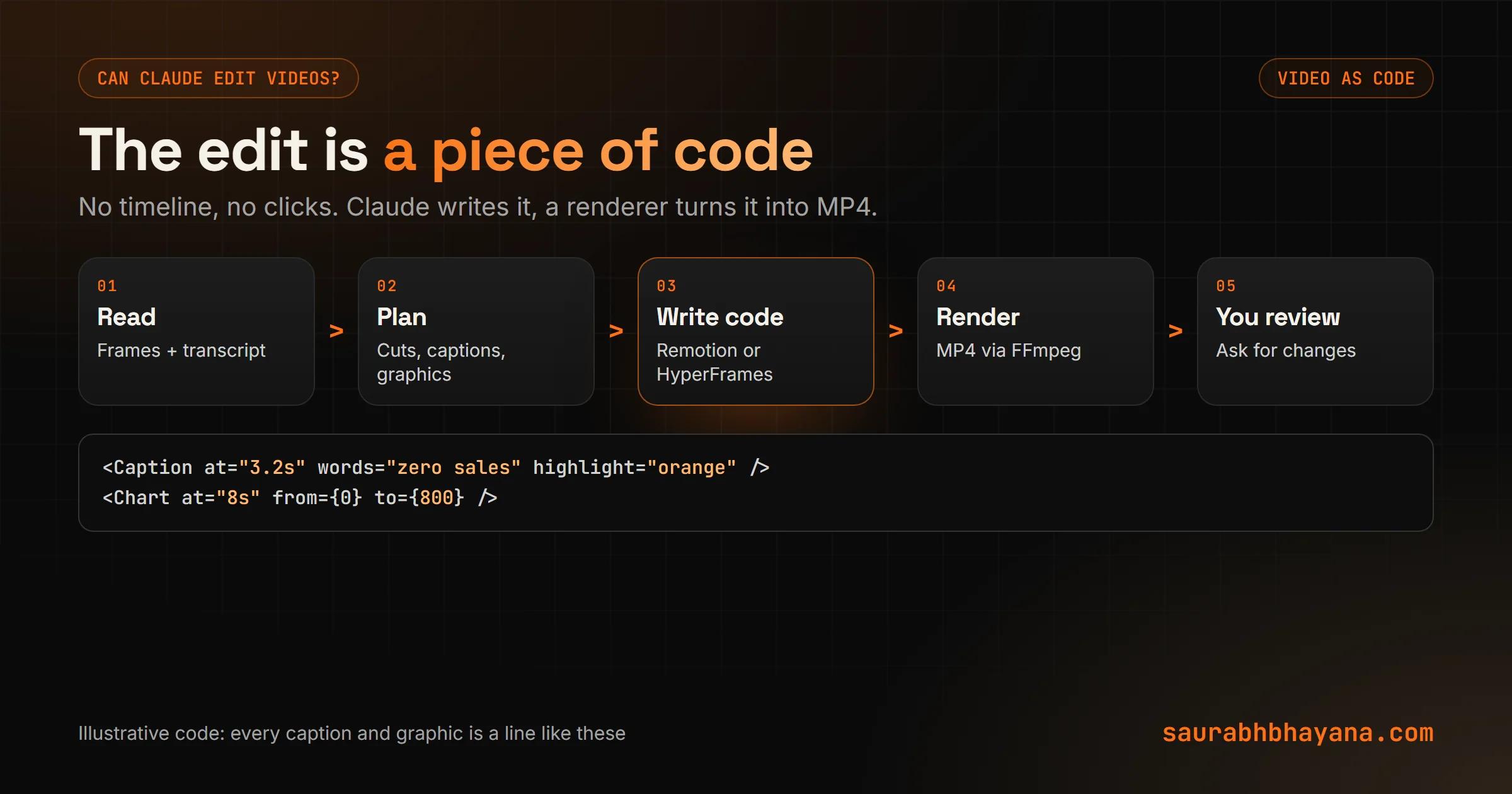
That is why you use Claude Code (or a similar coding agent) for this, not the normal chat. It needs to install tools, read files on your computer, run commands and render.
The tools: Remotion and HyperFrames
Remotion
Remotion lets you build videos as React components: a caption is a component, a chart is a component, the whole scene is a function of time. It has been around for years, and the Remotion team publishes official skills for Claude Code, installed with npx skills add remotion-dev/skills, or as a Claude Code plugin.
This is what we use for one of our reel channels. We built the world once, as reusable pieces: the setting, the character, the props, the lighting. Each new episode is mostly new text and timing on top. That is where code-based video shines: the tenth episode takes a fraction of the time of the first.
HyperFrames
HyperFrames is HeyGen's open-source framework, released under the Apache 2.0 licence, that turns HTML, CSS and animations into MP4 using a headless browser and FFmpeg. It was designed for AI agents and ships its own skills, installed with npx skills add heygen-com/hyperframes. If Claude can build a web page, it can build a HyperFrames scene, which is why it picks it up quickly.
| Remotion | HyperFrames | |
|---|---|---|
| Built with | React and TypeScript | HTML, CSS and JavaScript |
| Claude support | Official skills and a Claude Code plugin | Ships its own agent skills |
| Best for | Reusable templates and series | Quick motion graphics and overlays |
| Licence | Free for individuals and small companies; larger companies need a licence | Open source (Apache 2.0) |
Check Remotion's current licence terms before using it in a company. Our guide on what Claude skills are explains how these skill packs plug into Claude.
How to edit reels with AI: 5 ways, from basic to pro
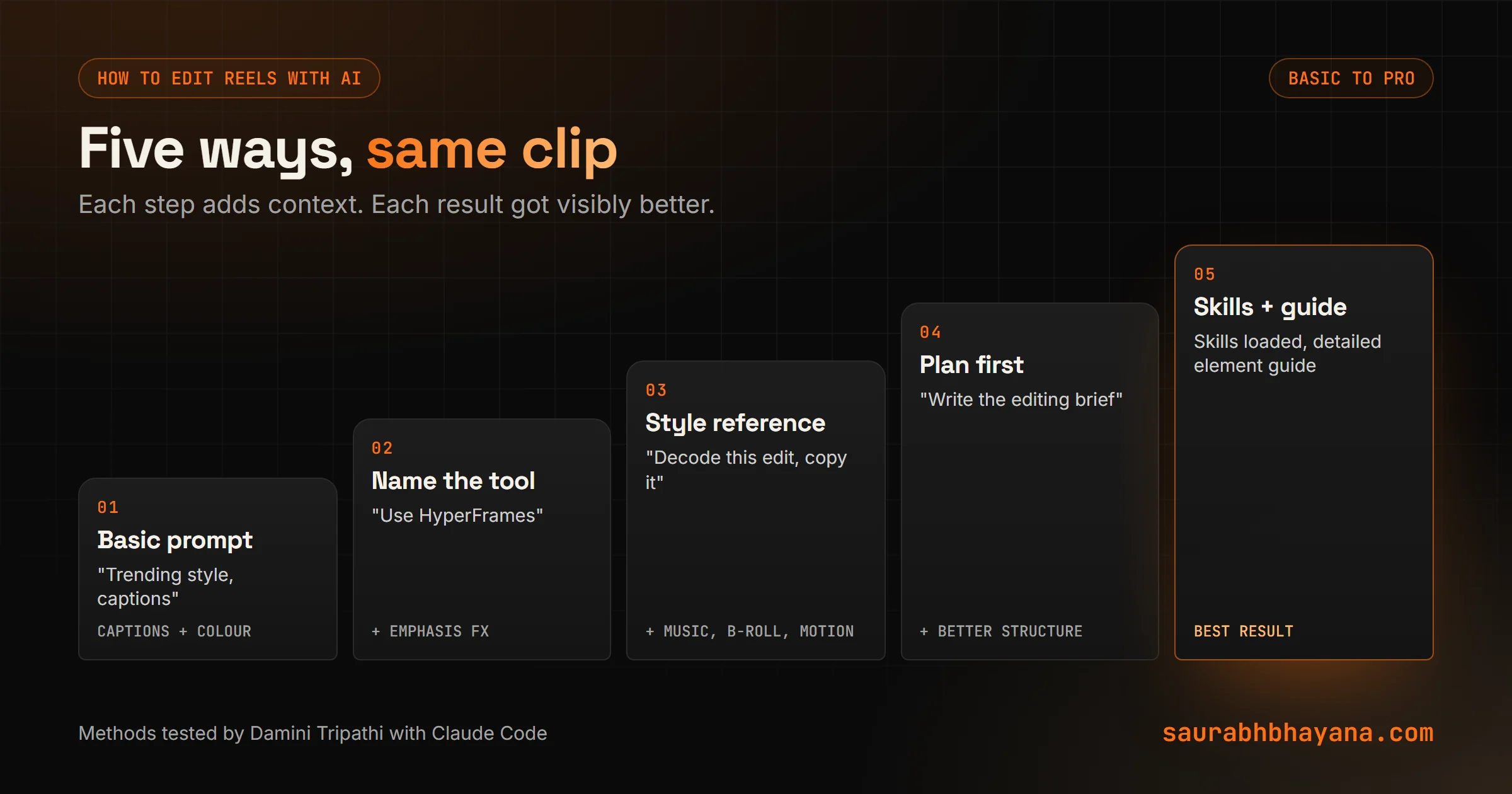
Damini edited the same clip five ways. Each step adds one thing, and each step got visibly better.
- 1.A basic prompt. "Edit this in a trending style, add captions, music, B-roll and charts where needed." Claude reads the frames, asks a few questions, installs what it needs, and delivers captions and a colour grade. Usable, plain.
- 2.Name the tool. Add "use HyperFrames" and it starts adding emphasis effects and simple graphics where you stress a line.
- 3.Give a style reference. Point Claude at an edit you like and say "decode this editing style, then edit my video the same way". It breaks down the cuts, captions, colour, B-roll, hook and outro, and copies the feel, down to the music mood and accent colours.
- 4.Ask for guidelines first. Have Claude watch your clip and write an editing brief, as if for a human editor. Then give it that brief plus the clip. Planning before doing gave a noticeably better edit.
- 5.Skills plus a detailed guide. Load video-editing skills, switch on the tools, and give an in-depth guide: which elements, where they pop up, what to avoid. This produced her best result.
Method 4 works for human editors too. Ask Claude to watch your raw clip and write an editing brief, then send that brief to your editor. It saves a round of revisions.
What Claude is good and bad at
| Good at | Not good at (yet) |
|---|---|
| Captions, word highlights, lower thirds | Taste: knowing when an effect is too much |
| Charts and numbers that animate on cue | Subtle colour grading without supervision |
| Branded intros and outros, the same every time | Layout around faces and products without being told |
| Turning one template into a weekly series | Fast turnaround on a single quick video |
| Copying a reference style closely | Judging which take or moment is the strongest |
Two mistakes from the video match what we see. In Damini's tests, Claude made the colour far too green, twice, until she told it to keep it natural. And in one edit its animation covered her face because nobody told it where her face was. Both are fixable in one sentence, but only if you watch the render.
Claude is a fast junior editor who never gets tired. You still need to be the one with taste.
Claude code video editing: a prompt that works
Edit raw/clip.mp4 into a 9:16 reel, about 45 seconds.
Style: copy the cuts, captions and colour of reference/edit-i-like.mp4.
Captions: 2-4 words at a time, highlight the key word in orange, bottom third.
Keep my face clear: graphics only in the top half when I'm on screen.
Colour: natural skin tones, slight contrast, no tint.
Add a simple animated chart when I say a number.
Before editing, write a short plan and ask me anything unclear.
Render a 10-second preview first, then the full video.
The preview line saves the most time. A 10-second test render shows colour and layout problems before you wait for the whole thing.
How long does it take, and what does it cost?
Damini says a basic edit takes about half an hour, and her most polished one took about an hour and a half, including several re-renders. It also uses a lot of tokens, because Claude reads many frames and rewrites code each round. If you are on a plan with usage limits, a few long edits can use up a big share of your allowance.
Our advice: use an everyday model for most of the work and keep the top model for the first plan, and reuse templates so later videos start from code that already works. Our Claude models guide compares the options.
AI video editing for small business: when it is worth it
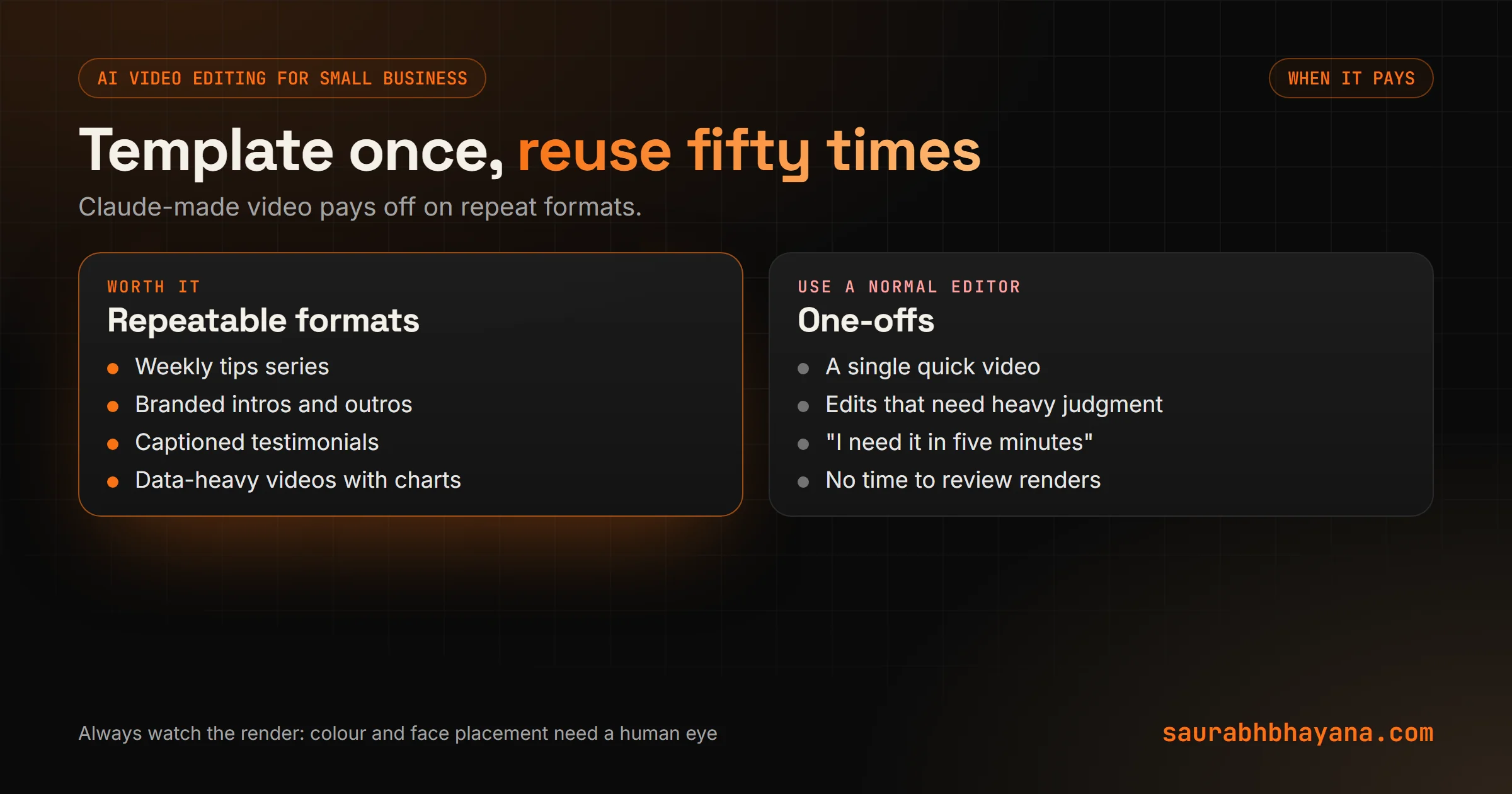
Honest answer: for one quick video, open CapCut or your usual editor. It is faster. Claude-made video pays off when you produce the same kind of video again and again: weekly tips, product spotlights, customer testimonials with captions, real estate listing reels. Build the template once and every new video is mostly new words.
The bigger picture
Video editing used to mean hours on a timeline. Now a growing part of it is describing what you want and checking what comes back. The skill that matters is moving from operating the software to directing the edit, which is good news for anyone who knows what good looks like.
So, which video do you make over and over? That is the one to template first. If you want a branded reel template built for your business, tell us what you post.
Sources: Damini Tripathi's video on YouTube at youtube.com/watch?v=g7tlWqEduN8; Remotion docs on Agent Skills and the Claude Code plugin; HyperFrames repository by HeyGen.
Frequently asked questions
Can Claude edit videos?+
Yes, by writing code rather than using an editing app. Claude Code reads frames and the transcript, plans the edit, writes captions, cuts and animations as code with tools like Remotion or HyperFrames, and renders an MP4.
What is HyperFrames?+
HyperFrames is HeyGen's open-source framework that turns HTML, CSS and animations into MP4 video using a headless browser and FFmpeg. It was built for AI agents and ships skills for tools like Claude Code.
Can I use Remotion with Claude Code?+
Yes. Remotion publishes official Agent Skills (npx skills add remotion-dev/skills) and a Claude Code plugin that teach Claude Remotion's best practices.
How long does Claude take to edit a video?+
Roughly half an hour for a basic edit and an hour or more for a polished one with several re-renders, depending on length and how many changes you ask for.
Is AI video editing with Claude expensive?+
It uses a lot of tokens because Claude reads many frames and rewrites code each round. On a plan with usage limits, a few long edits can use a big share of your allowance. Templates make later videos much cheaper.
Will Claude replace video editors?+
Not for work that needs taste and judgment. It is very good at repeatable formats like captions, charts and branded templates, and works best directed by someone who knows what a good edit looks like.
What is the best way to get a good edit from Claude?+
Show it an edit you like and ask it to copy the style, ask for a written plan before it edits, tell it where faces and products are, and check a short preview before the full render.
Read next
My team and I automate the work that eats your hours with AI, and get your business found on Google, Maps and in AI answers.