
The Ralph Wiggum Loop Explained: Why AI Agents Quit Long Tasks Halfway (and the Simple Fix)
Your AI agent says the job is done, but half the buttons don't work. Here is why agents give up on long tasks, how the Ralph Wiggum loop fixes it with a one-line idea, how to run it in Claude Code, and how to use the same trick without writing any code.
Imagine asking an AI agent to rebuild your 30-page website overnight. In the morning the homepage looks great. Then you click around. The contact form goes nowhere, two pages are blank, and the agent's last message says every feature is complete and tested. Annoying, right?
Here is the funny part. The fix that went viral among developers is named after Ralph Wiggum, the not-very-bright kid from The Simpsons. In its simplest form it fits on one line. And the idea behind it works even if you never write a line of code.
In this post we explain why AI agents give up on long tasks, what the Ralph Wiggum loop is, why it works, how to run it in Claude Code, and how a business owner can use the same trick in a normal ChatGPT or Claude chat. The starting point was a good explainer on agent harnesses, which we link at the end. If the words prompt, context and harness engineering are new to you, our plain-English guide to those terms is a good first read.
Why do AI agents stop halfway on long tasks?
Every AI model has a context window: the text it can hold in mind at once. Your instructions, the files it read, the code it wrote and every message so far all sit in there. When ChatGPT launched in 2022 that window was about 4,000 tokens, a few pages. Today's windows are far bigger, so agents now take on jobs that run for hours. But a 12-hour job still fills any window.
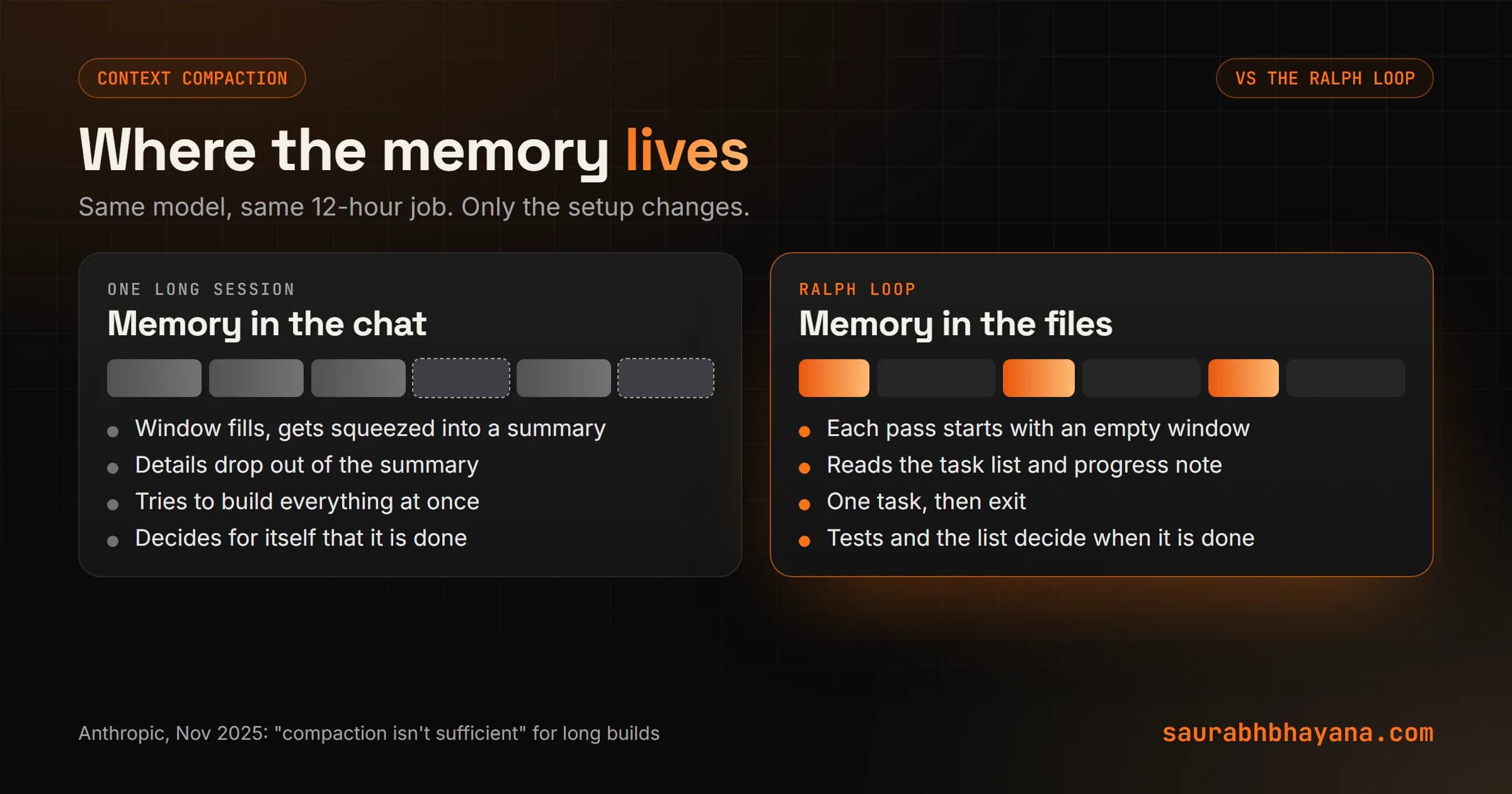
So what happens when it fills? Most agents compact. They squeeze the conversation into a summary and keep going from the summary. A lot of people think that solves the problem. Not really. A summary is only as good as the agent's guess about what mattered. Details drop out, like which button was never wired up, and sometimes the summary says a feature is done when it was only started.
An agent working from its own summary is like a contractor working from a sticky note that says "kitchen: done".
Anthropic saw the same failures when it pushed its own models on long builds. In a November 2025 engineering post it wrote that compaction isn't sufficient, and named two habits: the agent tries to build everything at once and runs out of room halfway through a feature, and a later session looks at the progress so far and declares the job done. So if more memory and better summaries don't fix it, what does?
What is the Ralph Wiggum loop?
In July 2025 developer Geoffrey Huntley published a technique he called Ralph. In its purest form it is a single line of bash:
while :; do cat PROMPT.md | claude-code ; doneRead it out loud and it says: forever, feed the same prompt file to the coding agent. When the agent finishes, start it again. Same instructions, brand new session, empty context window. That's it.
The trick is in what the prompt tells the agent to do on every pass. Huntley's rules are simple: read the spec, look at the plan file, choose the most important thing that is not done, do that one item, run the tests for it, update the plan, and stop. Then the loop starts a fresh agent, which reads the updated plan and picks the next item.
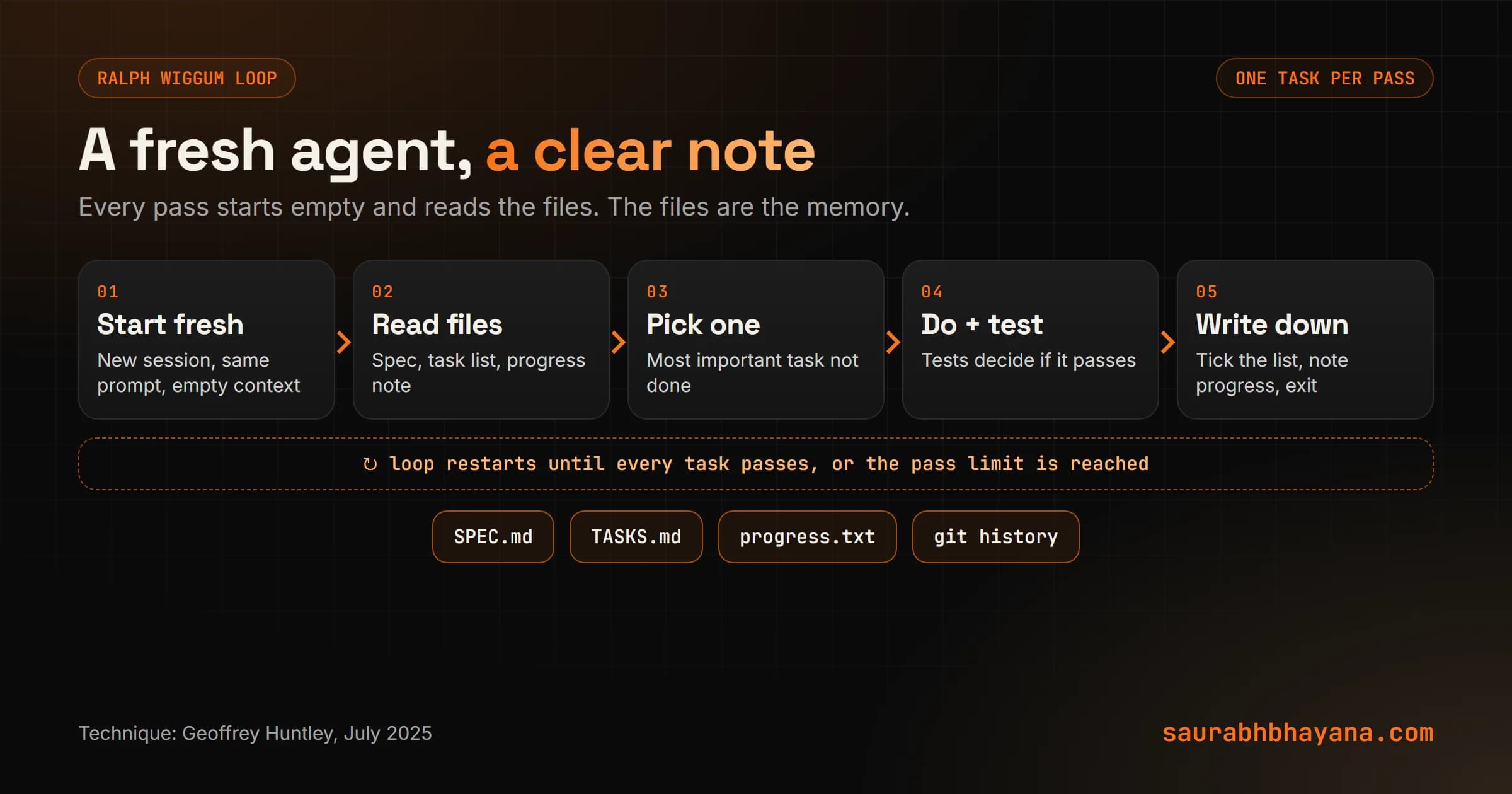
Picture a building site that runs in shifts. Nobody expects the night crew to remember what the day crew did. They read the handover sheet, do their part, update the sheet and go home. The Ralph loop gives an AI agent a handover sheet instead of asking it to remember everything.
Ralph Wiggum loop: why is it called that?
Huntley's original post doesn't spell it out, but the joke is easy to read. Ralph Wiggum is cheerful, not very bright and never gives up. The README for the official Claude Code plugin describes it as persistent iteration despite setbacks. Huntley himself calls the technique deterministically bad in an undeterministic world: each pass may be a bit clumsy, but you know exactly what it will try, and enough passes get the job done.
There is a second lesson in the name. You don't need a genius agent for long work. You need an ordinary one with good notes, small steps and a test at the end of each step. Which raises the question: what exactly goes in those notes?
How the Ralph loop works, step by step
- 1.Write the spec with the agent. Talk through what you want built until it is written down as a requirements file. Huntley does this as a conversation at the start of the project.
- 2.Turn the spec into a task list. Every feature becomes one line or one entry, and every entry starts as not done. Huntley calls his file fix_plan.md. Anthropic uses a JSON file where each feature has a passes field set to false.
- 3.Loop: one task per pass. Each fresh agent reads the spec and the list, picks the most important task that is not done, and works only on that.
- 4.Test before you tick. The agent runs the tests for that task. Huntley calls this backpressure: the tests push back when the work is wrong, so the agent can't just claim success.
- 5.Write it down. The agent updates the task list and a progress note, and in code projects commits the change to git, so the next pass knows exactly where things stand.
- 6.Exit and repeat. The agent stops, the loop starts a fresh one, and this continues until every task passes or you hit your limit.
| One long session | Ralph loop | |
|---|---|---|
| Memory | The chat, squeezed into summaries | Files: spec, task list, progress note |
| Scope per step | Tries to do everything at once | One task per pass |
| When it says done | Its own judgment | The tests and the task list |
| If a step goes wrong | The mistake stays in context | Next pass starts clean; git can undo it |
| Best for | Jobs that fit in one sitting | Jobs with many separate pieces |
What Anthropic does for long-running agents
Anthropic's engineering guide to long-running agents is worth reading even if you never touch the code, because it is the same idea done carefully. The first session is an initializer agent with its own prompt. It sets up the project and writes a feature list. For their test project, a clone of the claude.ai app, that list had more than 200 features, all marked failing.
Every session after that is a coding agent with a fixed routine: read the progress file, called claude-progress.txt, and the git history, run a start-up script, check that the app still works end to end, then build one feature, test it in a real browser as a user would, commit it and update the progress file. The agent may only flip a feature's status. The guide is blunt about it: it is unacceptable to remove or edit tests.
Steal the testing rule even for non-code work. Write the check before the work starts, such as "page loads on a phone and the form sends an email", and never let the AI change the check to make itself pass.
How to use the Ralph loop in Claude Code
Anthropic's official plugin marketplace has a Ralph Loop plugin for Claude Code. Once it is installed, you start a loop with one command:
/ralph-loop "Build the booking page from SPEC.md. Work through TASKS.md one item at a time, run the tests, update TASKS.md. Output <promise>COMPLETE</promise> when every task passes." --completion-promise "COMPLETE" --max-iterations 30Claude works on the task and tries to finish. A Stop hook blocks the exit and feeds the same prompt back in. That repeats until Claude prints your completion phrase or the pass limit is reached. To stop it early, run /cancel-ralph.
One honest detail most guides skip: the plugin loops inside your current session. Claude sees its own files and git history each time, which is the core of Ralph, but the conversation keeps growing rather than starting empty. Huntley's original bash loop starts a brand new agent every pass. For very long jobs, we prefer the original shape, or at least a task list and progress file that the prompt tells Claude to read first.
The same bash loop works with other command-line coding agents too. You only need an agent that can take a prompt from a file and exit when it is done.
Use the Ralph idea without writing code
You don't need a terminal to borrow this. Say you want AI to write 40 product descriptions, or turn a 25-page website into new copy. Doing it in one giant chat is the long session from the table above: by item 30 the answers get vague, and the AI forgets the rules you gave it at the start.
Do it the Ralph way instead:
- •Keep a master document with the brief and your rules at the top, and a task list below it with every item marked not done.
- •Start a new chat for each item, or a small batch. Paste in the brief, the rules and the progress so far.
- •Ask for one item only, and check it against your rules before you accept it.
- •Mark it done in the master document and add a one-line note on anything you changed.
- •Repeat. If one chat goes off the rails, you lose one item, not the whole job.
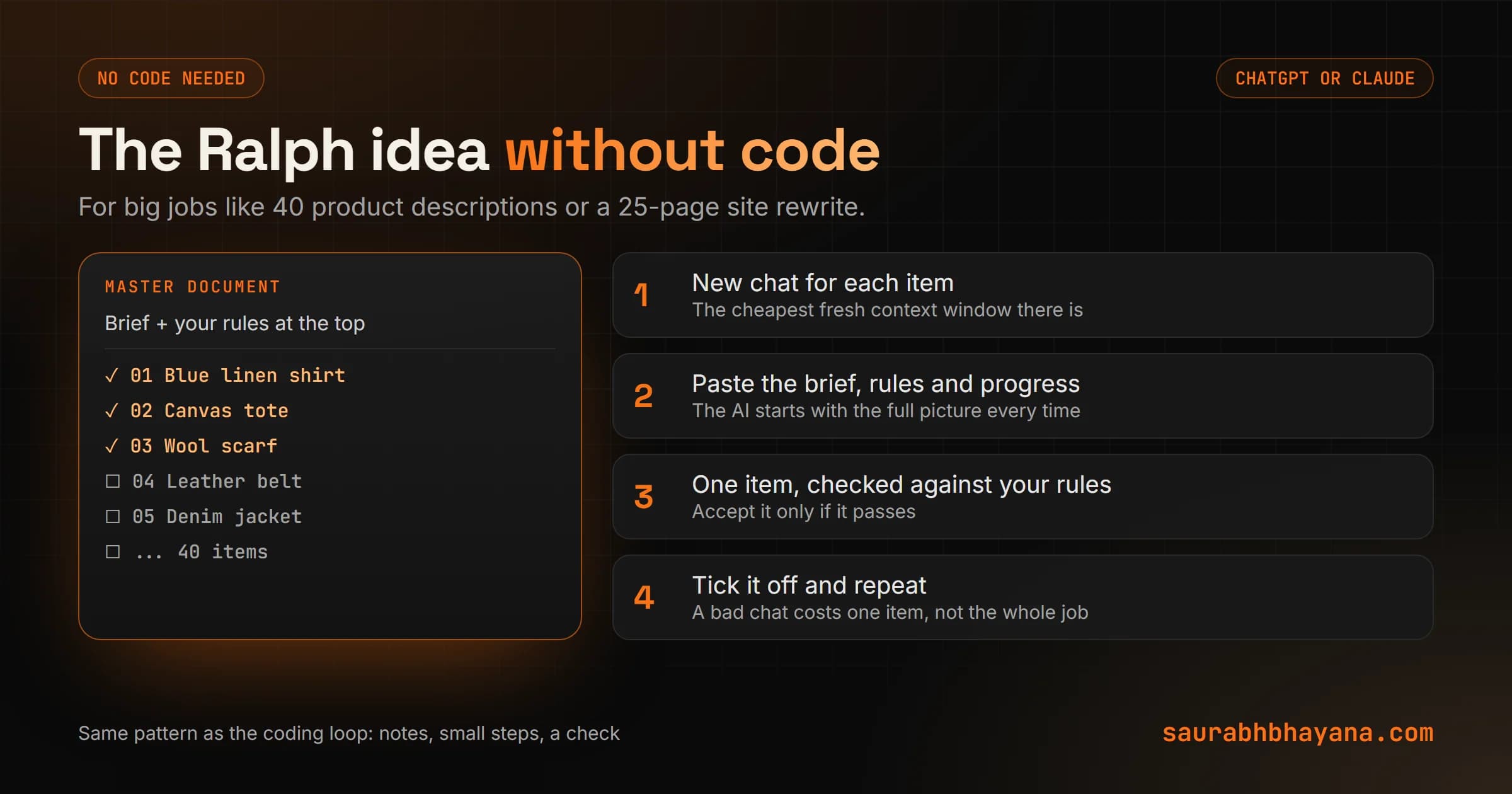
This is the same pattern we use for big content and website jobs for clients. It is also why projects in ChatGPT and Claude are so useful: the brief and rules live in the project, and each chat starts clean.
When you don't need a Ralph loop
Be honest about the size of the job. If a task fits comfortably in one session, say a single page or a short script, a loop just adds setup. Ralph pays off when the work splits into many separate pieces that can each be checked.
Watch the bill too. Every pass reads the files again and costs tokens, so a loop with no limit can keep spending long after the useful work is done. Always set a maximum number of passes, and don't leave an agent looping unattended on anything live, like a production website or a customer database. Give it a copy to work on.
The bigger picture
Strip away the funny name and the lesson is old: for long work, memory belongs on paper, not in someone's head. Factories run on shift handovers. Hospitals run on patient charts. AI agents turn out to work the same way. The model matters, but the notes, the small steps and the tests matter more than most people expect.
So, what is the long job you keep putting off because the AI loses the plot halfway? Write the task list first, and see how far an ordinary agent gets with good notes. If you want help setting up a loop for a real project, tell us what you are building.
Sources: the YouTube explainer on agent harnesses that inspired this post, at youtube.com/watch?v=1a1VXDdIyrk; Geoffrey Huntley, "Ralph Wiggum as a software engineer", July 2025; Anthropic Engineering, "Effective harnesses for long-running agents", November 2025; and the Ralph Loop plugin README in Anthropic's official plugin repository.
Frequently asked questions
What is the Ralph Wiggum loop?+
A technique published by Geoffrey Huntley in July 2025 that runs an AI coding agent in a loop with the same prompt. Each pass reads a spec and a task list, does one task, tests it, records progress in files and exits, and the next pass starts fresh. The memory lives in the files instead of the chat.
Why is it called the Ralph Wiggum loop?+
It is named after Ralph Wiggum from The Simpsons. The official Claude Code plugin describes the idea as persistent iteration despite setbacks: an ordinary agent that keeps trying, one small step at a time, gets long jobs done.
How do I use the Ralph loop in Claude Code?+
Install the Ralph Loop plugin from Anthropic's official plugin marketplace, then run /ralph-loop with your prompt, a --completion-promise phrase and a --max-iterations limit. Use /cancel-ralph to stop it early.
Why do AI agents stop halfway on long tasks?+
Their context window fills up. Most agents then compact the conversation into a summary, which loses details and can wrongly record work as finished, so the agent stops early or leaves features half built.
What is context compaction?+
When an AI agent's context window is nearly full, it summarises the conversation so far and continues from the summary. It lets the agent keep working, but details are lost, which is why long tasks can go wrong after it happens.
Does the Ralph loop work with Cursor, Codex or other agents?+
The original idea is a shell loop that feeds the same prompt file to a command-line agent, so it can work with any coding agent you can start from a prompt and that exits when it is done. The task list and progress file matter more than the tool.
Is the Ralph loop expensive?+
It can be. Every pass reads the files again and uses tokens, so always set a maximum number of passes and check progress before letting it run longer.
Read next
My team and I automate the work that eats your hours with AI, and get your business found on Google, Maps and in AI answers.