
What Is Claude Code? How to Install It and Use It (2026 Guide)
Claude Code is Anthropic's coding agent: it reads your project, edits files and runs commands for you. What it is, how it differs from the Claude chat app, how to install it on Mac, Windows and Linux, your first session step by step, and how we use it every day.
Most people meet Claude in a chat window. You ask, it answers, and you copy the answer somewhere. Claude Code skips the copying. You give it a task in plain English, and it opens your files, makes the changes, runs the commands and shows you what it did. That one difference is why it has become the tool we spend most of our working day in.
This guide explains what Claude Code is, how it differs from the normal Claude app, how to install it on Mac, Windows or Linux, and what to do in your first session. One honest warning before you start: Claude Code works on real files on your computer. It is fast and very capable, and it can also delete or break things if you approve the wrong step. Keep your work in Git and read what it proposes. Every fact below comes from Anthropic's own documentation and pricing pages, checked in November 2026.
What is Claude Code?
Claude Code is Anthropic's agentic coding tool. In Anthropic's words, it "reads your codebase, edits files, runs commands, and integrates with your development tools." Agentic means it does not stop at suggesting code. It plans the steps, carries them out one by one, checks the result, and keeps going until the task is done or it needs you.
A simple way to picture it: the Claude chat app is a smart colleague you message. Claude Code is the same colleague sitting at your computer, with your permission to open folders, type commands and save files. You stay in charge. It asks before risky actions, and you can stop it at any moment.
Claude chat gives you answers. Claude Code does the work in your files and shows you what changed.
Claude Code vs the Claude app: what is different?
| Claude app (chat) | Claude Code | |
|---|---|---|
| Where you use it | claude.ai, desktop and mobile chat | Terminal, VS Code, JetBrains, desktop app Code tab, claude.ai/code |
| What it sees | What you paste or upload | Your whole project folder |
| What it can do | Answer, write, analyse | Edit files, run commands, use Git, open pull requests |
| Who acts | You copy the answer and apply it | It applies the change, you review it |
| Best for | Questions, writing, research | Building, fixing and automating real projects |
| Plans | Free and paid | Paid plans or a Console account |
If you mostly want help writing emails or understanding a topic, the normal app is enough, and our guide on how to use Claude covers it. If you want something built, fixed or automated, that is Claude Code's job. For office work on files without code, such as sorting documents or building spreadsheets, Anthropic also has Cowork, which we explain in what is Claude Cowork.
Where Claude Code runs
Claude Code is one engine with several front ends. Anthropic calls them surfaces. Your project settings, your CLAUDE.md rules and your connected tools work the same on all of them, so you can pick whichever feels comfortable and switch later.
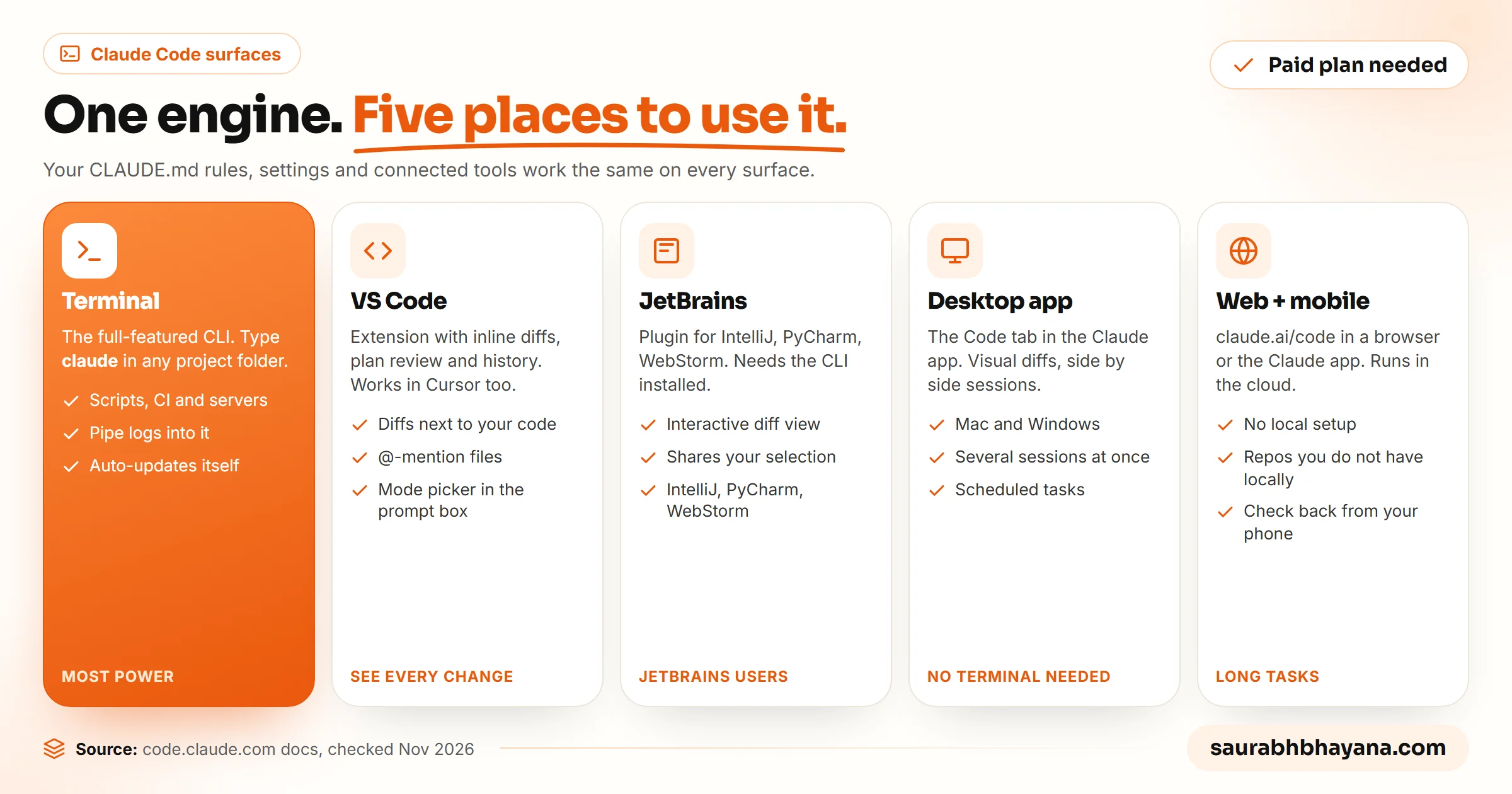
| Surface | What it is | Good for |
|---|---|---|
| Terminal (CLI) | The full-featured command-line tool | Developers, scripting, servers, automation |
| VS Code and Cursor | Extension with inline diffs and plan review | Seeing every change next to your code |
| JetBrains | Plugin for IntelliJ, PyCharm, WebStorm and others | JetBrains users (needs the CLI installed too) |
| Desktop app | The Code tab inside the Claude app | Visual diffs, several sessions side by side, scheduled tasks |
| Web and mobile | claude.ai/code in a browser or the Claude app | Long tasks in the cloud, repos you do not have locally |
Not comfortable with a terminal? Start with the desktop app's Code tab or the VS Code extension. You get the same Claude Code with buttons and visual diffs.
What you need before you start
- •A paid Claude plan or an Anthropic Console account. The free plan does not include Claude Code. Pro costs $20 a month, or $17 a month billed yearly, and higher plans give more usage. With a Console account you pay per use instead.
- •A computer running macOS, Linux, Windows or WSL.
- •A project folder. It can be a website, an app, a set of scripts, even a folder of documents.
- •On Windows, Git for Windows is recommended so Claude Code can use its Bash tool. Without it, Claude Code uses PowerShell instead.
- •Git in your project, ideally. It is your undo button if a change goes wrong.
How to install Claude Code
Anthropic's recommended method is the native installer. It updates itself in the background. Open a terminal and paste the command for your system.
macOS, Linux and WSL
curl -fsSL https://claude.ai/install.sh | bashWindows PowerShell
irm https://claude.ai/install.ps1 | iexWindows CMD
curl -fsSL https://claude.ai/install.cmd -o install.cmd && install.cmd && del install.cmdNot sure which Windows shell you are in? PowerShell shows PS C:\ at the start of the line; CMD shows just C:\. The installer shows no progress while it downloads. When it finishes, open a new terminal window and run claude --version. If you see a version number, it worked. If the shell says claude is not found, the install folder is not on your PATH yet, and Anthropic's install troubleshooting page has the fix.
Prefer a package manager? brew install --cask claude-code works on Mac and winget install Anthropic.ClaudeCode on Windows. Both are fine, but neither updates automatically, so you need to upgrade them yourself from time to time.
Your first session, step by step
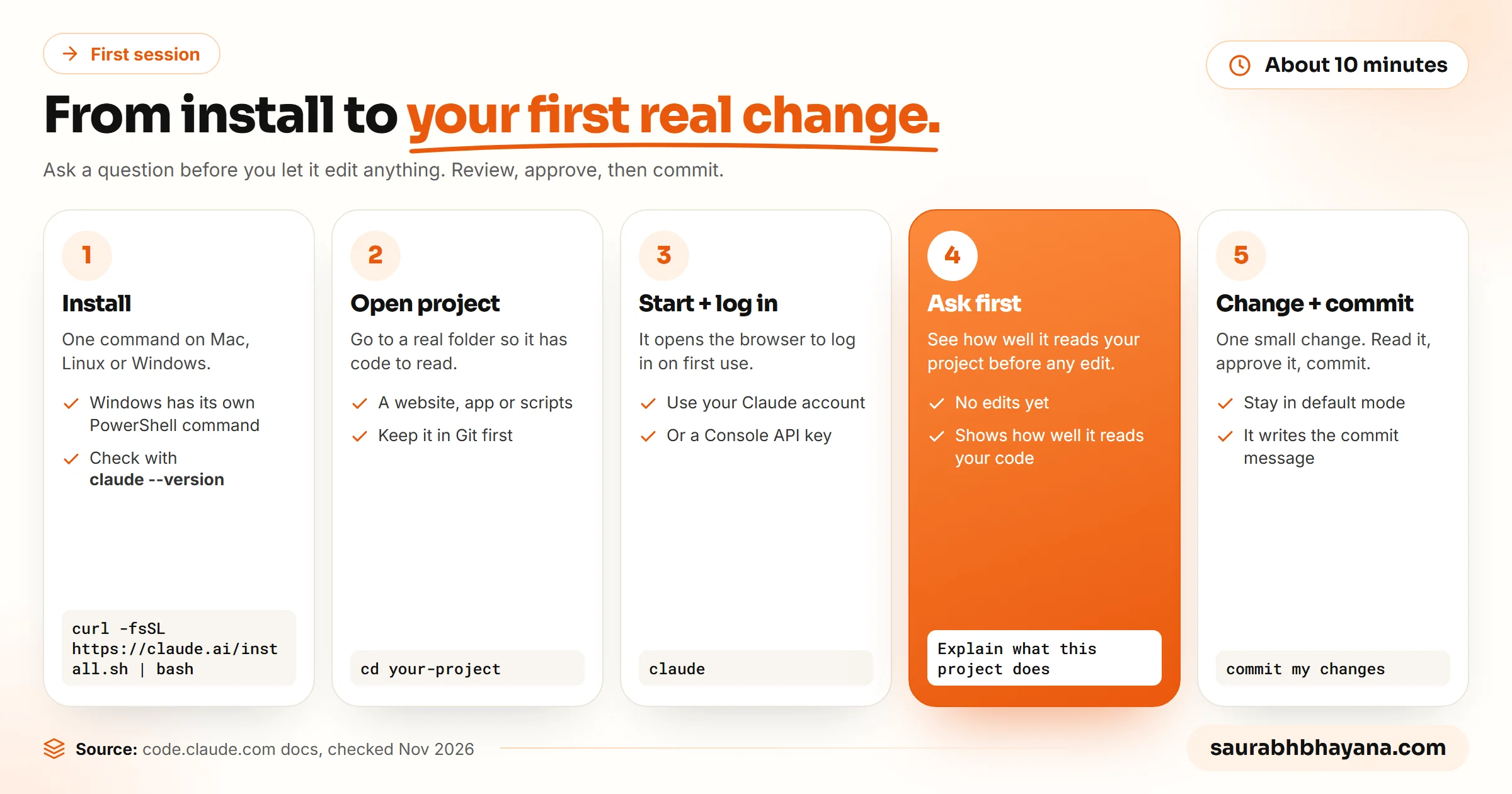
- 1.Open a terminal in your project folder: cd your-project. Use a real project, not an empty folder, so it has something to read.
- 2.Type claude and press Enter. On first use it asks you to log in with your Claude account in the browser.
- 3.Start with a question, not an edit: "Explain what this project does and how it is organised." This shows you how well it reads your code before you let it change anything.
- 4.Ask for one small, checkable change: fix a typo, add a missing alt text, write a test for one function. Read the change it proposes and approve it.
- 5.Ask it to commit: "commit my changes with a descriptive message". Claude Code works with Git directly, so it stages, writes the message and commits for you.
Run /init in your first session. Claude Code looks through the project and drafts a CLAUDE.md file for you, which you then edit with your own rules.
Five things to try in your first week
| Try this | Example prompt |
|---|---|
| Fix a bug from an error message | "This error shows when I submit the contact form: [paste]. Find the cause and fix it." |
| Write tests | "Write tests for the auth module, run them, and fix any failures." |
| Clean up a project | "Fix all lint errors across the project and show me what changed." |
| Explain unfamiliar code | "Walk me through how a request reaches the database in this app." |
| Automate a boring task | "Rename every image in /photos to lowercase with dashes and update the links in the HTML files." |
Two of these prompts come straight from Anthropic's documentation. The pattern that works best is the same every time: say what you want, say how you will know it worked, and let Claude Code check its own result.
Teach it your rules: CLAUDE.md, skills and hooks
Out of the box, Claude Code does not know your preferences. Three features fix that, and they are what turn it from a clever helper into something that works the way your team works.
- •CLAUDE.md is a plain markdown file in your project root. Claude Code reads it at the start of every session. Put your coding standards, the commands to build and test, and anything it must never do. If your repo already has an AGENTS.md for other coding agents, Claude Code can read that instead.
- •Skills package a repeatable workflow, such as reviewing a pull request or deploying to staging, so anyone can run it with a slash command. Our guide to Claude skills explains how they work.
- •Hooks run your own shell commands before or after Claude Code acts, for example formatting every file it edits or running lint before every commit.
Claude Code can also connect to outside tools through MCP, the Model Context Protocol, to read docs in Google Drive, update Jira tickets or call your own systems. If MCP is new to you, start with MCP vs APIs explained.
Our own CLAUDE.md files carry rules like never print an API key, always show the cost before calling a paid API, and never publish to a live audience without a preview first. Rules like these are the difference between an agent you trust and one you babysit. Read more about skills in what are Claude skills.
Permission modes: how much it does without asking
This is the setting that matters most for safety. Press Shift+Tab during a session to cycle through modes, or pick one in the mode selector in VS Code and the desktop app.
| Mode | What it does without asking | When to use it |
|---|---|---|
| Default (Manual) | Reads only; asks before edits and commands | Your first weeks, unfamiliar projects |
| Accept edits | Reads, file edits and common file commands | Routine work you review afterwards in Git |
| Plan | Researches and writes a plan, does not edit your source | Big or risky changes: agree the plan first |
| Auto | Everything, with background safety checks | Experienced users on well-tested projects |
| Bypass permissions | Everything, no checks | Only in isolated containers or VMs, as Anthropic advises |
New to Claude Code? Stay in default mode, and use plan mode before any change you could not easily undo.
How we use Claude Code every day
This is not a tool we tried for a weekend. Our SaaS, wptaskify, and this blog are run with Claude Code every working day. A few real examples from the last week:
- •Deploying our products: it runs the test checks, deploys with one command, then opens the live site to confirm the pages load.
- •Editing WordPress sites through our own MCP server: internal links, SEO titles and scheduled posts across several sites, each change dry-run first.
- •Planning and scheduling content: it checks which topics a site already covers, looks at who ranks in Google's top 10, and keeps each site's article queue full.
- •Housekeeping: this week it found a Windows scheduled task that opened a terminal window every 15 minutes and turned it off once we agreed.
What it does not replace is judgement. It still gets things wrong: a stale fact, a step skipped, a confident answer about something that changed last month. Our rule is simple: it can do the work, but a person approves anything that goes live, costs money or talks to customers.
Is Claude Code worth it?
| Worth it if you | Probably not yet if you |
|---|---|
| Build or maintain websites, apps or scripts | Only need help writing text or answering questions |
| Repeat the same technical tasks every week | Never touch files, code or a terminal |
| Run a small business with a website you manage yourself | Cannot review changes or keep a backup |
| Want to learn to code by doing real projects | Need a guaranteed zero-mistake result with no checking |
The cheapest way to find out is a month of Pro. Give it one real project, keep everything in Git, and judge it by how much work actually got done. If you also use other AI models, our Claude models guide explains which model fits which job.
Frequently asked questions
What is Claude Code used for?+
Claude Code is used to build features, fix bugs, write tests, clean up projects, work with Git and automate technical tasks. It reads your project, edits files and runs commands, so it does the work rather than only suggesting it.
Is Claude Code free?+
No. The free Claude plan does not include Claude Code. It comes with paid plans, starting with Pro at $20 a month ($17 a month billed yearly), and higher plans give more usage. You can also pay per use with an Anthropic Console account.
What is the difference between Claude and Claude Code?+
Claude is the AI model and the chat app you talk to. Claude Code is Anthropic's coding agent built on Claude: it works inside your project folder and can edit files, run commands and commit changes, instead of only answering in chat.
Do I need to know how to code to use Claude Code?+
No, but it helps. Beginners can use the desktop app or VS Code extension and ask in plain English. You still need to read what it proposes, keep backups in Git and know what result you expect.
How do I install Claude Code on Windows?+
Open PowerShell and run irm https://claude.ai/install.ps1 | iex, or in CMD run the install.cmd command from Anthropic's docs. Then open a new terminal and run claude --version to check it worked. Git for Windows is recommended.
Is Claude Code safe to use?+
It is as safe as the permissions you give it. In the default mode it asks before editing files or running commands. Use plan mode for big changes, keep your project in Git, and only use bypass mode inside an isolated container or VM.
Can Claude Code work in VS Code?+
Yes. Install the Claude Code extension for VS Code (it also works in Cursor), then open the command palette and choose Claude Code: Open in New Tab. You get inline diffs, plan review and conversation history in the editor.
What is CLAUDE.md?+
CLAUDE.md is a markdown file in your project root that Claude Code reads at the start of every session. Use it for coding standards, build and test commands, and rules it must always follow. Running /init drafts one for you.
Read next
My team and I automate the work that eats your hours with AI, and get your business found on Google, Maps and in AI answers.