
AI Agents for Small Business: What They Actually Do in 2026 (and Where They Fail)
Every software tool now claims to have an AI agent. Here is what an agent actually is, the jobs agents handle well for a small business today, the ways they fail, and a four-question test for deciding whether you need an agent or a simpler workflow.
Every software tool you use now has an AI agent. Your CRM has one, your email has one, your accounting software has one. Most of them are a chatbot with a new label.
Gartner sees it too. In June 2025, Gartner predicted that over 40 percent of agentic AI projects will be canceled by the end of 2027, because of escalating costs, unclear business value or inadequate risk controls. It also estimated that only about 130 of the thousands of vendors selling agentic AI offer real agent capabilities. The rest, it said, are agent washing: rebranding chatbots and automation tools.
The caveat, up front: that is a forecast, not a measured result, and agents improve fast. Some agent work is genuinely useful today. I run a product, wptaskify, that lets AI assistants like Claude and ChatGPT carry out WordPress tasks on their own, so I have watched agents both save hours and break things. This guide covers what an agent actually is, where agents earn their keep for a small business, where they fail, and how to decide if you need one at all.
What an AI agent actually is
Anthropic, the company behind Claude, draws a clear line in its guidance on building agents. A workflow is a system where AI models and tools follow steps that code has laid out in advance. An agent is a system where the model itself decides which steps to take and which tools to use, until the job is done.
| Chatbot | Workflow with AI | Agent | |
|---|---|---|---|
| Who decides the steps | Nobody, it only answers | You, in advance | The AI, as it goes |
| Can take actions | No | Yes, the ones you scripted | Yes, any tool it has access to |
| Example | Answers questions on your site | New lead, AI drafts reply, CRM updated | Find 50 local prospects, research each, draft outreach |
| Predictability | High | High | Lower |
| Cost per task | Low | Low | Higher, more model calls |
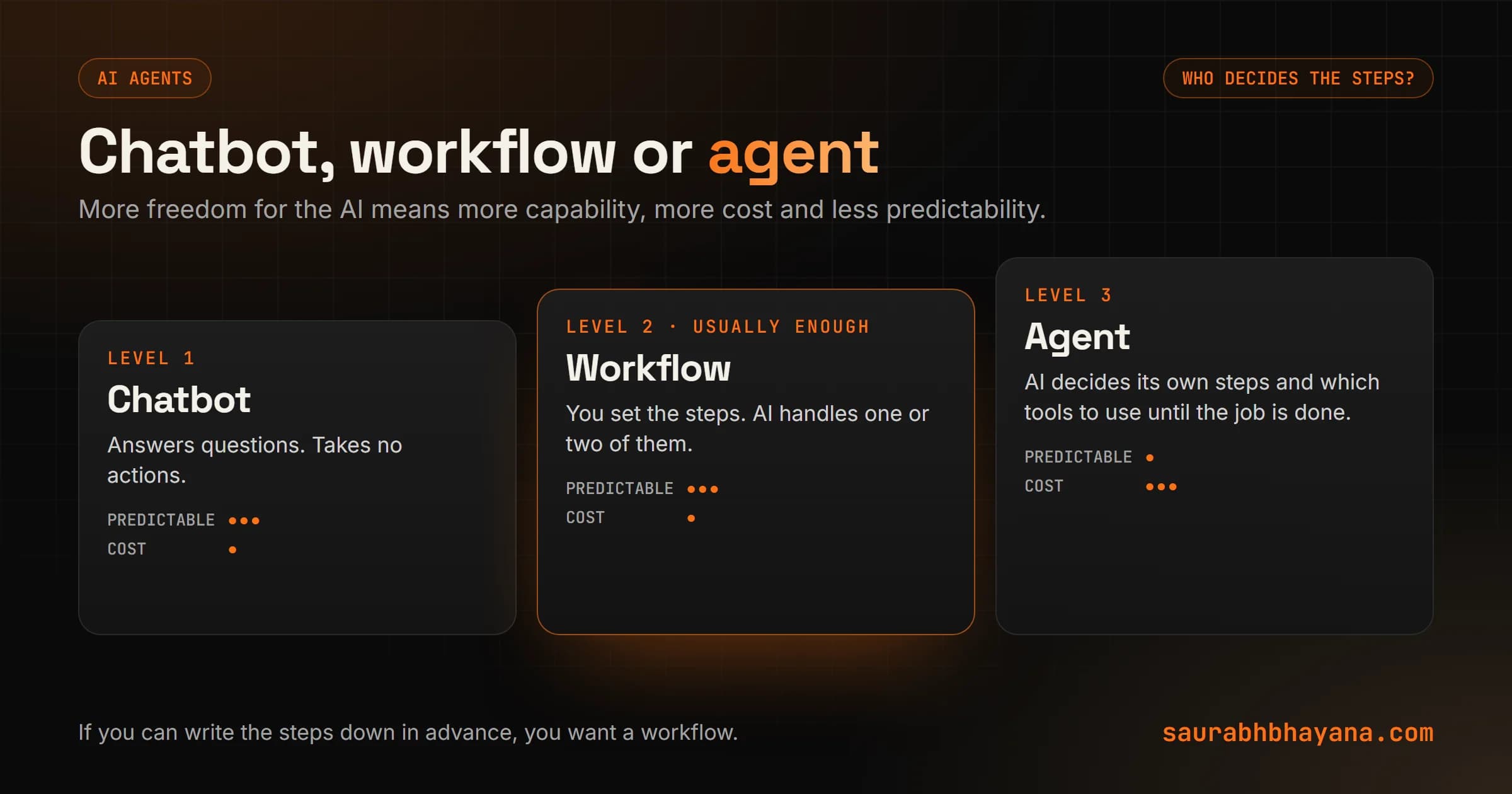
Anthropic's advice is to use the simplest solution that works and add complexity only when it clearly pays off. In my experience that rule alone would cancel most agent projects before they start, which is roughly what Gartner predicts will happen to them anyway.
If you can write the steps down in advance, you want a workflow, not an agent.
What agents genuinely do well today
Agents shine on jobs where the steps depend on what they find along the way. Here are the ones that work for small businesses now.
- •Research. Find businesses that match a profile, read their websites, pull out the details that matter, and put them in a sheet. The steps change with every site, which is exactly where an agent beats a script.
- •Website maintenance through a proper connection. Tell an assistant to fix the missing image descriptions on your 40 product pages, and it reads each page, writes the text and saves it. This is what MCP, the standard for connecting AI assistants to tools, makes possible.
- •Messy data cleanup. Merge duplicate customers, standardise addresses, flag records that look wrong, with a person reviewing the result.
- •Inbox and document work with review. Read a pile of emails or contracts, sort them, draft answers or summaries for a person to approve.
- •Code and spreadsheets. Agents are strong at writing and fixing scripts, formulas and small internal tools, because a test or a check can confirm whether the result works.
Notice what these have in common: the work is checkable, and a mistake can be caught before it reaches a customer. I explain how assistants connect to your tools in MCP vs APIs.
Where agents fail
1. Small errors compound
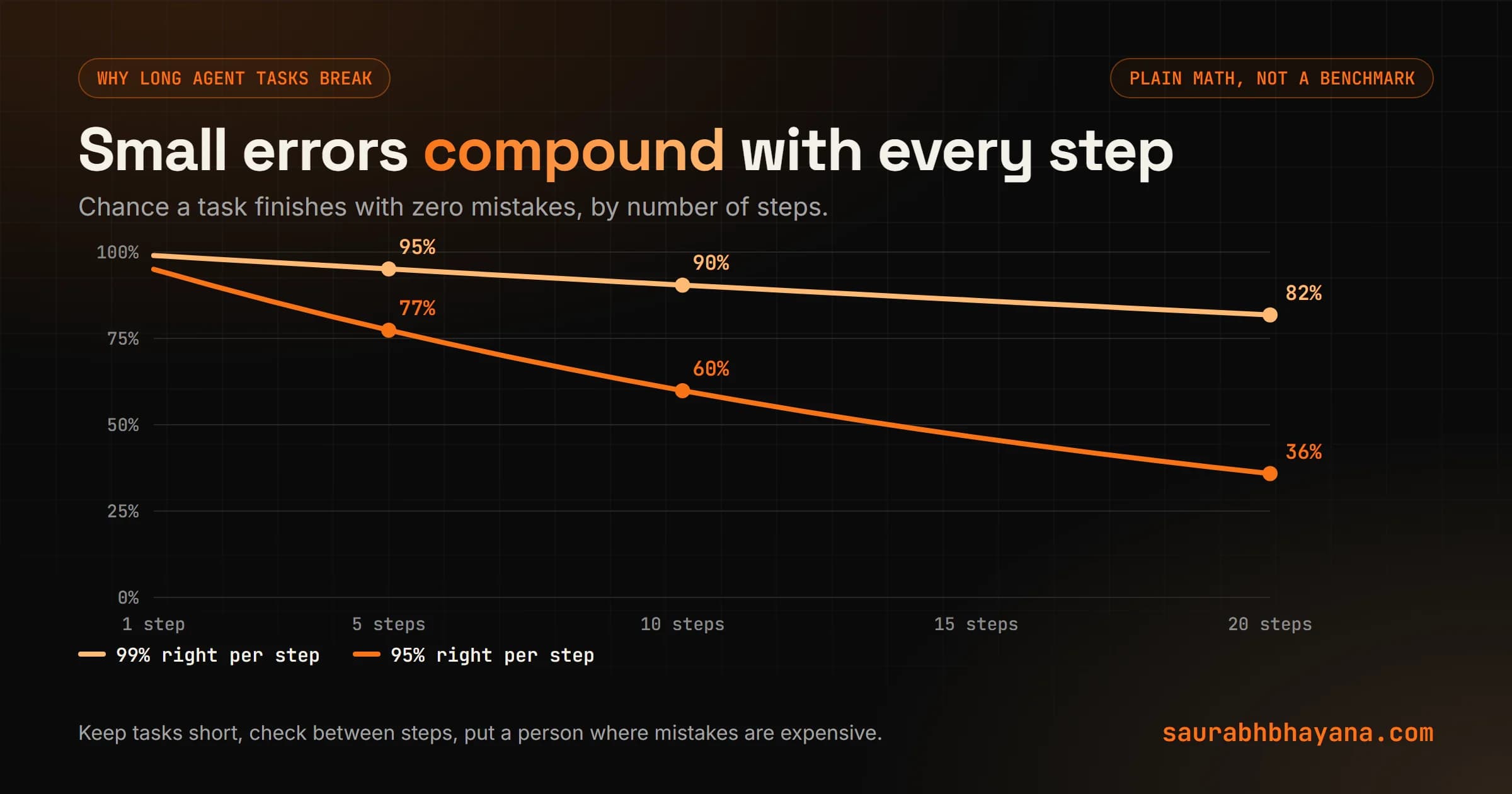
This is plain arithmetic, and it is the most important idea in this guide. If an agent gets each step right 95 percent of the time, the chance it finishes a task with no mistakes falls with every step it takes.
| Steps in the task | At 95% per step | At 99% per step |
|---|---|---|
| 5 | 77% | 95% |
| 10 | 60% | 90% |
| 20 | 36% | 82% |
That is why short, checkable agent tasks work and long, unattended ones disappoint. The fix: keep tasks short, add checks between steps, and put a person at the points where a mistake is expensive.
2. Confident wrong answers
An agent that does not know something can still state it confidently. When the agent speaks to customers, your business owns what it says. In Moffatt v. Air Canada (2024), a passenger relied on the airline's website chatbot, which described a bereavement refund policy incorrectly. Air Canada argued it was not responsible for the chatbot. The British Columbia Civil Resolution Tribunal disagreed and ordered the airline to pay about 812 Canadian dollars. Small sum, clear principle.
3. Too much permission
An agent with access to send emails, issue refunds or delete records will, eventually, do one of those things when it should not. The damage is limited by what you let it touch.
4. Costs that run away
Agents call the model many times per task, and a confused agent can loop. Without a limit, one stuck task can cost more than a week of normal use. Model choice matters here too, which I break down with real numbers in my Claude models guide.
The four-question test: agent or workflow?
Before building an agent, ask four questions. These follow the criteria Anthropic gives for deciding when an agent is worth it. If any answer is no, use a workflow or a single AI step instead.
- 1.Is the task hard to spell out in advance? If you can write the steps, script them.
- 2.Is the outcome worth the extra cost and time? Agents use more model calls than a workflow.
- 3.Can AI actually do this well? Test it by hand on ten real examples first.
- 4.Can mistakes be caught and undone? If an error reaches a customer or moves money before anyone sees it, the answer is no.
| Job | Best fit | Why |
|---|---|---|
| Reply to every new lead in a minute | Workflow with one AI step | Same steps every time; see my speed to lead guide |
| Sort invoices and chase late payments | Workflow | Fixed rules, money involved |
| Research 50 prospects and draft outreach | Agent, with review | Steps differ for each prospect; nothing sends without approval |
| Fix SEO fields across 200 pages | Agent, with backups | Varies by page, easy to check and undo |
| Approve refunds | Human, AI drafts | Money and trust, hard to undo |
Most of the 25 tasks in my small business automation guide land in the workflow column. That is fine. Workflows are cheaper, faster and easier to trust, and I compare the tools for building them in n8n vs Zapier vs Make vs custom code.
How to run an agent safely
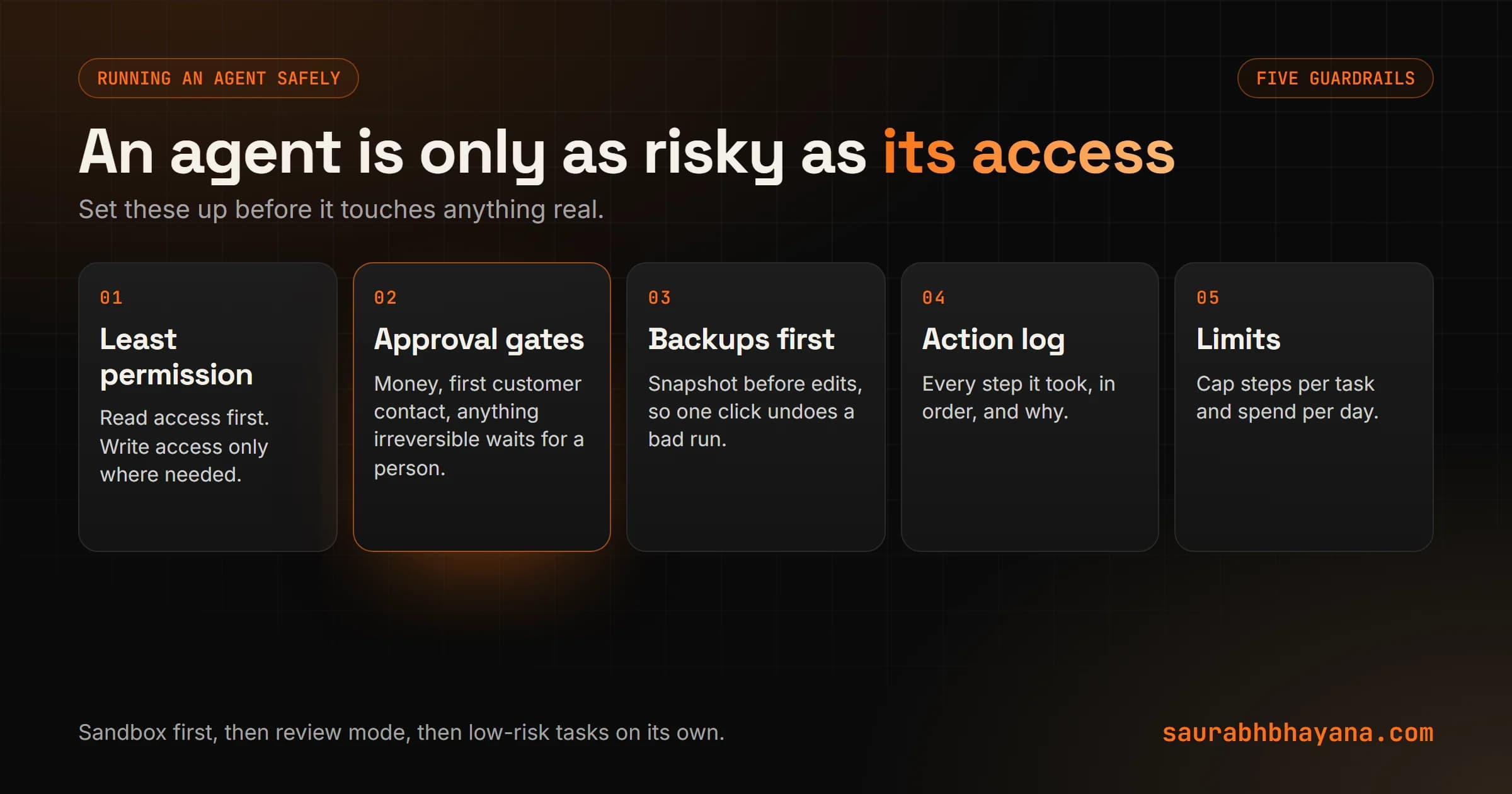
- •Least permission. Give it read access first. Add write access only for the specific things it must change.
- •Approval gates. Anything that moves money, contacts a customer for the first time or cannot be undone waits for a person.
- •Backups before changes. If it edits your website or records, take a snapshot first so one click undoes a bad run.
- •A log of every action. You should be able to see what it did, in order, and why.
- •Limits. Cap the steps per task and the spend per day, so a confused agent stops instead of looping.
Run any new agent in a sandbox or on a copy first, then in review mode on the real thing, and only then let it act alone on low-risk tasks.
A sensible way to start
- 1.Pick one open-ended, checkable job, such as prospect research or fixing website content.
- 2.Do it by hand with an AI assistant ten times. Note where it goes wrong.
- 3.If it is reliable, give an agent read-only access and have it produce results for review.
- 4.Add write access for the narrow part it gets right, with backups and a log.
- 5.Measure hours saved and errors caught for a month before you expand it.
If you want help deciding which of your jobs need an agent and which just need a good workflow, that is a conversation my team has every week. Tell me what you want to hand off and I will tell you honestly which kind of system fits.
Frequently asked questions
What is an AI agent?+
An AI agent is a system where the AI model decides its own steps and which tools to use until a task is done. Anthropic contrasts this with workflows, where code lays out the steps in advance and the AI handles parts of them.
What is the difference between an AI agent and a chatbot?+
A chatbot answers questions. An agent can take actions with tools, such as searching, editing records or sending drafts, and decides the order of those actions itself. Many products marketed as agents are chatbots or simple automations, which Gartner calls agent washing.
Are AI agents worth it for a small business?+
For some jobs. Agents work well for open-ended, checkable tasks like research, data cleanup and website content fixes. For repeatable tasks such as lead replies or invoices, a workflow with one AI step is usually cheaper and more reliable.
Why do AI agent projects fail?+
Gartner predicted in June 2025 that over 40 percent of agentic AI projects will be canceled by the end of 2027 because of escalating costs, unclear business value or inadequate risk controls. Small errors also compound across many steps, so long unattended tasks often go wrong.
Is a business responsible for what its AI chatbot says?+
At least one tribunal has said yes. In Moffatt v. Air Canada (2024), a Canadian tribunal held Air Canada responsible for its chatbot's incorrect description of a refund policy and ordered it to pay the customer about 812 Canadian dollars.
How do I use AI agents safely?+
Give the agent the least access it needs, require human approval for anything involving money or that cannot be undone, take backups before it makes changes, keep a log of its actions, and set limits on steps and spending.
What can AI agents do for a small business today?+
Research prospects and summarise what they find, clean up messy customer data, fix website content through tools like MCP, sort and draft replies to emails for review, and write or fix spreadsheets and small scripts.
Read next
My team and I automate the work that eats your hours with AI, and get your business found on Google, Maps and in AI answers.