
n8n vs Zapier vs Make vs Custom Code: Which One Should Run Your Business Automation?
Zapier, Make and n8n all connect your apps, but they bill for completely different things, and that decides what you pay once a workflow grows. Here is how each one counts, what the same workflow costs on each, and when none of them fit and custom code is the cheaper answer.
Zapier, Make and n8n all promise the same thing: connect your apps and let the boring work run itself. They are not the same product, and the difference that matters most is not on their homepages. It is what each one charges you for.
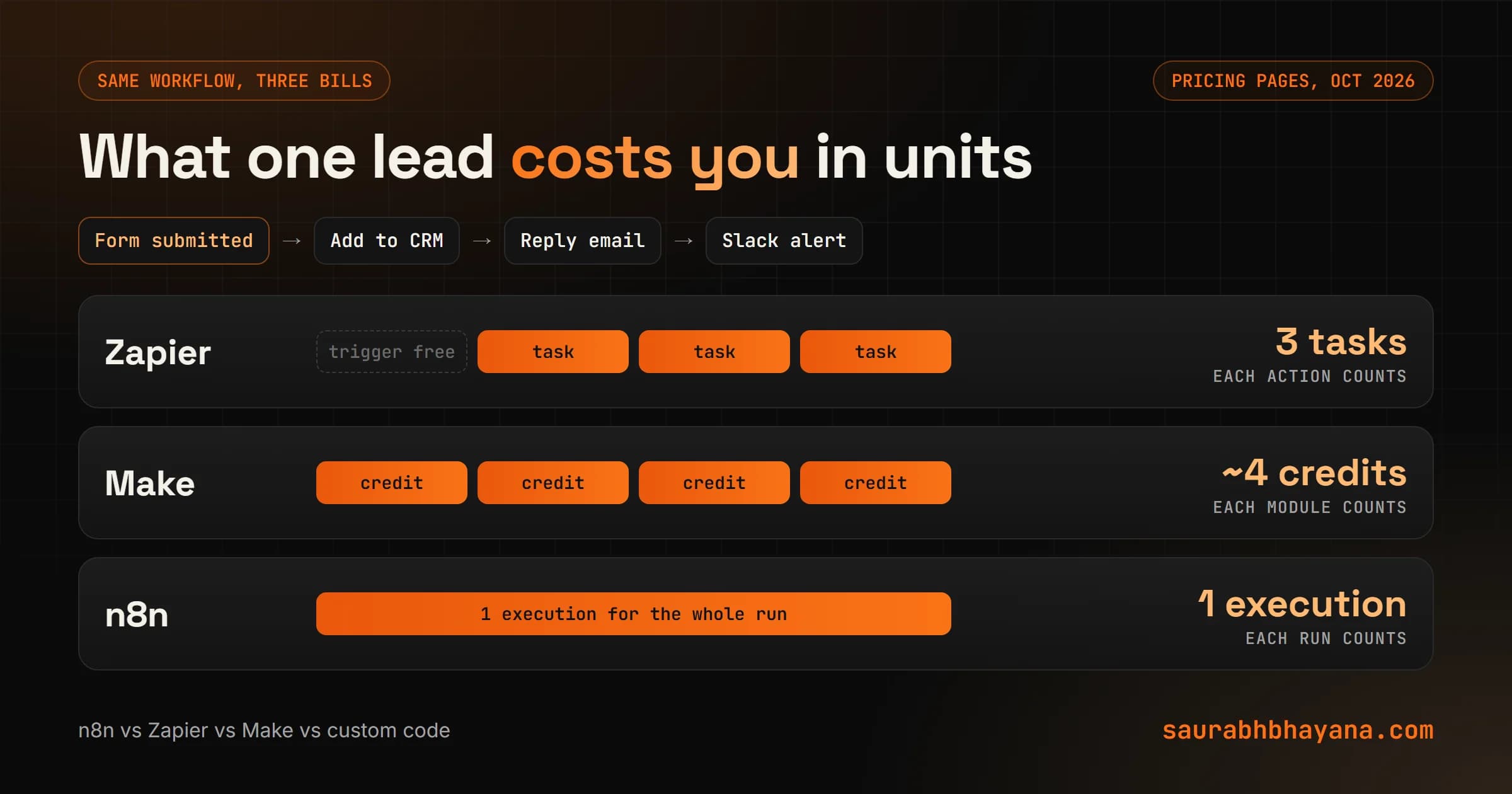
Zapier charges per action. Make charges per module. n8n charges per run. That sounds like fine print until a workflow grows from three steps to twelve, and one tool's bill quadruples while another's stays flat.
This guide compares the three on cost, ease and control, works the same workflow through each one, and then covers the question most comparisons skip: when should you use none of them and write custom code? The honest caveat first: prices change, and these are the prices on Zapier's and n8n's own pricing pages as of October 2026. Make does not publish prices on its public pricing page, so for Make I explain how it bills and give a range rather than pretend to an exact number. Check each page before you commit.
Where I have an opinion, it comes from building automations for clients at Logical Dottech, including one where the client insisted on n8n and we ended up using it for half the job. That story is further down.
The short answer
| If you | Use |
|---|---|
| Are not technical and need a few simple automations working this week | Zapier |
| Want visual, branching workflows at a lower price per step | Make |
| Have long workflows, high volume, or want to self-host and own your data | n8n |
| Need a screen, a login, memory or rules your team can change safely | Custom code (often with n8n for the background jobs) |
The rest of this guide explains why, so you can check the answer against your own workflows.
How each tool bills you
This is the part that decides your bill, so it is worth getting exactly right.
| Tool | Unit | What counts | What is free |
|---|---|---|---|
| Zapier | Task | Each action that completes successfully | Triggers, polling, Filter, Formatter, Paths, failed actions |
| Make | Credit | Each module action, most use 1 credit, AI modules can use more | Routers and error handler modules |
| n8n | Execution | One full run of a workflow, whatever its length | Steps inside the run |
| Custom code | Server time | Hosting, plus any paid APIs you call | Everything you write yourself |
One extra detail from Zapier's page: its tasks are a single pool shared across automations, AI by Zapier and Code by Zapier, and a Zapier MCP tool call uses two tasks. If AI agents are part of your plan, read that pool carefully.
What they cost: the entry plans
| Plan | Price (billed yearly) | Included | Billed monthly |
|---|---|---|---|
| Zapier Free | $0 | 100 tasks, two-step Zaps only, 15-minute polling | $0 |
| Zapier Professional | $19.99 a month | 750 tasks a month at the entry tier | $29.99 a month |
| Zapier Team | $69 a month | 2,000 tasks a month at the entry tier | $103.50 a month |
| Make Free | $0 | 1,000 credits a month | $0 |
| Make Core | Roughly $9 to $11 a month in 2026 pricing guides | About 10,000 credits a month | Check make.com |
| n8n Starter (cloud) | 20 euros a month | 2,500 executions a month | About 20% more (yearly saves 17%) |
| n8n Pro (cloud) | 50 euros a month | 10,000 executions a month | About 20% more (yearly saves 17%) |
| n8n Community Edition | Free, self-hosted | No execution limit from n8n, you pay for the server | Free |
Two things to notice. Zapier's yearly price is a third lower than its monthly price, so the plan you see first is the yearly one. And if you go over your task limit with pay-per-task switched on, Zapier's page says overage is billed at 2.5 times the base rate on monthly plans and 1.25 times on yearly plans.
The same workflow on each tool
Here is a workflow almost every service business needs, the same one that tops my list of tasks to automate: a lead fills the website form, the details go into the CRM, the lead gets a reply email, and the team gets a Slack message. One trigger, three actions. Say 500 leads a month.
| Tool | Units per lead | Units a month (500 leads) | Fits which plan |
|---|---|---|---|
| Zapier | 3 tasks (trigger is free) | 1,500 tasks | Above Professional's 750 entry tier, so a higher task tier or Team |
| Make | About 4 credits | About 2,000 credits | Comfortably inside a 10,000-credit Core plan |
| n8n cloud | 1 execution | 500 executions | Inside Starter's 2,500 |
| Custom code | A few milliseconds of server time | Effectively nothing | A small server you may already have |
Now add an AI step that writes a personal reply, a lookup to check whether the lead is already a customer, a filter for spam, a second Slack channel for big jobs, and a follow-up two days later. That is a realistic version of the same workflow, and it is ten steps instead of four.
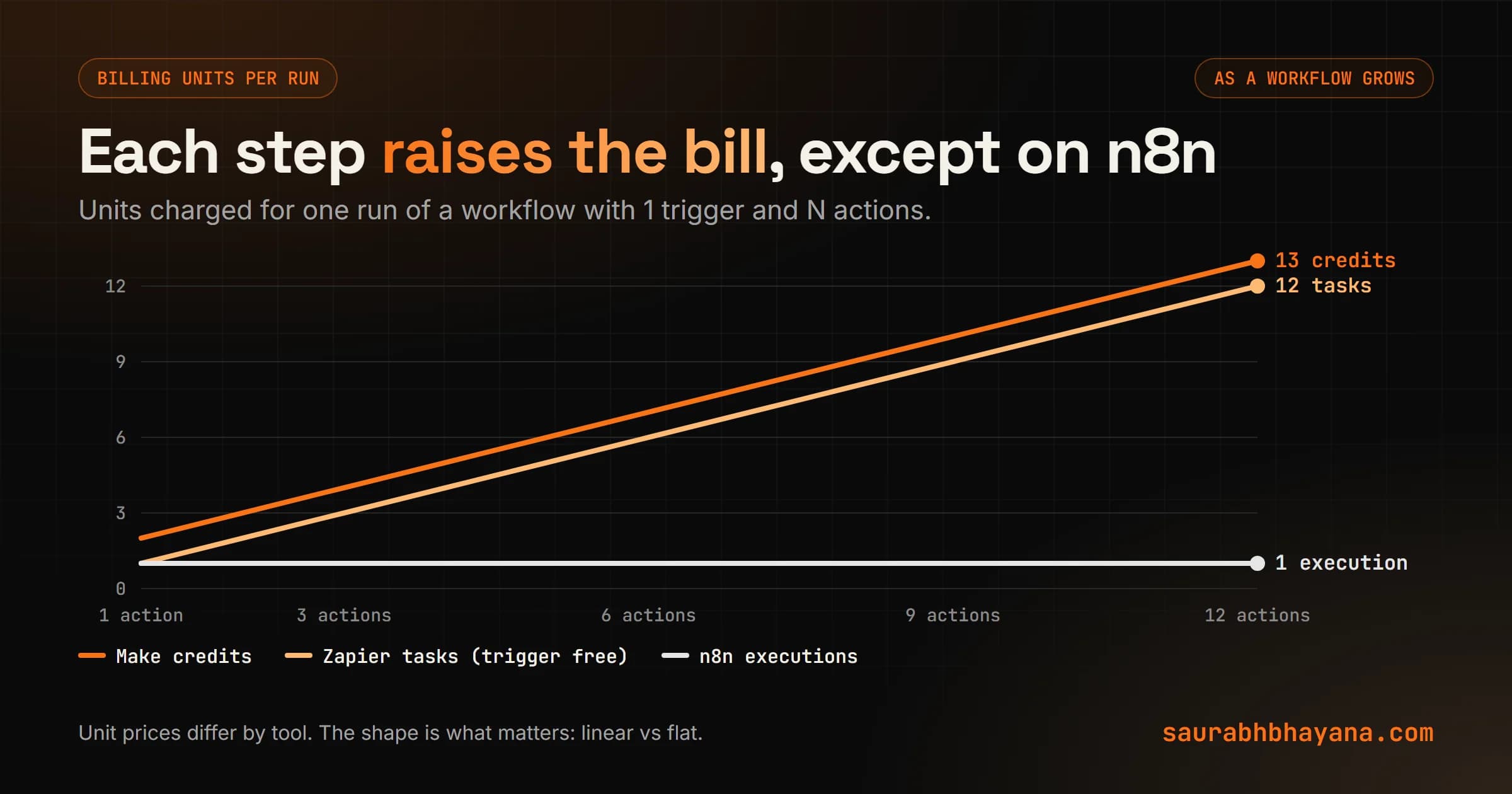
On Zapier the ten-step version uses roughly three times the tasks of the four-step one. On Make, roughly two and a half times the credits. On n8n, it is still one execution per lead. That single difference explains most of the n8n vs Zapier arguments you will read online. For short workflows it barely matters. For long, busy ones it is most of the bill.
Zapier and Make charge for steps. n8n charges for runs. Count your steps before you pick.
Zapier: the easiest to start, the priciest per step
Zapier is the tool to give someone who has never built an automation. You pick a trigger app, pick an action, map a few fields, and it runs. It connects to the widest range of business apps of the three, and for a simple two- or three-step job it is hard to beat.
- •Best for: non-technical owners, simple linear automations, apps that only Zapier connects to.
- •Watch out for: cost per step on long or busy workflows, the shared task pool if you also use its AI features, and overage rates if you leave pay-per-task on.
- •Free plan: real but small. 100 tasks and two-step Zaps only, so it is a trial more than a plan.
Make: visual and cheaper per step
Make shows your workflow as a map of connected circles, with branches, loops and error handling you can see. It takes an afternoon longer to learn than Zapier and gives you far more control for the money. Routers and error handlers are free, which rewards building workflows properly instead of cutting corners.
- •Best for: branching workflows, people who think visually, moderate volume on a tight budget.
- •Watch out for: credit use climbing with every module, AI modules using more than one credit, and loops over long lists that burn credits per item.
- •Free plan: 1,000 credits a month, enough to build and test properly.
n8n: flat pricing, self-hosting and code when you need it
n8n looks like Make, a canvas of connected nodes, but it bills per run and you can host it yourself. It also lets you drop into JavaScript or Python inside a workflow, which removes the wall you eventually hit in pure no-code tools.
Self-hosting is where people get the licence wrong. The Community Edition is free and self-hosted, under n8n's Sustainable Use License. That licence lets you use or modify n8n for your own internal business purposes, or for non-commercial or personal use. You may give it to others only free of charge for non-commercial purposes. In plain terms: running it for your own business is fine. Building a paid product where your customers use n8n as the service is not, without a commercial licence from n8n.
- •Best for: long or high-volume workflows, teams with someone technical, businesses that want data on their own server.
- •Watch out for: self-hosting means you own updates, backups and security. Some features are only on paid plans, and Business is self-hosted at 667 euros a month on yearly billing.
- •Free option: Community Edition, self-hosted. Your cost is the server and your time.
When none of them fit: custom code
All three tools are built for background work. Something happens, steps run, done. None of them gives your customers or staff a login, a screen to use, or memory between runs. The moment your automation needs any of those, you are building an app, and the workflow tool becomes a second system you maintain next to it.
A real example: the client who wanted n8n
A French real estate firm hired us to build a lead system. Every night it watches official public business notices and finds companies their advisors should call. The client asked for n8n, and the reasons were good ones: open source, self-hosted, no vendor lock-in, low running costs, and the ability to change the criteria himself.
For the nightly pipeline, collect the notices, filter them, remove duplicates, push to the CRM, n8n fit well. But the product they actually wanted had more: a chat where advisors type only Bordeaux, only this month and it remembers that, a map, prospect cards, a validation button and an admin console. n8n has no interface for end users, so that app had to be built either way.
Our estimate: about 22 days to build it n8n-first, against about 18 days as a normal web app, because n8n helped with roughly 15 percent of the work and added overhead to the rest. Hosting was a wash, a few euros a month either way. The argument that settled it was simple: using n8n meant building the same app plus maintaining a second system.
What we did: the nightly collection job runs in a workflow tool, which suits it, and the application is ordinary code. The real want, I can change the criteria without calling the developer, became a settings screen where the client ticks regions and notice types. Easier for the client than editing workflow nodes, and nothing can break. The whole system runs for under 20 dollars a month.
If the honest answer to will a person use this every day? is yes, you are building an app. Price it as one, and use a workflow tool only for the parts nobody sees.
Signs you need custom code
- •Customers or staff need to log in and use a screen.
- •The automation needs to remember things between runs, like a conversation or a user's settings.
- •Volume is high enough that per-step pricing is a real line in the budget.
- •The logic has many rules and exceptions that turn a canvas into spaghetti.
- •Facts must come from a strict source and never be invented, such as prices, legal data or medical data. Code makes that rule easy to enforce and test.
Where AI fits in each one
All four can call an AI model for the reading and writing steps: classifying a message, drafting a reply, pulling fields out of an email. The difference is how you pay. Zapier counts AI by Zapier in the same task pool. Make's AI modules can use more than one credit. n8n counts the run once, and you pay the AI provider directly if you bring your own key. Custom code always pays the provider directly, which is usually the cheapest per call.
The rule from my automation guide applies in all four: let AI read and write around facts, never supply them. If you are connecting AI assistants like Claude or ChatGPT to your tools rather than running fixed workflows, that is a different pattern, which I explain in MCP vs APIs.
How to choose in 15 minutes
- 1.List the three workflows you want first. For each, write the trigger and count the steps.
- 2.Estimate runs a month. Leads, orders, bookings, whatever starts the workflow.
- 3.Multiply. Steps times runs gives Zapier tasks and Make credits. Runs alone gives n8n executions.
- 4.Check who will maintain it. If nobody technical, lean Zapier or Make. If someone can, n8n opens up.
- 5.Ask the app question. If a person will log in and use it, plan custom code for that part.
- 6.Start on the free tier of your pick and build the smallest workflow first. Switching early is cheap. Switching after 40 workflows is not.
If you want a second opinion on which way to go, or want the whole thing built and running, that is what my team does. Tell me what you want automated and I will tell you which tool I would use and why.
Frequently asked questions
Is n8n better than Zapier?+
It depends on the workflow. n8n bills one execution per run however many steps it has, can be self-hosted and lets you write code inside workflows, so it wins on long, high-volume workflows. Zapier is easier for non-technical users and charges per action, so it suits short, simple automations.
How does Zapier count tasks?+
A task is counted each time an action completes successfully. Triggers, polling, Filter, Formatter and Paths steps do not count, and failed actions are not counted. Tasks are one pool shared across automations, AI by Zapier and Code by Zapier.
How much does Zapier cost in 2026?+
On Zapier's pricing page in October 2026, the Free plan includes 100 tasks a month. Professional starts at $19.99 a month billed yearly or $29.99 monthly for 750 tasks, and Team starts at $69 a month billed yearly or $103.50 monthly for 2,000 tasks.
How much does n8n cost?+
n8n cloud Starter is 20 euros a month billed yearly for 2,500 executions, Pro is 50 euros for 10,000, and Business is 667 euros a month, self-hosted, for 40,000. The Community Edition is free to self-host; you pay only for the server.
Is self-hosted n8n free for commercial use?+
For your own business, yes. n8n's Sustainable Use License allows use for your own internal business purposes. It does not allow you to provide n8n to others commercially, for example as a paid hosted service, without a separate licence from n8n.
Is Make cheaper than Zapier?+
Usually, per step. Make charges about one credit per module action and does not charge for routers or error handlers, and its entry paid plans include far more credits than Zapier's entry plans include tasks. Make does not list prices on its public pricing page, so confirm current prices there.
When should I use custom code instead of a no-code tool?+
When people need to log in and use a screen, when the automation must remember things between runs, when volume makes per-step pricing expensive, or when strict rules decide which data is allowed. In those cases you are building an app, and a workflow tool becomes a second system to maintain.
Read next
My team and I automate the work that eats your hours with AI, and get your business found on Google, Maps and in AI answers.