
Free Custom Domain Email in 2026: What Actually Works (and What Breaks in 2027)
You can get email at your own domain for free, but most guides skip the catch: receiving is easy, sending is not, and Gmail's Send as feature stops supporting third-party addresses in January 2027. Here are the four options that really work, what each costs, and the DNS records that keep you out of spam.
A customer finds your business, likes what they see, and goes to email you. The address says yourbusiness@gmail.com. Nothing is wrong with that, but it reads like a side project. hello@yourbusiness.com reads like a company. That small difference is why so many owners search for a free way to get email at their own domain.
The good news: it is possible, and we will show you four ways that actually work. The honest caveat comes first, because most guides and videos skip it. Getting mail in is free and easy. Sending mail out as you@yourdomain.com is where every free option has a catch. And the setup most tutorials teach, Cloudflare forwarding plus Gmail's Send as feature, has an end date: Google says Gmail will stop supporting Send as for third-party addresses in January 2027.
This guide started with a video about Mailflare, an open-source tool that runs your own email on Cloudflare and calls itself unlimited and free. It is a genuinely good project. It is also not quite free once you want to send mail, so we checked every price against the providers' own pages. Here is what we found.
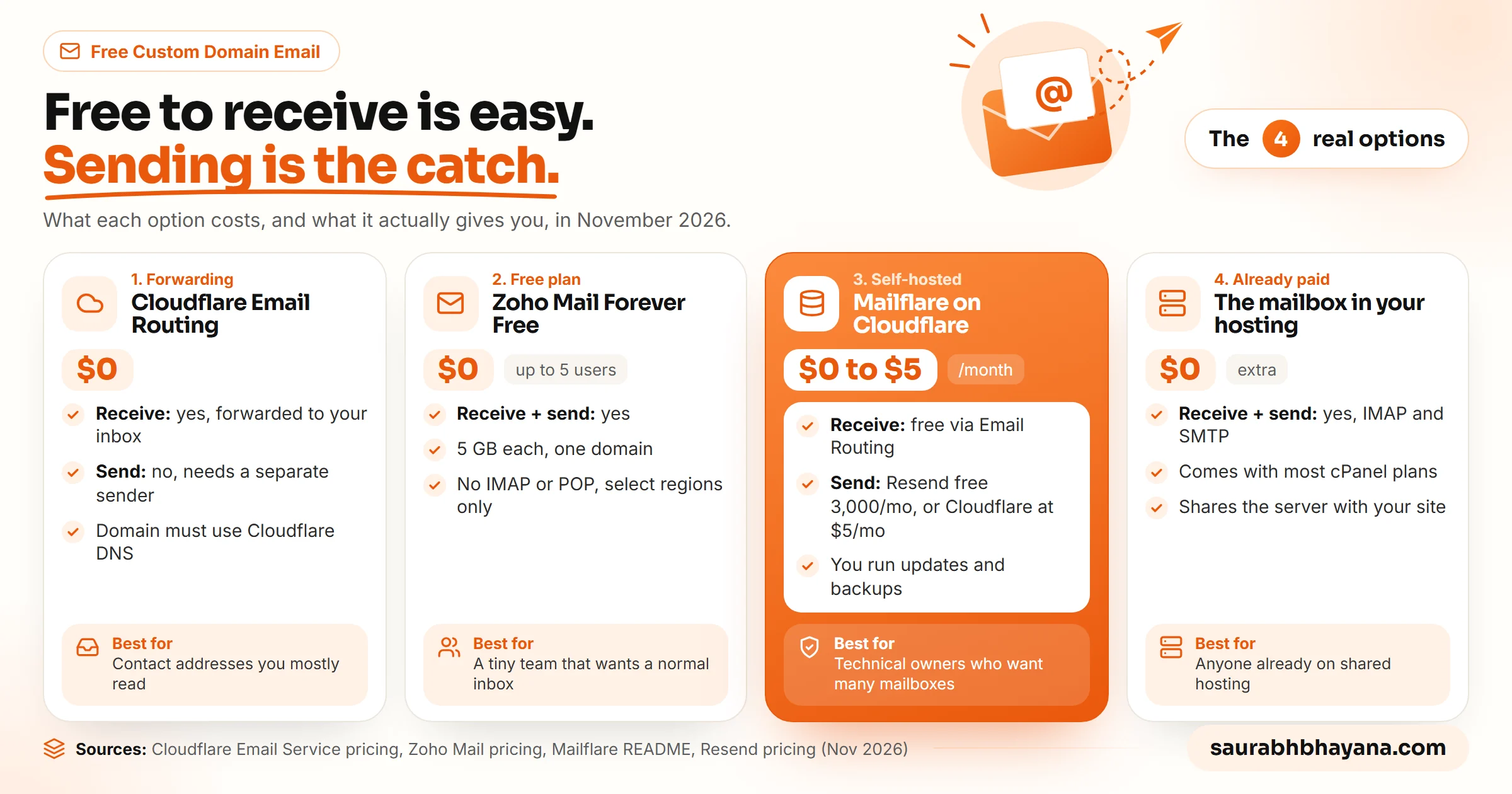
Can you really get a custom domain email for free?
Yes, if you already own the domain. The domain itself costs money every year, usually somewhere between $10 and $20 for a .com. Everything after that can be free, as long as you accept one of these trade-offs:
- •Forwarding only: mail sent to you@yourdomain.com lands in an inbox you already have, but you reply from somewhere else.
- •A free plan with limits: a real mailbox, but capped on users, storage or apps.
- •Self-hosting: no seat fees, but you are now the mail administrator.
- •Bundled email: a mailbox that came with something you already pay for, usually your web hosting.
What you cannot get for free is all of it at once: unlimited users, full sending, IMAP for every app, and nobody to maintain it. The fix: decide first whether you mostly receive (a contact address on your website) or mostly send (quotes, invoices, follow-ups to leads). That one answer picks your option faster than any feature list.
Option 1: Cloudflare Email Routing (free forwarding)
Cloudflare Email Routing is the cleanest free way to receive mail at your domain. You create an address such as hello@yourdomain.com, point it at an inbox you already use, and Cloudflare forwards everything. Inbound routing is unlimited on both the free and paid Workers plans, according to Cloudflare's own pricing page.
There are two conditions. Your domain must use Cloudflare as its DNS provider (Cloudflare's docs say plainly: "You must be using Cloudflare DNS to use Email Service"), and the inbox you forward to must be verified first. The limits are generous for a small business: 200 routing rules per domain, 200 destination addresses per account, and messages up to 25 MiB.
How to set up Cloudflare Email Routing
- 1.Add your domain to Cloudflare and switch its nameservers to Cloudflare's. Wait until the dashboard shows the domain as active.
- 2.Go to Compute, then Email Service, then Email Routing, and select Onboard Domain. Pick your domain.
- 3.Let Cloudflare add the records it shows you: MX records for incoming mail, plus TXT records for SPF and DKIM. Changes usually apply within minutes.
- 4.Under Destination Addresses, add the inbox you want mail delivered to, then click the verification link Cloudflare emails you.
- 5.Open the Routing Rules tab and create a rule: the address (for example hello) and the verified inbox it should go to. Save it.
- 6.Send a test email from a different account to hello@yourdomain.com and check that it arrives.
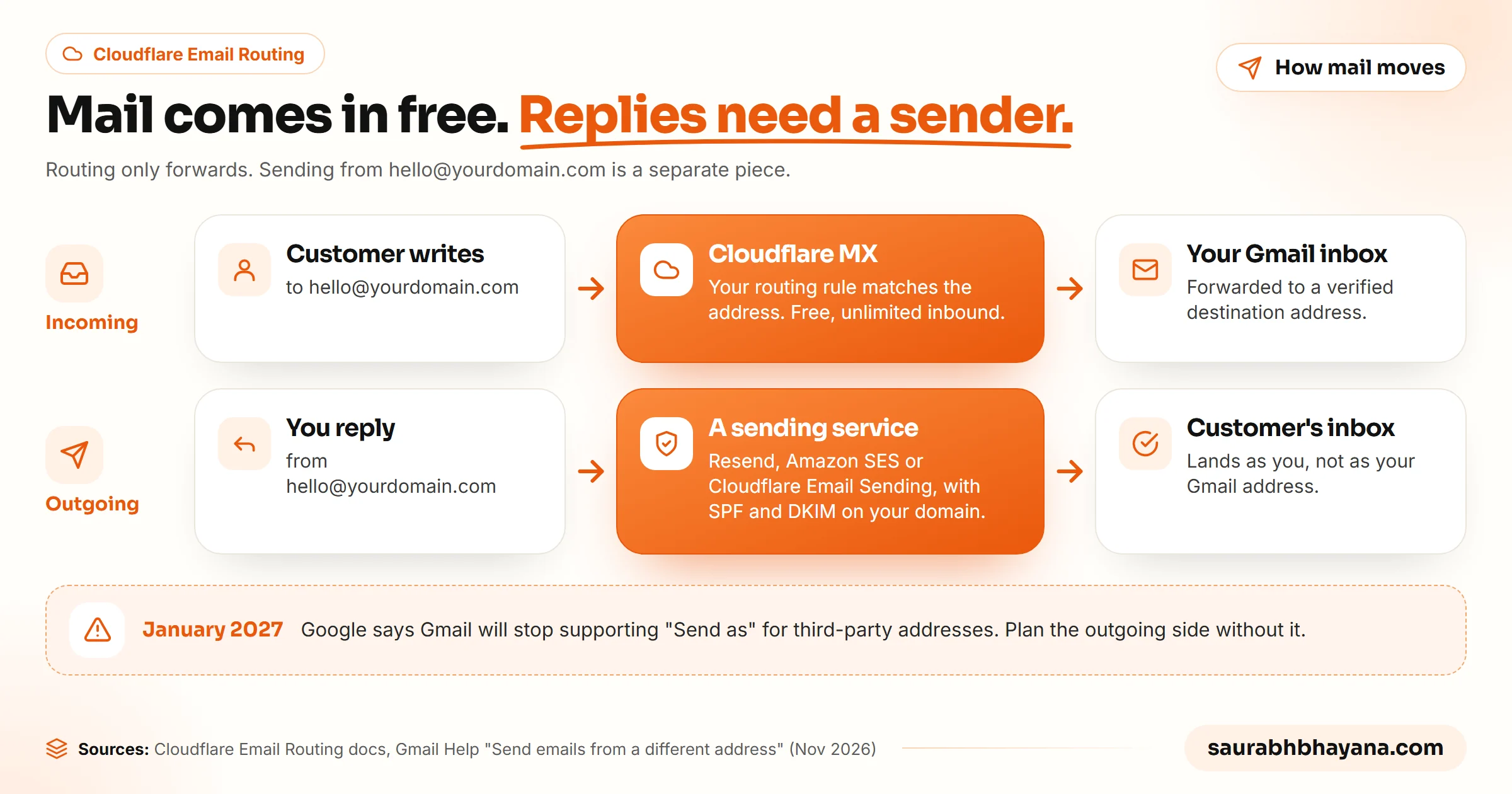
Now the catch. Email Routing forwards; it does not send. When you hit reply in Gmail, the customer sees your Gmail address. For years the workaround was Gmail's Send as feature: add hello@yourdomain.com as an extra address in Gmail settings and send through an SMTP server. Google's own help page now says: "Starting January 2027, Gmail will no longer support the 'Send as' feature for third-party email addresses." Coverage of the announcement lists custom domains among the affected addresses; Google Workspace aliases are not affected.
Forwarding is free forever. Replying as yourself is the part you have to plan.
The fix: use Email Routing for addresses you mostly read, such as a contact address on your website or a separate address for invoices from suppliers. If you need to reply as that address every day, pair it with one of the options below instead of building on Send as.
Option 2: Zoho Mail Forever Free
If you want a normal inbox with sending and receiving, and you are a very small team, Zoho's free plan is the simplest answer. Zoho's pricing page lists the Forever Free plan as "email hosting for one domain for up to 5 users" with 5 GB of storage per user.
The limits matter. IMAP, POP and ActiveSync are not included, so you use Zoho's web app and mobile apps rather than Outlook or Apple Mail. Zoho also notes the free plan is available only in select data centers, so it may not be offered where you sign up. Paid Zoho plans remove those limits.
The fix: pick Zoho Free if you are one to five people, happy to live in Zoho's own apps, and want sending that just works today. Check that the free plan is offered in your region before you move your MX records.
Option 3: Mailflare, a self-hosted inbox on Cloudflare
Mailflare is the tool from the video that started this post, and it is more than email. Its GitHub README describes custom-domain mailboxes (personal or shared), routing rules, a calendar with invitations, a public booking link, a drive for files, and AI agents that can search mail and draft replies. It is open source under AGPL-3.0, had about 5,700 stars on GitHub when we checked, and runs on Cloudflare Workers with D1 for the database and R2 for attachments, or in a Docker container.
| Piece | What it costs | Notes |
|---|---|---|
| Mailflare itself | Free (AGPL-3.0) | Deploy to Cloudflare with one button, keep the app name mailflare |
| Receiving mail | Free | Cloudflare Email Routing, unlimited inbound |
| Sending via Resend | Free up to 3,000 a month | Resend's free plan also caps you at 100 emails a day |
| Sending via Cloudflare | $5 a month Workers Paid | 3,000 included a month, then $0.35 per 1,000 |
| Sending via Amazon SES | Pay per email | New SES accounts start in a sandbox until AWS approves production access |
So the video's "unlimited and free" is half right. Mailboxes are unlimited and receiving is free. Sending is free only while you stay under Resend's 3,000 a month and 100 a day, and Cloudflare's own sending is not available on the free Workers plan at all.
Setup is short if you are comfortable in Cloudflare. You deploy from the README's Deploy to Cloudflare button, create a scoped Cloudflare API token and add it to the Worker as a secret named CF_TOKEN, open /setup to create the admin account, then add your domain (it must be in the same Cloudflare account) and your first mailbox. The README lists the exact token permissions it needs: Email Sending, DNS, Email Routing and Zone Settings.
Treat that API token like a password. It can change DNS for your domains. Scope it to the domains Mailflare needs, store it only as a Worker secret, and never paste it into a chat, a screenshot or a public repository.
The part nobody mentions in a five-minute setup video: once you self-host, you are the mail admin. Updates, backups of your mail database, a broken deploy after an update, a lost token, all of that is yours. That is a fine trade for a technical founder with ten mailboxes. It is a bad trade for an accountant who just wants email to work.
The fix: choose Mailflare when you want many mailboxes or shared inboxes without per-seat fees and someone on the team is happy to own it. Set a sending provider on day one, and put a monthly reminder in the calendar to update and back it up.
Option 4: The mailbox that comes with your hosting
This one is easy to forget because it is not exciting. Most shared hosting plans with cPanel include email accounts on your domain, with webmail, IMAP and SMTP. If your website already lives on shared hosting, you may already be paying for a perfectly usable mailbox.
It is what we did. In November 2026 we moved this website to a WordPress theme on shared hosting to cut costs, and we created hello@saurabhbhayana.com as a cPanel mailbox on the same account instead of keeping a separate mail service. Sending and receiving work, and every mail app connects to it over IMAP.
The trade-offs are real but manageable. The mailbox shares a server with your website, so a hosting problem can take both down. Storage is usually small. Deliverability depends on your host's server reputation, which is why the DNS records in the next section matter even more here. And if you ever change hosts, you have to move the mail too, by copying it over IMAP to the new mailbox.
The fix: before paying for anything, open your hosting control panel and look for Email Accounts. If it is there, create the address, set SPF and DKIM (cPanel often has an Email Deliverability page that checks them), and you are done.
The DNS records that keep free email out of spam
Whichever option you choose, a new domain with no reputation lands in spam easily. Google's email sender guidelines have required every sender to Gmail to use SPF or DKIM since 1 February 2024, and bulk senders (more than 5,000 messages a day) to use SPF, DKIM and DMARC. You are probably not a bulk sender, but setting all three costs nothing and fixes most "why did my quote go to spam" problems.
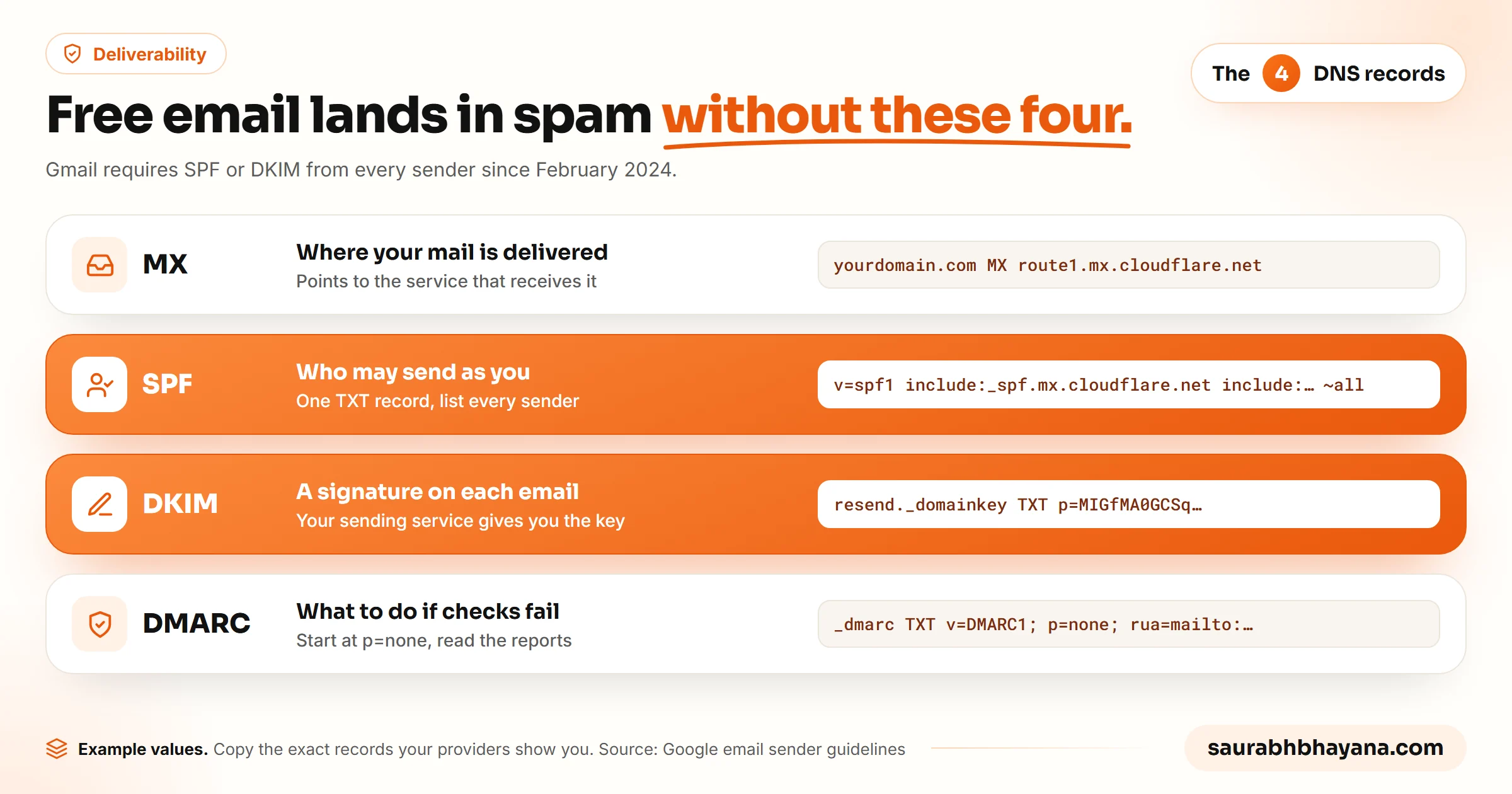
| Record | What it does | Common mistake |
|---|---|---|
| MX | Tells the world which service receives your mail | Leaving the old provider's MX records in place, so some mail goes to the wrong inbox |
| SPF | Lists the services allowed to send as your domain | Two separate SPF records. You get one TXT record; combine every include into it |
| DKIM | Signs each message so receivers can check it was not altered | Adding it for receiving but not for the service you actually send with |
| DMARC | Tells receivers what to do when SPF or DKIM fail, and sends you reports | Starting at p=reject before you know every service that sends as you |
The fix: set MX for your receiving service, one SPF record that includes every sender, DKIM for each sending service, and DMARC at p=none with a reporting address. After two or three weeks of clean reports, tighten DMARC to quarantine.
Which free option should you choose?
| Your situation | Best choice | Why |
|---|---|---|
| You only need a contact address on your website | Cloudflare Email Routing | Free, unlimited inbound, nothing to maintain |
| One to five people who want a normal inbox | Zoho Mail Forever Free | Real sending and receiving with no setup beyond DNS |
| Many mailboxes, a technical owner, low sending volume | Mailflare plus Resend's free tier | No seat fees; free while you send under 3,000 a month |
| Your website is already on cPanel hosting | Your hosting mailbox | Already paid for, with IMAP and SMTP |
| Email is how you sell, and the team keeps growing | Google Workspace or Microsoft 365 | Support, uptime and admin tools you are not maintaining |
For reference, Google Workspace Business Starter costs $7 per user per month on an annual plan or $8.40 on a flexible plan in the US, with 30 GB of storage per user. For a team of three that is about $252 a year on the annual plan. That is often cheaper than the hours spent fixing a self-hosted setup that broke during a busy week.
The fix: start with the free option that matches how you use email today, and set a trigger to upgrade, such as your third hire or the first month you send more than a few thousand emails. If replies to leads are where your money comes from, read how we set up fast lead follow-up before you pick, because the inbox you choose is where that system lives.
Common mistakes when setting up free domain email
- •Building on Gmail's Send as for a custom domain today. It works for now, but Google has announced the end date. Choose a setup with its own sending.
- •Moving MX records before the new mailbox is ready. Mail sent during the gap bounces. Create the mailbox first, then switch MX.
- •Forgetting the old provider. When you leave a host or a mail service, export your old mail over IMAP before the account closes.
- •Publishing two SPF records. Receivers treat that as an error. Merge them into one.
- •Sending newsletters from your personal mailbox. Use a newsletter or transactional service for bulk mail so a spam complaint does not hurt the address you reply to customers from.
The fix: treat email like the rest of your business setup. Write down which service receives, which sends, and where the DNS lives, so whoever touches it next does not break it by accident. If you are also cleaning up the rest of your small-business stack, our list of tasks worth automating is a good next stop.
Frequently asked questions
Can I get a custom domain email for free?+
Yes, once you own the domain. Cloudflare Email Routing forwards mail at your domain for free, Zoho Mail Forever Free gives up to 5 users a free mailbox on one domain, Mailflare is a free open-source inbox you host on Cloudflare, and most cPanel hosting plans include mailboxes. The catch is usually sending, limits or maintenance, not receiving.
Can Cloudflare Email Routing send emails?+
No. Email Routing only forwards incoming mail to a verified inbox. To send as your domain you need a sending service. Cloudflare's own Email Sending is not available on the free Workers plan; on Workers Paid it includes 3,000 emails a month, then $0.35 per 1,000. Resend and Amazon SES are the common alternatives.
Is Gmail removing Send mail as for custom domains?+
Google's Gmail Help page says that starting January 2027, Gmail will no longer support the Send as feature for third-party email addresses, and coverage of the announcement lists custom domains among them. Google Workspace aliases and other Gmail addresses you own are not affected. Plan a setup with its own sending rather than relying on Send as.
Is Mailflare really free?+
Mailflare itself is free and open source under AGPL-3.0, and receiving through Cloudflare Email Routing is free. Sending is not unlimited: Resend's free tier allows 3,000 emails a month and 100 a day, and Cloudflare's own sending needs the $5 a month Workers Paid plan. You also take on updates and backups yourself.
What is the best free business email for a small business?+
It depends on how you use email. For a contact address you mostly read, Cloudflare Email Routing. For one to five people who want a normal inbox, Zoho Mail Forever Free. For many mailboxes with a technical owner, Mailflare. If you already pay for cPanel hosting, the mailbox included with it is often the simplest choice.
Why do emails from my custom domain go to spam?+
Usually because SPF, DKIM or DMARC are missing or wrong, or because the domain is new and has no sending reputation. Gmail has required SPF or DKIM from every sender since February 2024. Publish one SPF record that includes every service that sends for you, add DKIM for each sending service, and start DMARC at p=none.
Is self-hosted email worth it for a small business?+
Only if someone on the team is happy to be the mail admin. Tools like Mailflare remove seat fees, but you own updates, backups and fixing it when something breaks. If email is how you win customers and nobody wants that job, paying around $7 per user per month for Google Workspace is usually the cheaper choice in practice.
Read next
My team and I automate the work that eats your hours with AI, and get your business found on Google, Maps and in AI answers.