
Can I Run an LLM on My Laptop? How Much VRAM You Need, Explained Simply
An AI model is just a big file of numbers, so why can't you run ChatGPT on your own laptop? Here is how much memory a local LLM really needs, why GPUs matter, and our honest take on local AI vs an API for a small business.
Imagine keeping your own private ChatGPT on the laptop in front of you. No monthly bill, no client files sent anywhere. Sounds perfect, right? So why does almost nobody do it?
Here is the surprising part: an AI model is just a file. A big one, full of numbers. Running it means loading that file into memory and doing a lot of maths. So, can you run an LLM on your laptop? Often yes, a small one. A big one, usually not. And the reason is almost entirely about memory.
In the next few minutes we will work out exactly how much memory a model needs, why GPUs matter, why some models write fast and others crawl, and then give you our honest take on local AI vs an API for a small business. The caveat: memory figures below are simple arithmetic estimates, and real tools add some overhead on top. The ideas follow a good AI infrastructure course on YouTube, which we link at the end. The business angle is ours.
Our running example: a four-person accounting firm that wants AI to summarise client documents but does not want those documents leaving the office.
What is an AI model, really?
Forget AI for a second. Picture a tiny machine: you put in 3, it gives you 6. Put in 10, get 20. It doubles everything. That machine is a model, and the number 2 inside it is its one learned setting, called a weight.
A language model is the same idea at a ridiculous scale: the same kind of formula, but with billions of weights, learned during training. Those weights are what make GPT, Claude and Llama different. And they sit on disk as one very large file. Open it and all you would find is numbers.
A model is a formula plus a giant file of numbers. Running it is loading the file and doing the maths.
So if it is just a file, why not open it on your laptop like any other? Because of how big that file is, and where it has to live while the maths happens.
How much VRAM do I need for a local LLM?
Here is the rule of thumb, and it is simple multiplication: memory needed is about the number of parameters times the bytes each one takes. At 16-bit precision, each parameter takes 2 bytes. Compressed versions, called quantized models, use fewer bytes per parameter and lose a little quality.
| Model size | 16-bit (full) | 8-bit | 4-bit (compressed) |
|---|---|---|---|
| 8 billion parameters | ~16 GB | ~8 GB | ~4 to 5 GB |
| 70 billion parameters | ~140 GB | ~70 GB | ~35 to 40 GB |
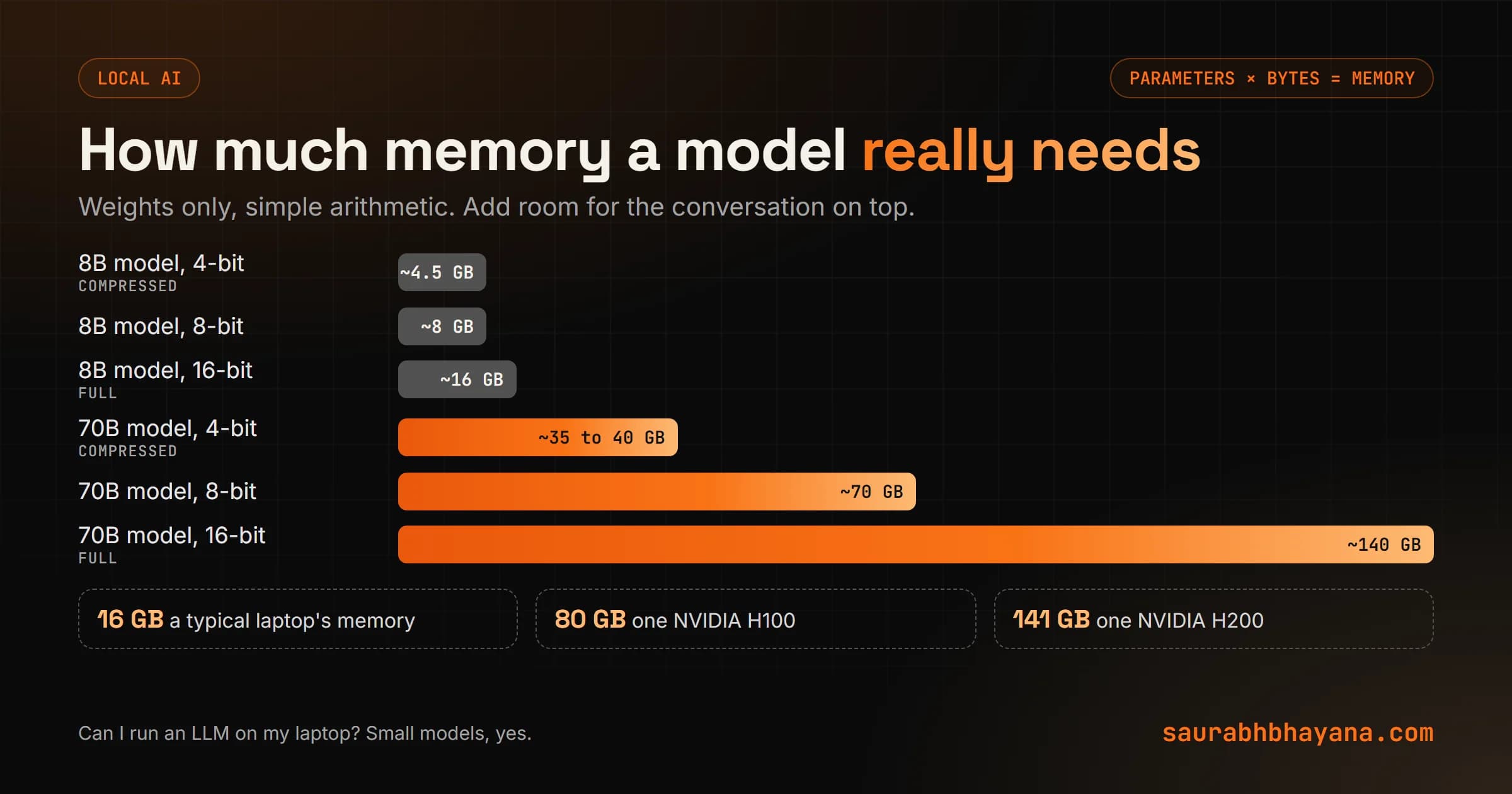
Those numbers are only the weights. The model also needs working room for the conversation it is handling, the KV cache, which we explain in what is LLM inference. Longer documents need more of it.
How much RAM do you need to run a 70B model?
Around 140 GB at full precision, or roughly 35 to 40 GB compressed to 4-bit, plus working room. That is far beyond a normal laptop and more than one 80 GB data-center GPU at full precision. An 8B model compressed to 4-bit, on the other hand, fits comfortably on a lot of ordinary machines. So for our accounting firm, a small model on a decent laptop is realistic. A frontier-sized model is not.
Why a GPU and not your CPU?
Running a model comes down to billions of tiny multiplications, and here is the thing: they do not depend on each other, so they can all happen at once.
A CPU is a brilliant generalist with a handful of powerful cores. It works through tasks mostly one after another, which is perfect for your browser and your spreadsheets and painfully slow for billions of independent sums. A GPU is built the opposite way: thousands of small, simple cores all doing maths at the same time. Even a modest data-center card like NVIDIA's T4 has around 2,500 of them.
But the GPU solves one problem and creates another. All those cores need the weights fed to them constantly. If the weights sat in normal computer memory, far from the chip, the cores would sit idle waiting. So GPUs carry their own memory right next to the cores, called VRAM, with a much wider road between them. The catch is size: VRAM is fast but small, and space on it is precious.
Why some models write fast and others crawl
When the model writes an answer, it produces one token at a time, and for every single token it has to read the whole model out of memory again. That gives you a simple ceiling:
Max tokens per second  ~  memory speed / model size

Example: a GPU that reads 3 TB per second, a 16 GB model
3,000 GB / 16 GB  ~  190 tokens per second, at best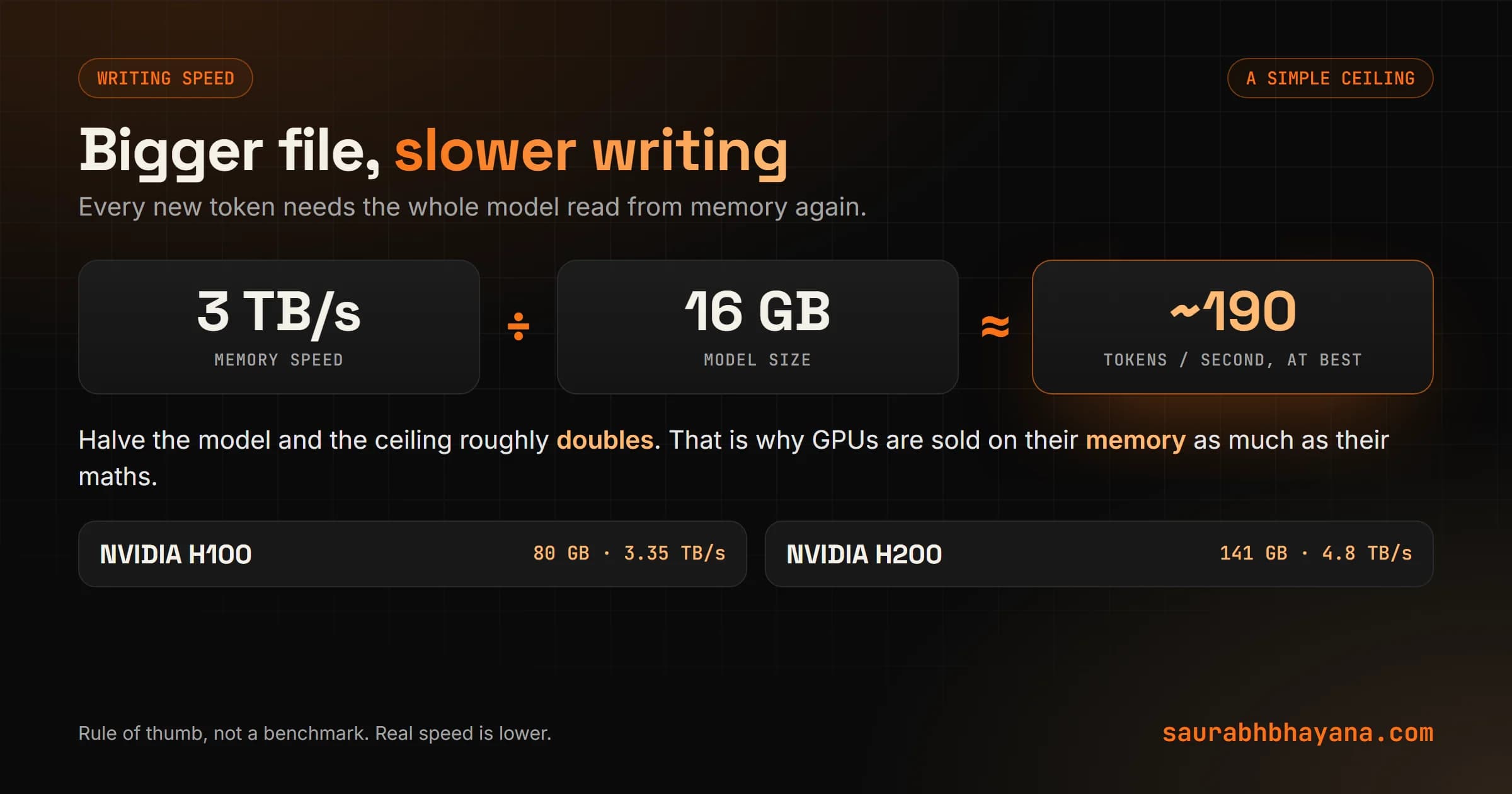
That is why data-center GPUs are sold on their memory as much as their raw speed. NVIDIA's H100 has 80 GB at 3.35 TB per second; the H200 has 141 GB at 4.8 TB per second. And it is why a big model on a laptop, even when it fits, can write painfully slowly: the laptop's memory simply cannot move the file around fast enough.
If a local model is too slow, try a smaller or more compressed version before buying hardware. Halving the model size roughly doubles the best possible writing speed.
Why does ChatGPT sometimes say it is at capacity?
Memory again. A service runs many people on one GPU at the same time by grouping their requests, which is cheap because one read of the model can produce a token for every person in the group. But each person also needs their own working memory, and that has to fit in whatever VRAM the model itself does not use. When it fills up, new people wait in line. The chip usually has maths to spare. It is the memory that runs out.
How to run an LLM locally (the easy way)
You do not need to write code. Tools such as Ollama let you download a model and chat with it on your own computer, on Mac, Windows or Linux. For serving a model to many people at once, teams use model servers like vLLM. Most of these speak the same request format as OpenAI's API, so an app built for one can often point at your local model instead by changing a setting.
- 1.Check your memory: how much RAM, or VRAM if you have a graphics card.
- 2.Pick a model that fits using the table above, starting small, such as an 8B model compressed to 4-bit.
- 3.Install a local runner such as Ollama and download that model.
- 4.Test it on 10 real tasks from your work and compare the answers with an API model.
- 5.Only then decide whether local is good enough for that job.
Local LLM vs API: which should a business use?
| Local model | API (Claude, ChatGPT and others) | |
|---|---|---|
| Privacy | Data never leaves your machine | Data goes to the provider under their terms |
| Quality | Smaller models, good for simple tasks | The most capable models |
| Cost | Hardware up front, then electricity | Pay per token, nothing up front |
| Speed | Depends on your hardware | Fast, on data-center GPUs |
| Upkeep | You install and update it | None |
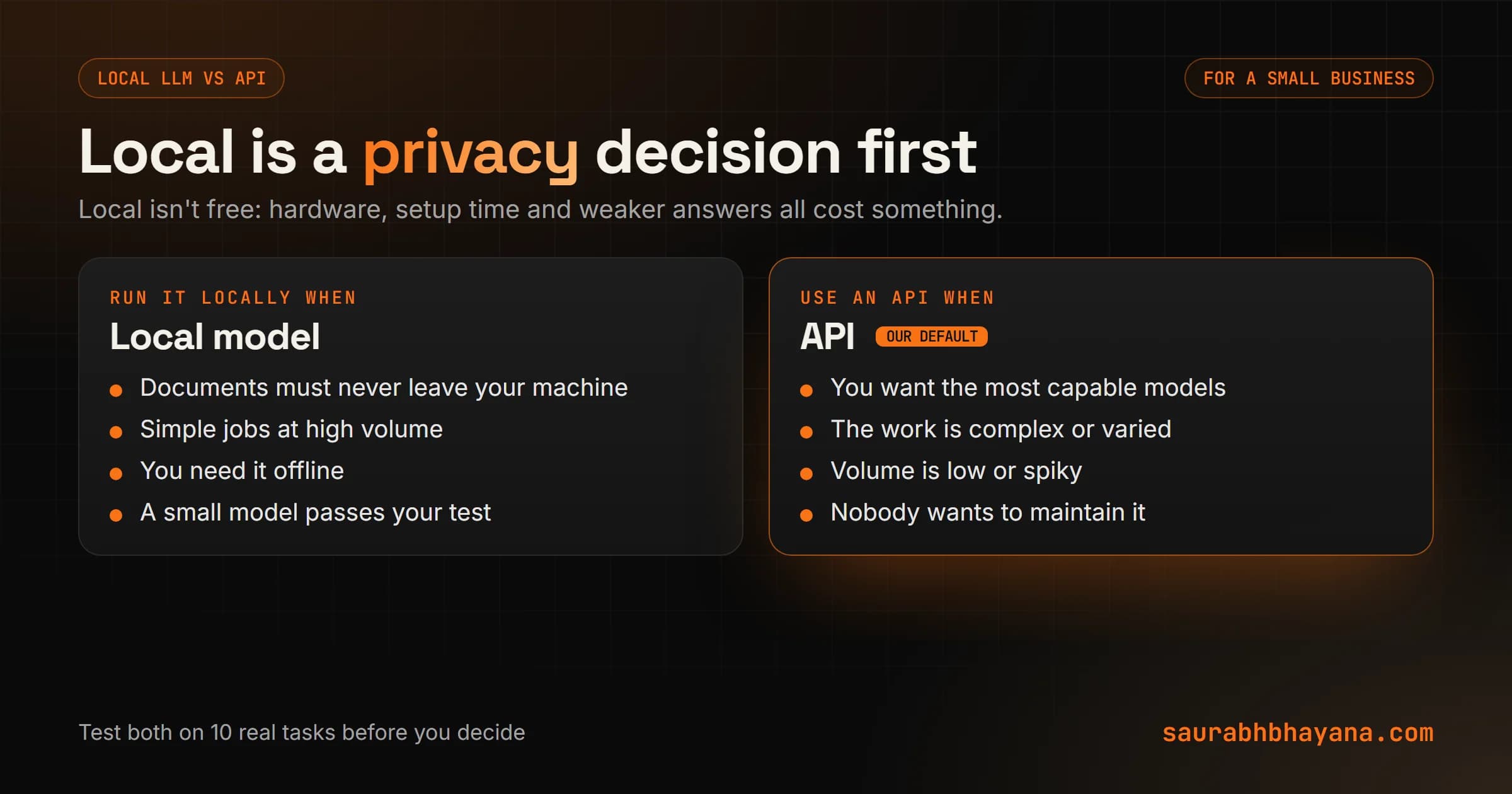
Our take: for most small businesses, an API is the better starting point. You get the most capable models, nothing to maintain, and you pay only for what you use, which we price out in our Claude models guide. Go local when documents genuinely must never leave the building, like our accounting firm's client files, or for simple, repetitive jobs at high volume where a small model is good enough.
A lot of owners think local means free. Not quite. The hardware, the setup time and the weaker answers all cost something. Local is a privacy decision first and a cost decision second.
The bigger picture
Strip it all back and every AI product sits on the same three numbers: how much maths the chip can do, how much fits in its memory, and how fast it can read that memory. None of this is exotic. It is the old computing story of processors, memory and the road between them, just at a much bigger scale.
So, is there a job in your business where the documents should never leave the building? That is your best candidate for a local model. If you want help deciding between local and an API for a real workflow, tell us what you want the AI to read.
Source for the infrastructure walkthrough: the YouTube course that inspired this post, at youtube.com/watch?v=hBzUokVYQkI.
Frequently asked questions
Can I run an LLM on my laptop?+
Yes, a small one. An 8 billion parameter model compressed to 4-bit needs roughly 4 to 5 GB of memory, which many laptops have. Large models such as 70B need around 35 to 40 GB even when compressed, and far more at full precision, so they do not fit on a normal laptop.
How much VRAM do I need for a local LLM?+
Roughly the number of parameters times the bytes per parameter, plus working room: about 2 bytes per parameter at 16-bit, 1 at 8-bit and about half a byte at 4-bit. So an 8B model needs about 16 GB at 16-bit or 4 to 5 GB at 4-bit.
How much RAM do you need to run a 70B model?+
About 140 GB at 16-bit precision, about 70 GB at 8-bit, or roughly 35 to 40 GB compressed to 4-bit, plus extra room for the conversation it is handling.
Why do LLMs need a GPU?+
Running a model is billions of small, independent multiplications. A GPU has thousands of small cores that do them at the same time, while a CPU has a few powerful cores that work mostly in sequence. GPUs also have fast memory right next to the cores, called VRAM.
Why are bigger models slower?+
Each new token requires reading the whole model from memory, so the best possible writing speed is roughly memory bandwidth divided by model size. A bigger model file means fewer tokens per second on the same hardware.
Is a local LLM better than an API for a business?+
For most small businesses an API is the better start: the most capable models, no maintenance and pay-as-you-go pricing. A local model makes sense when documents must never leave your machine or for simple, high-volume tasks where a small model is good enough.
Why does ChatGPT say it is at capacity?+
Each person being served needs their own working memory on the GPU, alongside the model itself. When that memory is full, new requests have to wait, even if the chip has computing power to spare.
Read next
My team and I automate the work that eats your hours with AI, and get your business found on Google, Maps and in AI answers.