
How Does the Backend Work? Follow One Click Through All 11 Layers
Backend roadmaps list dozens of tools. Follow one "Place order" click instead: reverse proxy, backend, login check, database, cache, queue, Docker, Kubernetes, cloud, CI/CD and monitoring, what each one solves, and which ones a small product really needs.
Search for a backend roadmap and you get a wall of logos: Spring Boot, Docker, Kubernetes, Redis, Kafka, PostgreSQL, Jenkins, AWS, Prometheus and a dozen more. The fair question is whether a backend developer really needs all of it. The short answer is no. What you need is to understand why each category exists. Once you know the problem a tool solves, learning a second tool in the same category takes days, not months.
So instead of walking through a list, we will follow one request. You are on a shopping site. You found a laptop, added it to your cart, typed your address, paid, and clicked Place order. For you that was one click. Behind it, a whole chain of software went to work. This idea comes from a clear video by Cloud X Berry, and we have added what we see running our own products: which of these layers a small business actually needs, and which ones it can skip for years.
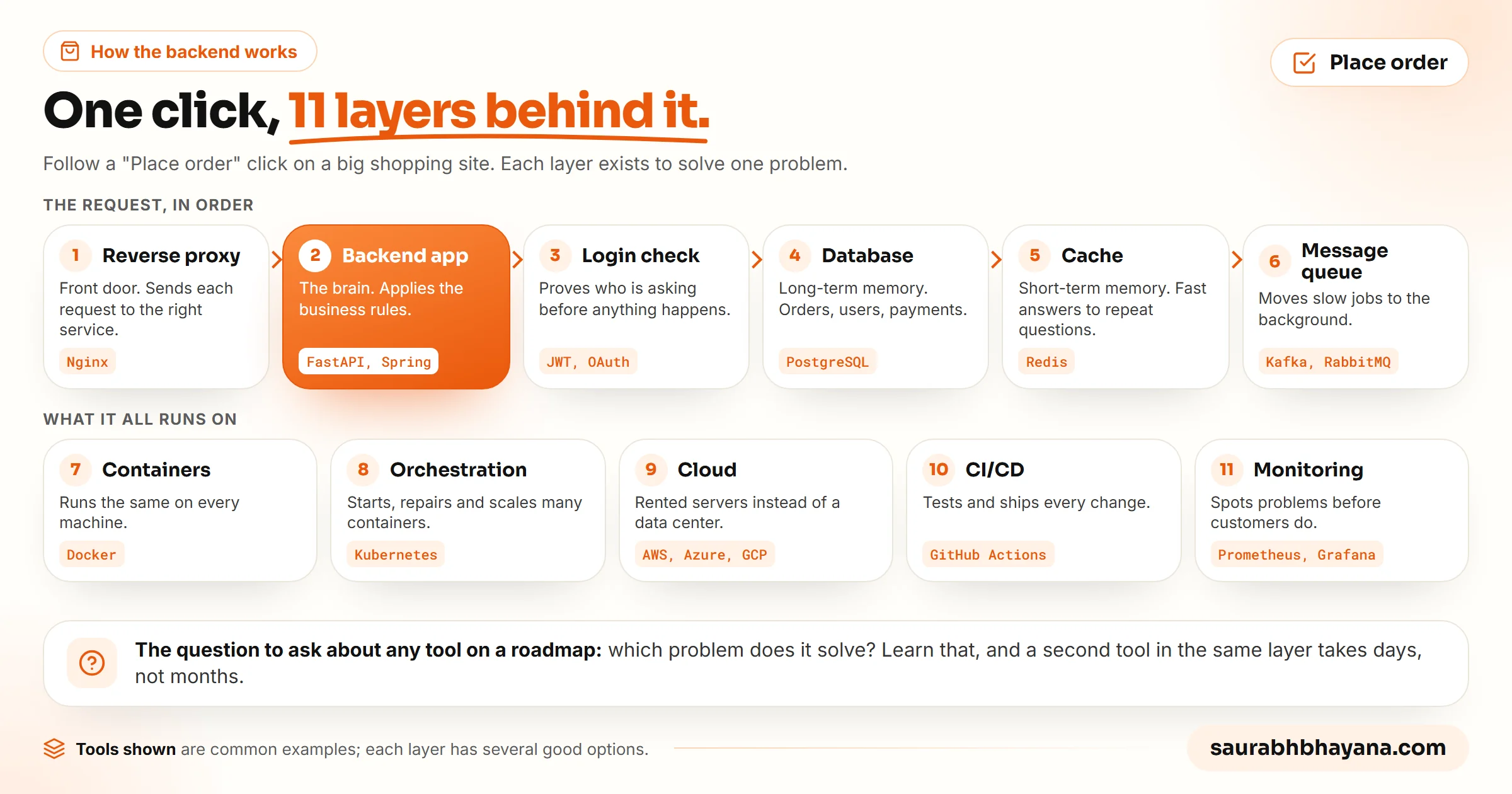
The 11 layers at a glance
| # | Layer | Problem it solves | Common tools |
|---|---|---|---|
| 1 | Reverse proxy | One front door that sends each request to the right service | Nginx |
| 2 | Backend application | Applies the business rules for the request | Spring Boot, ASP.NET Core, Express, NestJS, FastAPI, Django |
| 3 | Authentication | Proves who is making the request | Sessions, JWT, OAuth, OpenID Connect |
| 4 | Database | Stores data permanently | PostgreSQL, MySQL, SQL Server, Oracle |
| 5 | Cache | Answers repeated questions fast | Redis |
| 6 | Message queue | Moves slow work to the background | Kafka, RabbitMQ |
| 7 | Containers | Makes the app run the same everywhere | Docker |
| 8 | Orchestration | Runs and repairs many containers | Kubernetes |
| 9 | Cloud | Rents the servers instead of buying them | AWS, Microsoft Azure, Google Cloud |
| 10 | CI/CD | Tests and ships every change automatically | GitHub Actions, GitLab CI, Azure DevOps, Jenkins |
| 11 | Monitoring | Spots problems before customers do | Prometheus, Grafana |
1. The reverse proxy: the front door
Your click first reaches a reverse proxy such as Nginx. It receives every incoming request and forwards it to the right backend service. A request to browse products can go to one application, and a payment request to another. Users never talk to the backend applications directly. Everything passes this front door first, which also makes it the natural place to handle HTTPS and to spread traffic across several copies of an app.
2. The backend: the brain of the app
The backend is simply the part of an application that runs on a server. The frontend is what you see and tap. The backend works behind it: it receives the request, applies the business rules (is this item in stock, is the price right, does the coupon apply), talks to the database and other services, and sends a response back to the frontend.
Developers build backends with frameworks, which are collections of ready-made code so nobody starts from zero. Java developers often use Spring Boot, C# developers ASP.NET Core, JavaScript developers Express or NestJS, and Python developers FastAPI or Django. The language and the framework change from team to team. The job of the backend stays exactly the same. If you are new to how the frontend and backend talk to each other, our guide to REST API basics covers the request and response format they share.
3. Authentication: who is asking?
Before the backend places any order, it has to answer one question: who sent this request? Anyone can send a message that says place an order. The backend must confirm it came from a logged-in customer. That check is authentication, and it is usually done with sessions, JWTs (signed tokens), OAuth or OpenID Connect.
If the identity checks out, the request moves on. If not, it is rejected on the spot, so nobody can place orders or read data on someone else's account. A related step, authorization, then decides what this user is allowed to do. Being logged in does not let you see another customer's orders.
4. The database: long-term memory
To place the order, the backend needs your address, the items in your cart and your payment details. It gets them from a database, where the application stores data permanently: customer accounts, products, orders, payments and addresses. That data is still there if the app restarts tomorrow. PostgreSQL, MySQL, SQL Server and Oracle are the common choices. Think of the database as the application's long-term memory.
5. The cache: short-term memory
Now picture millions of people using the shop every day, many asking for the same thing: the same popular product page, their own profile five times a day. If every one of those requests goes to the database, it does the same work again and again, and as traffic grows that becomes the bottleneck.
So the backend checks a cache such as Redis first. A cache keeps temporary copies of data that is asked for often. If the answer is there, it comes back almost instantly. If not, the backend reads the database, sends the answer, and saves a copy in the cache for next time. In code, the pattern looks like this:
def get_product(product_id):
    cached = cache.get(f"product:{product_id}")
    if cached:
        return cached                      # fast path: no database work

    product = db.fetch_product(product_id)  # slow path: ask the database
    cache.set(f"product:{product_id}", product, ttl=300)  # keep a copy for 5 minutes
return productRedis is not a replacement for the database. The original data always lives in the database. The cache only holds temporary copies to cut repeated work, and it can be emptied at any time without losing anything.
6. The message queue: answer now, finish later
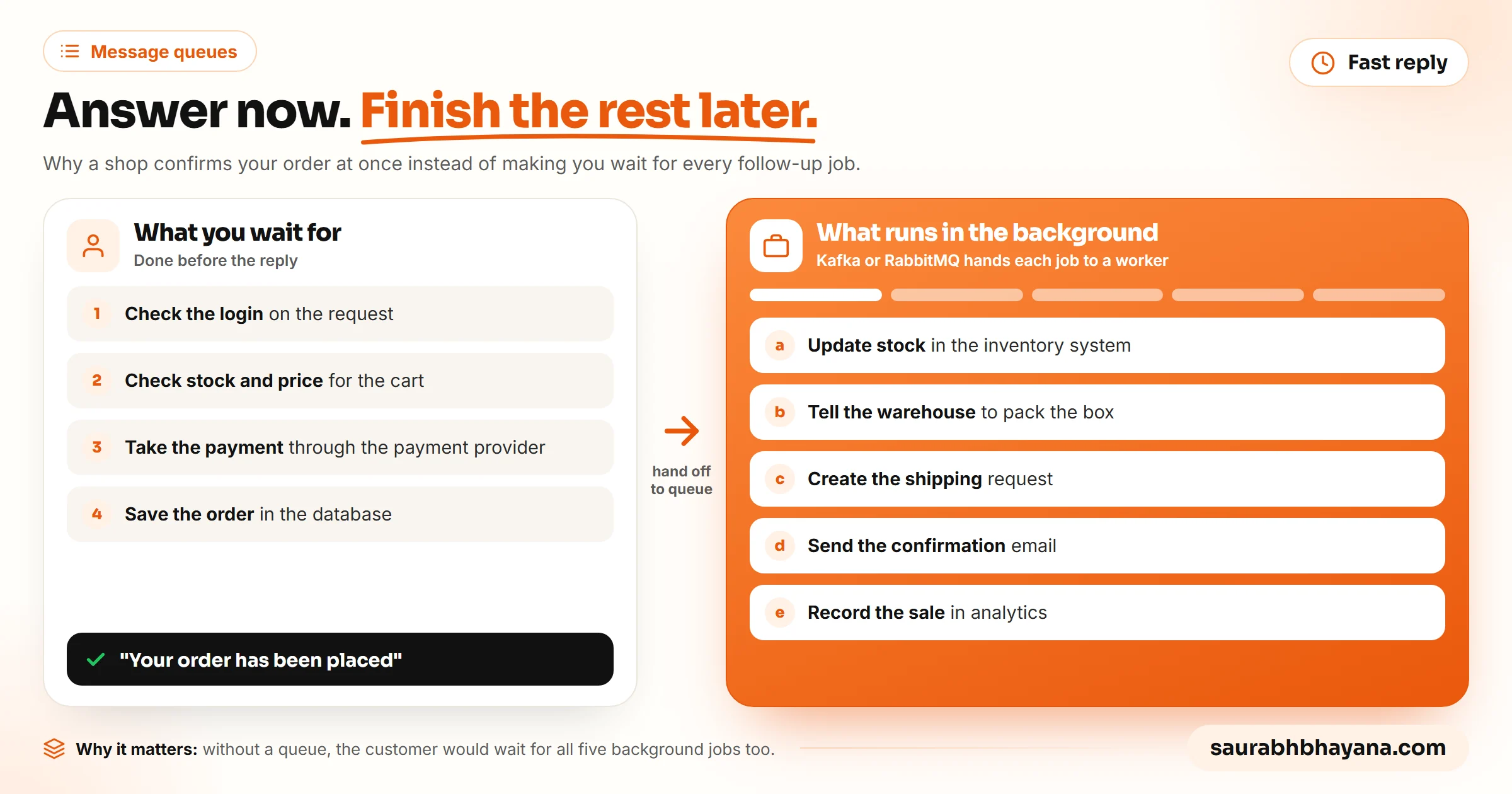
Your order is saved. From your side, the important part is done. But placing an order sets off more work: update the stock count, tell the warehouse to pack it, create a shipping request, send a confirmation email, record the sale in analytics.
Should you wait 10 or 15 seconds while all of that runs? No. The backend replies straight away with your order confirmation and hands the rest to a message queue such as Kafka or RabbitMQ. Think of the line at a ticket counter: each task joins the queue, and other services pick tasks up one by one and process them in the background. This is a big reason modern apps feel fast while doing a lot of work after a single click.
7. Docker: it works on my machine
Step back from the order for a moment. All this software has to run somewhere. Say you built the backend on your laptop and it works perfectly. A teammate runs the same code and it fails, because they have a different version of Java or .NET, or a library is missing. Every developer has heard the line: it works on my machine.
Docker fixes that. It packs your application together with everything it depends on, the runtime, the libraries and the settings, into a container. A container is a portable box with the app and all it needs inside. Because everything travels together, the app behaves the same on your laptop, a test server and the live server.
8. Kubernetes: managing many containers
Now the shop gets popular. During a holiday sale, millions of people order at once, and one container is not enough. You need hundreds or thousands spread across many servers. Some will crash, some need updates, more are needed when traffic spikes, and you want fewer when it drops so you stop paying for idle ones. Doing that by hand is close to impossible.
Kubernetes automates it. It starts new containers when more capacity is needed, restarts the ones that fail, and removes extras when traffic falls. The simplest way to remember the difference: Docker creates containers, Kubernetes manages them.
9. The cloud: renting the servers
Where do all those servers live? Years ago, companies bought physical machines and ran their own data centers. Today most rent computing power, storage and networking from cloud providers such as AWS, Microsoft Azure and Google Cloud. They pay for what they use instead of buying hardware, and they can add capacity in minutes.
10. CI/CD: shipping changes safely
Building the app is only part of the job. Teams fix bugs and add features every week. Copying each new version to the servers by hand would be slow and easy to get wrong. So teams use CI/CD pipelines. CI, continuous integration, builds and tests every code change automatically. CD, continuous delivery or deployment, ships approved changes to test or live servers automatically. GitHub Actions, GitLab CI, Azure DevOps and Jenkins are the usual tools.
11. Monitoring: catching problems early
Once the app is live, someone has to know when it slows down, when a service crashes, or when memory use climbs. Waiting for customers to complain is the worst way to find out. Engineers watch their systems with tools like Prometheus, which collects metrics from apps and servers, and Grafana, which turns those metrics into dashboards. Good alerts mean a problem gets fixed before most customers notice it.
The whole journey in one paragraph
From your side, placing an order was one click. Behind it, the request passed through a reverse proxy, reached the backend, proved who you are, read and wrote data in the database, used the cache to go faster, handed slow work to a message queue, and ran inside Docker containers managed by Kubernetes on rented cloud servers, shipped there by a CI/CD pipeline and watched by monitoring. That is why backend roadmaps look so crowded. They are not lists of unrelated tools. They are the parts of one system.
Do not ask which technology to learn next. Ask which problem it solves.
What a small product actually needs
Here is the part most roadmaps leave out: you do not need all 11 layers to run a real product. The full stack above is what a big shop needs at holiday-sale scale. A new product needs far less, and adding layers too early costs money and slows you down.
Our own product is a good example. wptaskify, which does WordPress work through AI assistants for paying customers, runs as one Python application in one Docker container on Railway, with one Postgres database next to it. The hosting platform provides the front door, HTTPS and basic logs. There is no Kubernetes, no Kafka and no Redis, and we deploy with a single command rather than a full pipeline. This blog is even simpler: WordPress on shared hosting, which is one PHP app and one MySQL database, with the host looking after the rest.
| Stage | What you need | What you can skip for now |
|---|---|---|
| Idea or first users | One backend app, one database, login, a platform that handles HTTPS | Kubernetes, message queues, a separate cache |
| Paying customers, steady traffic | Add automated tests and deploys (CI/CD), basic monitoring and alerts, backups | Kubernetes, multi-region setups |
| Slow pages under load | Add a cache such as Redis for the hot data | Rewriting everything |
| Slow or failing background jobs | Add a message queue for emails, exports and webhooks | Kafka-scale streaming, unless you need it |
| Many services, big traffic swings | Containers managed by Kubernetes, full monitoring dashboards | Nothing; this is the full stack |
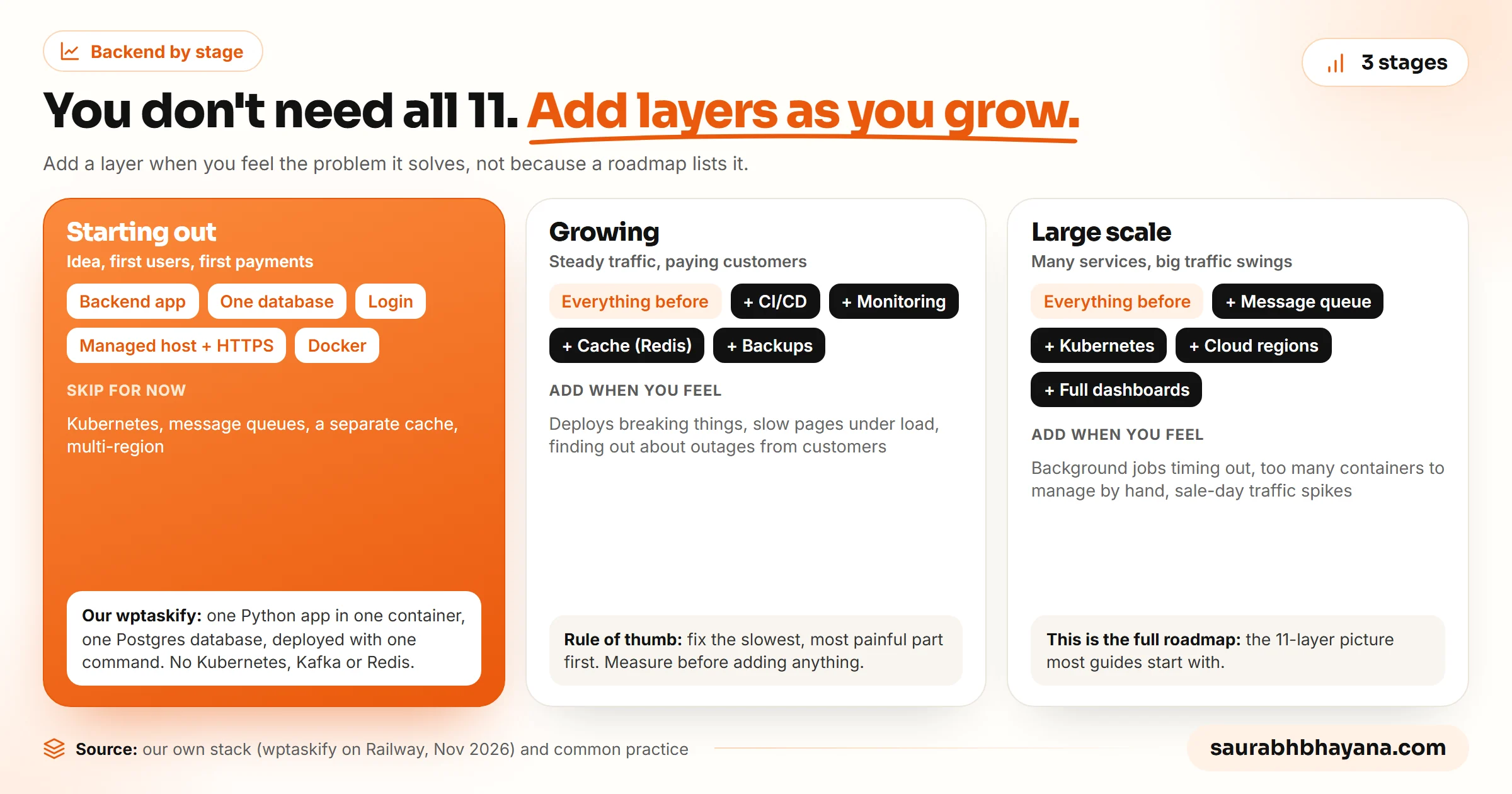
Add a layer when you feel the pain it removes. Pages slow under load: add a cache. Emails and exports timing out: add a queue. Deploys breaking things: add CI. Too many servers to manage: then think about Kubernetes.
How to learn backend without the overwhelm
- 1.Pick one language and one framework and build a small app that saves and reads data: FastAPI or Django for Python, Express for JavaScript, Spring Boot for Java.
- 2.Learn one SQL database properly, PostgreSQL is a safe choice, including how to design tables and write joins.
- 3.Add login with sessions or JWTs, and learn the difference between authentication and authorization.
- 4.Put the app in a Docker container and deploy it to a managed host.
- 5.Only then add a cache, a queue, CI/CD and monitoring, one at a time, each time asking what problem it solves in your app.
Good API habits matter at every step. Once you are building endpoints other people use, our list of API design rules senior backend developers follow will save you painful rewrites later.
Will AI replace backend developers?
It is one of the most asked questions about backend work right now, so here is our honest view. AI already writes a large share of code. Anthropic says more than 90% of the changes merged into its own core codebase are now written by Claude, with people guiding the work. We use Claude to write and fix code for our products every day too.
What AI does not remove is the need to understand the system. Someone still has to decide that this page needs a cache, that emails belong in a queue, and that a login check is missing on a route. That is exactly the knowledge this post is about. Developers who understand how the layers fit together get more out of AI, because they can tell it what to build and spot when it builds the wrong thing.
Frequently asked questions
How does the backend actually work?+
The backend is software running on a server. When you click a button, your request reaches it (usually through a reverse proxy), the backend checks who you are, applies the business rules, reads or writes data in a database, often uses a cache to answer faster, hands slow jobs to a message queue, and sends a response back to the frontend you see.
What is a backend in simple terms?+
The backend is the part of an app you do not see. The frontend is the screen you tap; the backend is the brain behind it that stores data, checks logins, applies rules like prices and stock, and sends results back to the screen.
Is backend easy to learn?+
The basics are learnable in a few months: one language, one framework, one database and a login system. It feels hard because roadmaps list dozens of tools at once. Learn the problem each category solves first and add tools one at a time as you need them.
Is Python a backend or frontend language?+
Python is mainly a backend language. It runs on servers with frameworks such as FastAPI and Django. Web frontends run in the browser, which uses HTML, CSS and JavaScript.
What is the difference between Docker and Kubernetes?+
Docker packages an application and everything it needs into a container so it runs the same everywhere. Kubernetes manages many containers across many servers: it starts more when traffic grows, restarts ones that crash, and removes extras when traffic falls. Docker creates containers; Kubernetes manages them.
Is Redis a database?+
Redis can store data, but in most backends it is used as a cache: a fast store of temporary copies of data people ask for often. The original data still lives in the main database, such as PostgreSQL or MySQL.
Do I need Kubernetes for my app?+
Probably not at the start. Most new products run fine as one or a few containers on a managed host with one database. Kubernetes pays off when you run many services with big traffic swings and need containers started, restarted and removed automatically.
Will AI replace backend developers?+
AI already writes much of the code; Anthropic says Claude writes more than 90% of the changes merged into its core codebase. People are still needed to design the system, decide where caches, queues and security checks belong, and catch mistakes, so understanding how the backend fits together matters more, not less.
Read next
My team and I automate the work that eats your hours with AI, and get your business found on Google, Maps and in AI answers.