
How to Check If ChatGPT Mentions Your Brand (and What to Do If It Doesn't)
There is no dashboard that shows what ChatGPT says about your business. Here is a 20-prompt test you can run in an hour, how to read the results, the one robots.txt line that can hide you from ChatGPT search, and the five fixes that get a business mentioned.
Ask ChatGPT for the best plumber in your town. Then open a new chat and ask again. There is a good chance you get two different answers, and a fair chance your business is in neither.
That matters more every month. OpenAI said in February 2026 that ChatGPT had 900 million weekly users. And in BrightLocal's 2026 survey of US consumers, 45 percent said they now use ChatGPT or other AI tools to find local businesses, up from 6 percent a year earlier. A growing share of your customers ask an assistant before they ask Google.
The honest caveat up front: there is no dashboard for this. ChatGPT does not show businesses a report of when it mentions them, and its answers change from one chat to the next. Every method, including the paid tools, is a way of asking it lots of questions and counting. So this guide gives you a test you can run yourself in about an hour, shows how to read it without fooling yourself, and then covers what to fix.
I will use three examples: a plumbing company, a neighbourhood bakery, and a small software company that sells proposal software. Local, walk-in and online. Between them they cover how most businesses get found.
Mention, citation, recommendation: three different wins
Before you test anything, separate the three things an AI answer can do for you. Mixing them up is the most common mistake in AI visibility tracking.
| Signal | What it looks like | Why it matters |
|---|---|---|
| Mention | Your business name appears anywhere in the answer | The assistant knows you exist |
| Citation | Your web page is linked as a source | The assistant trusts your page enough to quote it, and it can send a click |
| Recommendation | Your business is offered as the answer to the question | This is the one that wins customers |
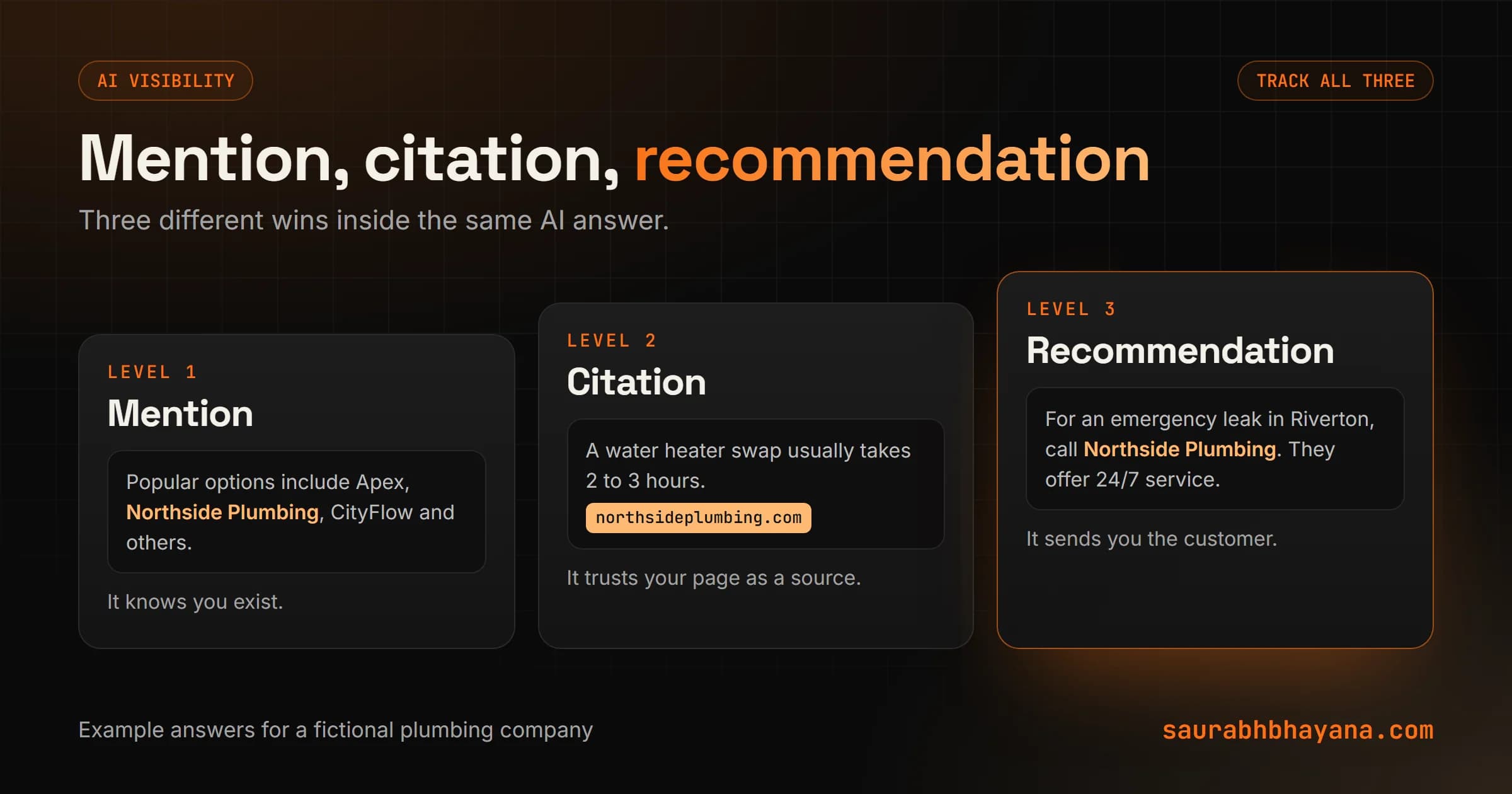
A bakery can be mentioned in a list of ten places and still never be recommended. A software company can be cited for a statistic in its blog post while ChatGPT recommends a competitor's product. Count each one separately.
The 20-prompt test
Write 20 questions your customers actually ask, in their words, not yours. Split them across four types so you see the whole picture.
| Type | What it tests | Example (plumbing company) |
|---|---|---|
| Brand | Does it know you and get the facts right? | What is Northside Plumbing and what do they do? |
| Category | Do you show up when people shop? | Best emergency plumber in Riverton |
| Comparison | How are you positioned against rivals? | Northside Plumbing vs Apex Plumbing, which is better? |
| Problem | Do you get recommended for the job you do? | My water heater is leaking, who should I call in Riverton? |
Five prompts of each type gives you 20. The problem prompts matter most, because that is how real customers ask. Nobody types the name of a business they have never heard of.
PROMPT SET TEMPLATE (swap in your details)

Brand
  What is [business] and what do they do?
  Is [business] in [city] any good?
  What do customers say about [business]?

Category
  Best [service] in [city]
  Who are the top [service] companies near [neighbourhood]?

Comparison
  [business] vs [competitor], which should I choose?
  Alternatives to [competitor] in [city]

Problem
  [the problem in the customer's words], who should I call in [city]?
  How much does [service] cost in [city] and who do you recommend?
How to run it so the results mean something
- 1.Use a temporary or logged-out chat. Your own chat history and memory can make ChatGPT more likely to mention you, which flatters the result.
- 2.Run each prompt three times, in fresh chats. Answers vary, so one run is a weak signal. Three runs per prompt gives you 60 answers.
- 3.Note whether the answer searched the web. When ChatGPT shows sources, it searched. Answers with search and without it can differ a lot.
- 4.Log every answer in a spreadsheet: date, prompt, run number, mentioned yes or no, cited yes or no, recommended yes or no, which competitors appeared, and any wrong facts.
- 5.Repeat the same prompts in Perplexity, Gemini, Claude and Google's AI Overviews. Same questions, different engines, so you can compare.
Keep the prompt list fixed and rerun it every month. Changing the questions each time makes the trend meaningless.
How to read the results
Turn the spreadsheet into three rates. Mention rate is the share of answers that named you. Citation rate is the share that linked your page. Recommendation rate is the share that offered you as the answer. Then look at accuracy separately.
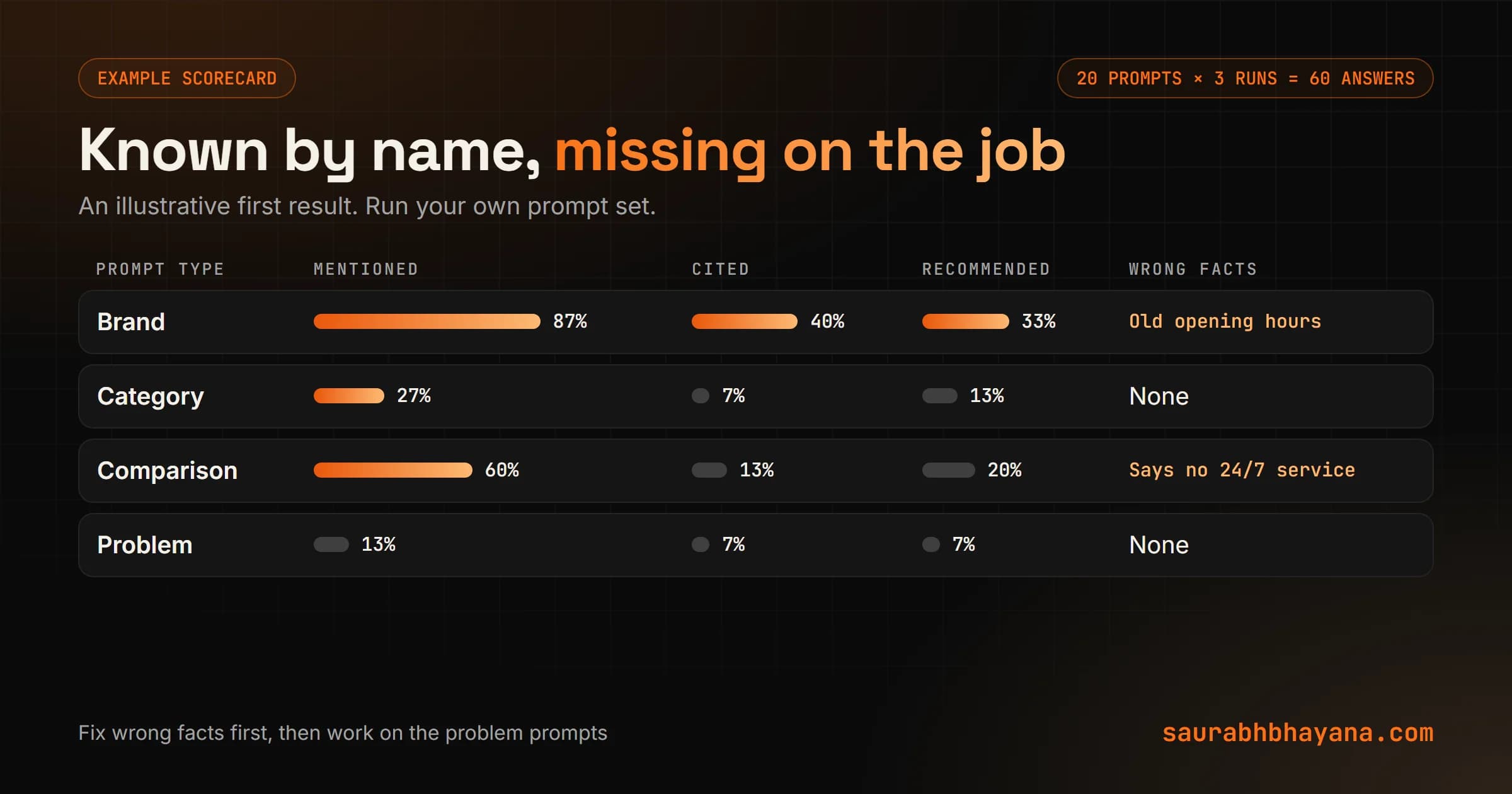
If your results look like this example, they tell you where to work. High on brand prompts and low on problem prompts means the assistant knows you exist but does not connect you with the job. That is a content and reputation problem, not a technical one.
Wrong facts come first, before any rate. If ChatGPT says the bakery closes at 5 when it closes at 8, or that the software company has no free trial when it does, customers act on that. Find where the wrong fact lives on the web, usually an old directory listing or an outdated page, and fix it at the source.
Track the rate across many runs, never a single answer. One answer is luck. Sixty answers is a measurement.
Check that ChatGPT can reach your site
Do this before anything else in the fix list, because it is the only problem that can hide you completely. OpenAI runs separate crawlers for separate jobs, and its own documentation is clear about what each one does.
| Crawler | What it does (per OpenAI) | If you block it |
|---|---|---|
| OAI-SearchBot | Surfaces websites in ChatGPT's search features | Your site will not be shown in ChatGPT search answers, though it can still appear as a navigational link |
| GPTBot | Collects content used to train OpenAI's models | Signals your content should not be used for training. Search is a separate control |
| ChatGPT-User | Visits a page when a user's request needs it | Not an automatic crawler, so robots.txt rules may not apply |
So you can keep your content out of training and still appear in ChatGPT search. OpenAI recommends allowing OAI-SearchBot. Here is a robots.txt that does both:
# Appear in ChatGPT search answers
User-agent: OAI-SearchBot
Allow: /

# Optional: opt out of model training
User-agent: GPTBot
Disallow: /
Two things to check beyond robots.txt. First, a blanket rule such as User-agent: * with Disallow: / blocks every crawler, OAI-SearchBot included. Second, some CDN, firewall and hosting settings block AI crawlers on their own, separate from robots.txt, so check those dashboards too. OpenAI says robots.txt changes for search can take about 24 hours to take effect.
Why ChatGPT does not mention you, and the fix for each
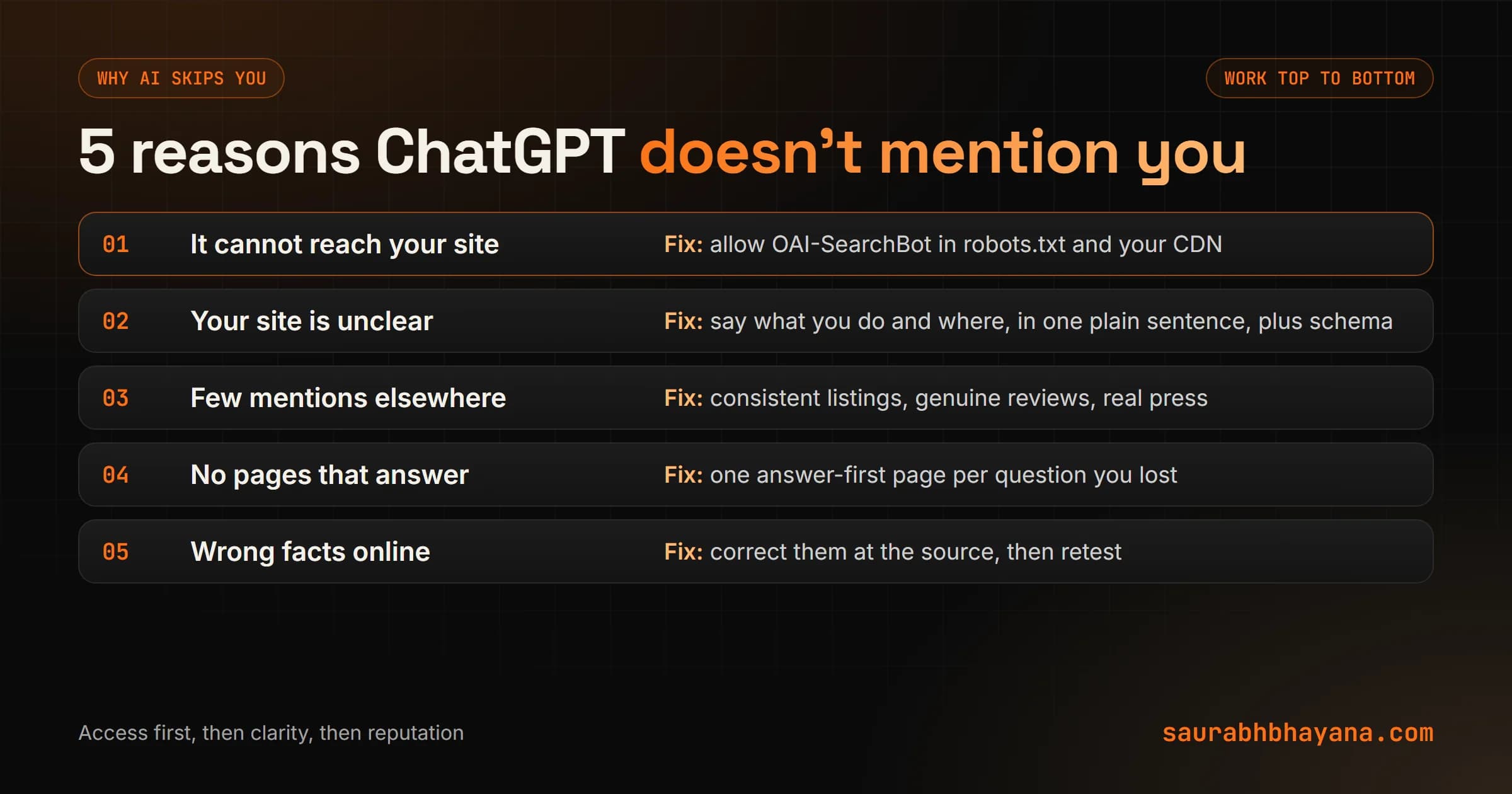
1. It cannot reach you
Covered above. Fix robots.txt and any CDN or firewall setting that blocks AI crawlers.
2. Your site does not say plainly what you are
Assistants need to connect your name with what you do and where. Many small business sites never state it in one plain sentence. The fix: an About page and homepage that say, in words, Northside Plumbing is a licensed plumbing company serving Riverton and the surrounding towns since 2009. Add Organization or LocalBusiness schema with the same facts, and keep your name, address and phone identical everywhere.
3. Not enough of the web talks about you
Assistants lean on what others say, not only what you say about yourself. Directory listings, genuine reviews, local news, industry roundups and forum threads all build that picture. For local businesses, reviews are the fastest lever, and my guide on how to get more Google reviews covers how to do it inside the rules. For the software company, real comparison articles and listings on software review sites do the same job.
4. You have no pages that answer the questions
Look at the problem prompts you lost. Each one is a page you should have: how much a water heater replacement costs in your area, which cake to order for 30 people, how proposal software compares with templates. Write the answer first, then the detail, with real numbers. My AEO and GEO guide explains the structure assistants find easiest to quote.
5. The web has wrong facts about you
Old hours on a directory, a former address, a product you discontinued. Assistants repeat what they find. Fix the source, not the answer: update the listing, the old page or the profile, then rerun the brand prompts a few weeks later.
Free and paid ways to automate the check
The manual test works, but it takes an hour a month. There are two ways to shorten it.
- •Free quick check: my team built a free AI Visibility Checker on wptaskify. Type your brand and it shows how an AI model describes you, whether it recognises you, and the biggest gap. It reflects one model's view at one moment, so treat it as a starting point, not a full test.
- •Paid trackers: a growing group of tools run your prompt set across several assistants on a schedule and chart mention and citation rates over time. They are worth it once you are actively working on AI visibility and need trends, not for a first look.
- •Do it yourself with a script: if you have a developer, the prompt set and spreadsheet above can be run through the model APIs on a schedule. Note that API answers can differ from the ChatGPT app, because the app can search the web and personalise.
You can try the free checker at wptaskify.com/ai-visibility. Whatever you use, keep the fixed prompt list. It is the only way to see whether your fixes are working.
A monthly 30-minute routine
- 1.First of the month: rerun the same 20 prompts, three times each, in a temporary chat. Log the results.
- 2.Update the three rates and compare with last month.
- 3.Fix any wrong fact the same day, at its source.
- 4.Pick the two problem prompts you lost most often and write or improve the page that answers each one.
- 5.Check robots.txt and your CDN settings after any site or hosting change.
- 6.Every quarter, repeat the test in Perplexity, Gemini, Claude and Google's AI Overviews.
The gap to watch is a good mention rate on brand prompts next to a low recommendation rate on problem prompts. The work is closing that gap, and it is the same work that grows Google traffic, so nothing here is wasted. If you want it done for you, AEO and GEO is part of what my team does. Tell me which questions you want to be the answer to.
Frequently asked questions
How do I check if ChatGPT mentions my business?+
Write about 20 questions your customers ask, covering your brand name, your category, comparisons with competitors and the problems you solve. Run each one three times in a temporary chat, log whether you were mentioned, cited or recommended, and repeat the same set every month to track the rate.
Is there a tool that shows what ChatGPT says about my brand?+
Not from OpenAI. ChatGPT has no dashboard or report of brand mentions. Free checkers give a quick snapshot, and paid trackers run a fixed set of prompts on a schedule across several assistants. All of them work by asking questions and counting the answers.
Why does ChatGPT not recommend my business?+
The usual causes are blocked AI crawlers, a website that never says plainly what the business does and where, too few mentions on other sites such as listings and reviews, no pages that answer the questions customers ask, and wrong facts about the business elsewhere online.
Does blocking GPTBot remove my site from ChatGPT?+
No. According to OpenAI, GPTBot collects content for model training, and OAI-SearchBot surfaces sites in ChatGPT search. You can block GPTBot and still allow OAI-SearchBot. Sites that block OAI-SearchBot are not shown in ChatGPT search answers.
How long does it take for ChatGPT to pick up changes?+
OpenAI says robots.txt changes for search can take about 24 hours to apply. Changes to how assistants describe your business take longer, usually weeks, because they depend on pages being recrawled and on mentions building up across other sites.
Why does ChatGPT give different answers to the same question?+
Answers vary with exact wording, timing, the model version, whether the assistant searched the web and the user's own chat history. That is why one answer is a weak signal and you should run each prompt several times and track the rate.
How many people use ChatGPT to find local businesses?+
In BrightLocal's 2026 survey of 1,002 US consumers, 45 percent said they use ChatGPT or other generative AI tools for local business recommendations, up from 6 percent the year before. OpenAI reported 900 million weekly ChatGPT users in February 2026.
Read next
My team and I automate the work that eats your hours with AI, and get your business found on Google, Maps and in AI answers.